Template details
Burogu
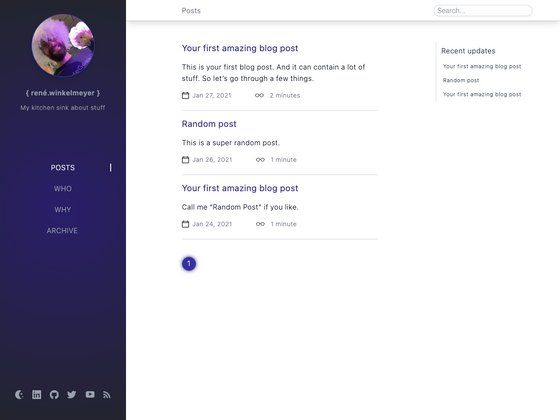
A minimal blog template built with Next.js 13 and Notion as a CMS, ready for one-click deployment to Vercel.
About this template
Burogu is a minimal blog template built with Next.js 13 that uses Notion as its content management system, and is designed for one-click deployment to Vercel.
What is Burogu?
Burogu is a lightweight blog starter kit that turns a Notion database into a blog. The template takes content from a Notion database you control and renders it as a static or server-rendered blog site. It runs on Next.js 13 and uses Tailwind CSS for styling. The project is maintained by GitHub user hyoban, and its repository includes a "Deploy with Vercel" button for instant setup.
Essentially, it connects two things: a Notion integration token and a database ID. The template reads published pages from that database and displays them as blog posts. It is a minimalist starting point, meaning the codebase is kept small and focused on the core blog functionality rather than including a large set of extra features.
Key Features
- Notion as a CMS — Uses the official Notion API to fetch posts from a designated database, identified by the NOTION_DATABASE_ID environment variable, with no separate admin panel needed.
- Next.js 13 — Built on the React framework Next.js 13, providing server rendering, file-based routing, and a modern developer experience.
- Tailwind CSS — Styling is handled entirely with Tailwind CSS utility classes, so there are no CSS-in-JS dependencies and the default design is easy to customize.
- One-click Vercel deployment — The repository includes a "Deploy with Vercel" button that clones the repo, prompts you to add the two environment variables, and publishes the site immediately.
- Site configuration via site.config.ts — The central configuration file lets you change the site name, author details, and other metadata without touching page components.
- Flexible writing workflow — Posts are written anywhere in Notion and then copied or moved into the connected database, so you can draft in your preferred workspace and publish by moving the page.
Who is it for?
- Developers who want a fast, minimal blog — If you already work with Next.js and want a small codebase to extend, Burogu gives you a working blog with clean structure and no UI framework lock-in.
- Notion users who want a blog without another CMS — People who keep their notes and writing in Notion can publish their content to a custom site without exporting markdown or learning a headless CMS.
- Self-hosters and indie writers — Because it deploys on Vercel's free tier and uses two environment variables, it is a low-cost way to launch a personal blog that is fully controlled by your own Notion database.
What can you do with Burogu?
- Personal blogging: Connect your personal Notion database and publish your writing as a public blog with minimal setup.
- Technical documentation or knowledge sharing: Since Notion is the source, you can maintain a knowledge base in Notion and sync selected pages to a public Burogu site.
- Rapid prototyping of content sites: Use Burogu as a base to experiment with a blog or newsroom layout, then extend the Next.js components as needed.
How does Burogu work?
Setting up the template requires a few steps. First, create an empty Notion database for storing blog posts and copy its database ID. Second, create a Notion integration at notion.so/my-integrations to get an API token, and connect that integration to the database. Then fork the repository or use it as a GitHub template, edit site.config.ts with your site information, and create a Vercel project with the repository. Finally, fill in the NOTION_TOKEN and NOTION_DATABASE_ID environment variables in Vercel, and the site will build and pull content from your Notion database.
FAQ
Is Burogu free to use?
The template can be freely cloned from GitHub, and there is no charge to download the code. Hosting costs depend on the platform you choose; Vercel offers a free tier for personal projects, but that is not stated in the template's README and should be verified on Vercel's site.
Do I need to write posts directly in the connected database?
No. The recommended workflow is to write your posts on any other page in Notion and then copy or move them into the connected database when they are finished. This keeps drafting separate from publishing.
What environment variables does Burogu require?
Burogu needs two environment variables: NOTION_DATABASE_ID, which is the ID of the Notion database that stores your posts, and NOTION_TOKEN, the API token from a Notion integration that has access to that database.
Can I change the styling and site info?
Yes. The template uses Tailwind CSS for utility-based styling, and site-wide metadata such as the blog name and author information is configured in the site.config.ts file. Both are designed to be edited directly.