Template details
Case - Portfolio Theme for Astro
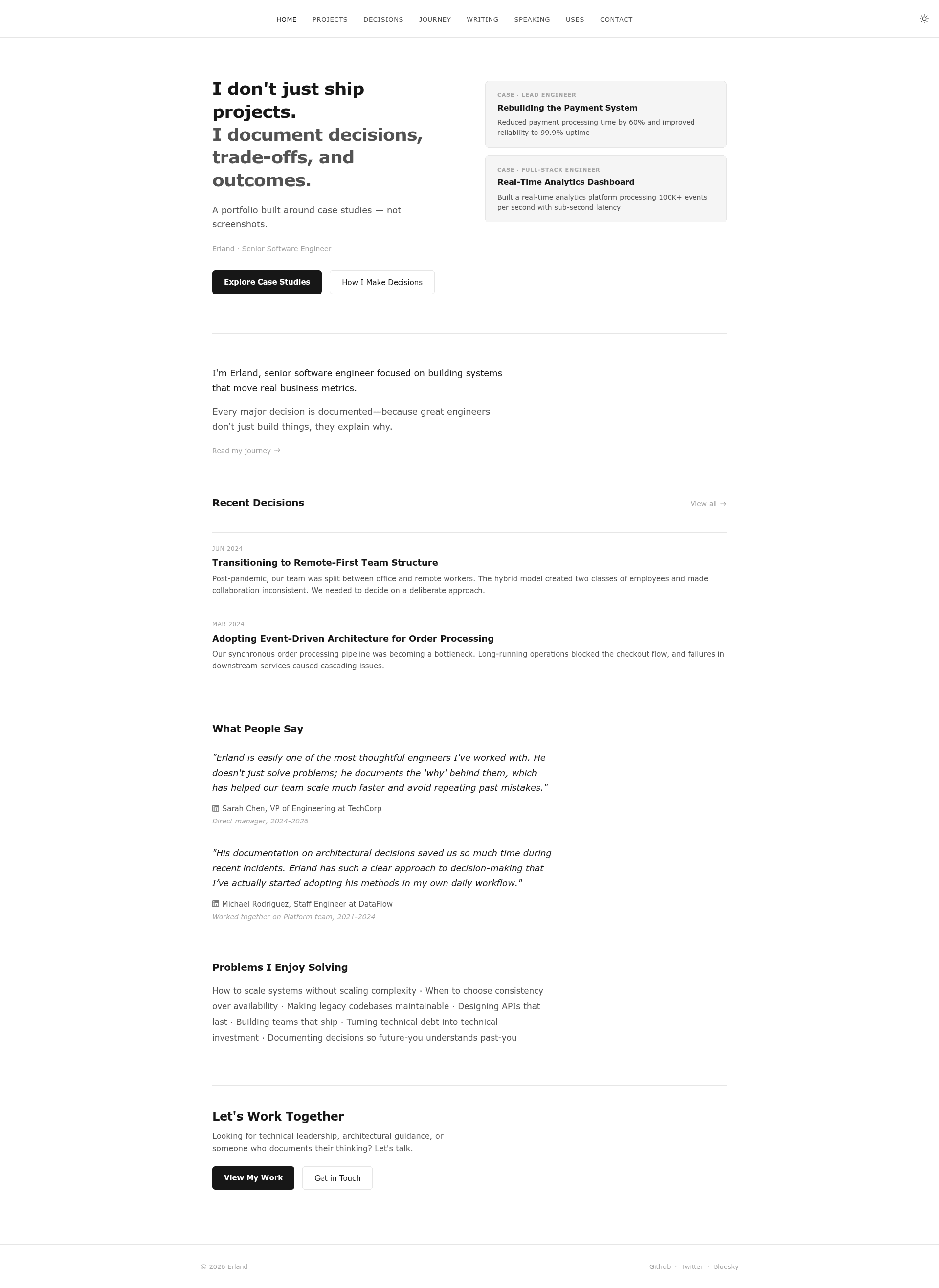
A case-study-first portfolio theme for Astro that showcases decisions, trade-offs, and real impact, not just screenshots.
About this template
Case is an Astro portfolio theme that structures every project as a case study — with problem, constraints, approach, decisions, and measured outcomes — so developers can showcase how they think rather than just what they built.
What is Case?
Case is a free, MIT-licensed portfolio theme built on the Astro static site generator. It accepts content written in seven purpose-built collections — Projects, Decisions, Journey, Writing, Speaking, Tools, and Testimonials — and renders a static portfolio website where each project can tell a full problem-to-solution story. The theme is distributed through the erlandv/case GitHub repository and can be scaffolded with npm create astro@latest -- --template erlandv/case. It does not bundle a CMS; all content is authored as Markdown-schema collections inside the Astro project and built into static pages.
Key Features
- Problem → Solution framework — Each project can be written with context, constraints, approach, and measurable impact sections, so visitors see the reasoning behind the work.
- Built-in decision records — ADR-style posts with problem statement, background context, options considered with trade-off analysis, chosen approach, outcomes, and tag-based filtering.
- Seven content collections — Projects, Decisions, Journey, Writing, Speaking, Tools, and Testimonials each have their own schema; the Writing collection auto-generates a table of contents for technical articles.
- Strategic highlighting — The homepage can feature your strongest work, moving specific case studies to the front.
- Quantified outcomes — Each case study supports performance improvements, team impact, and business results, not just bullet lists of technologies.
- Environment-based configuration — Copy
.env.exampleto.envto set your information, navigation, and favicons. - Extensive documentation — A
docs/folder contains six guides: installation, quick start, project structure, configuration, content guide, content templates, images, content strategy, styling, components, advanced layout, deployment, and troubleshooting.
Who is it for?
Case is aimed at developers and engineers who want to demonstrate decision-making ability to hiring managers and clients. It suits senior engineers who want to document architectural decisions, independent consultants who need to show project impact, technical writers who publish articles with a TOC, and engineering leaders who maintain decision logs. The theme is also useful for freelancers who want to feature testimonials and tools on their homepage to build trust.
What can you do with Case?
- Senior developers: present each project as a problem → solution narrative with quantified outcomes to demonstrate business impact in job applications.
- Engineering leaders: document architecture choices as ADR-style decision records with trade-off analysis to share with teams.
- Technical bloggers: publish articles with an auto-generated table of contents and list speaking engagements, podcasts, and workshop materials.
- Freelancers: curate strongest case studies on the homepage and add client testimonials and a tools/tech-stack page.
How does Case work?
You create a project with npm create astro@latest -- --template erlandv/case, copy .env.example to .env, edit it with your information, and run npm run dev to start the site on http://localhost:4321. Content is added through the seven content collections, and the docs include copy-paste templates for quick creation. The theme includes a deployment guide for building and deploying to various platforms.
FAQ
Is Case free?
Yes. Case is released under the MIT License and is free for personal and commercial use. Attribution is not required, although a link back to the repository is appreciated.
What content types does Case support?
Case includes seven content collections: Projects, Decisions, Journey, Writing, Speaking, Tools, and Testimonials. Each has its own schema, and the Writing collection auto-generates a table of contents.
What do I need to run Case?
You need Node.js and npm, plus the Astro CLI. The quick start is three commands: create the project from the template, copy the environment file, and run npm run dev. The default dev URL is http://localhost:4321.
Does Case include predefined templates for content?
Yes. The documentation includes a Templates guide with copy-paste templates for quickly creating content, alongside guides for images, content strategy, and the schema behind each collection.