Template details
Jekyll Portfolio Template
A Jekyll portfolio template for MLH Fellowship Pre Fellowship fellows with projects showcase, dark mode, and Google Analytics.
About this template
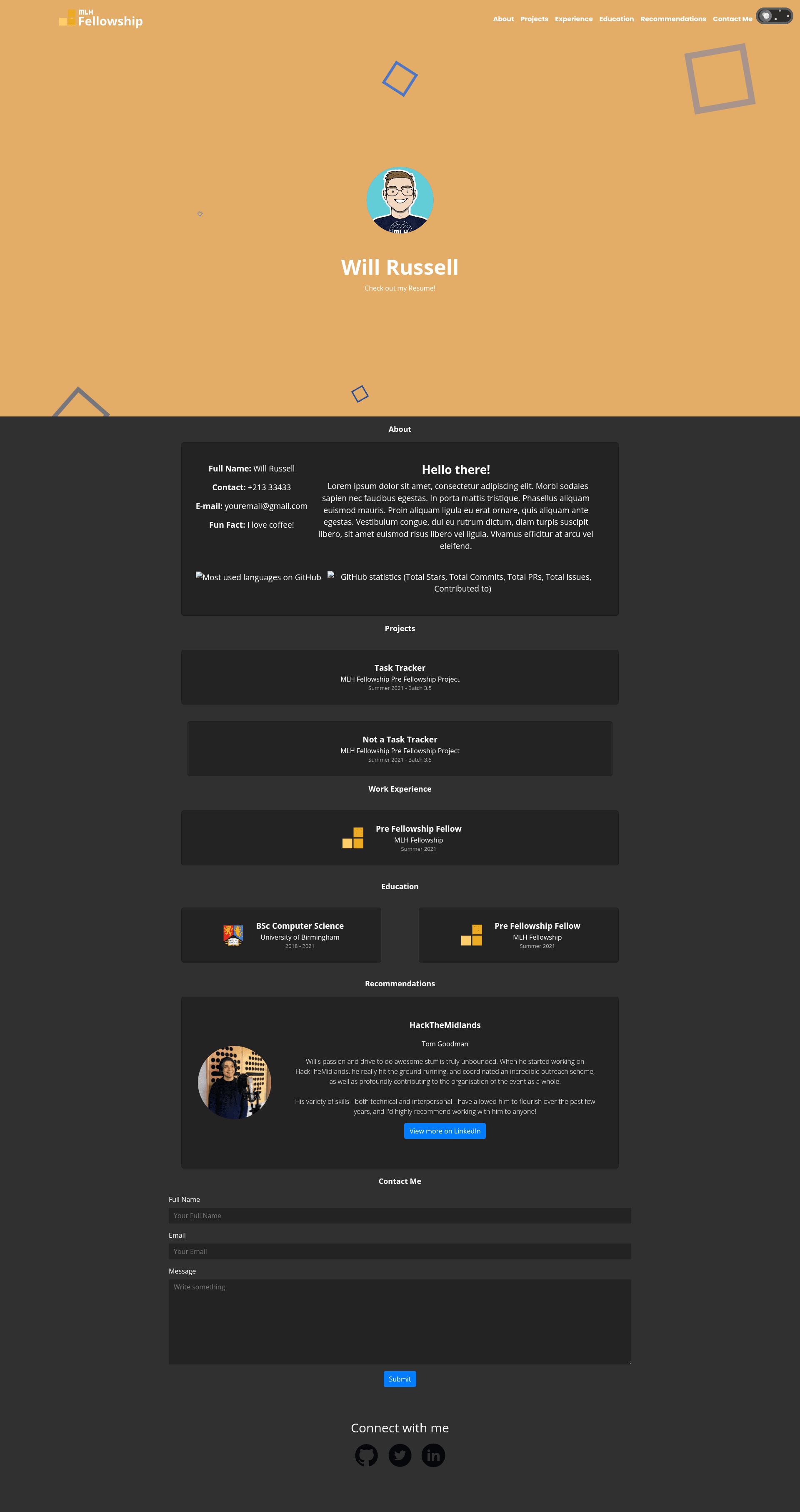
The Jekyll Portfolio Template is a static-site portfolio website template built on Jekyll, designed primarily for MLH Fellowship Pre Fellowship fellows to showcase projects, experience, education, and recommendations. It takes YAML data files and optional markdown project posts as input and outputs a multi-section portfolio site with a projects showcase, resume download, and social links.
What is the Jekyll Portfolio Template?
The Jekyll Portfolio Template is a Jekyll-based static portfolio website template created for MLH Fellowship Pre Fellowship fellows. It reads personal data from YAML files in the _data directory (projects.yml, experience.yml, education.yml, recommendation.yml) and produces a complete one-page portfolio with sections for projects, work experience, education, and recommendations. The template runs on any Jekyll-compatible host, including Netlify and GitHub Pages, and is maintained as an open-source project for Pod 3.1.3, Practically Pi!
Key Features
- Easy setup with .yml, .sass, and CSS variables — Configure site information in _config.yml and personal data files in _data; customize UI colors via CSS variables and _sass files.
- Projects showcase — Display projects with title, event, date, and an optional page-name link to a full markdown post stored in the projects folder.
- Google Analytics integration — Add your Tracking ID in the google-analytics field of _config.yml and the template injects the tracking code.
- GitHub stats and MUL integration — Includes widgets that surface GitHub statistics and MUL data on the portfolio page.
- Social links — Pre-built links to your Twitter, GitHub, and LinkedIn profiles.
- Downloadable resume — Drop a resume.pdf into the assets folder and it becomes available for download as "{name surname} - resume.pdf".
- Dark mode — Toggleable dark mode implemented via a JavaScript file in assets/js.
- Lighthouse Automated Auditing — Includes a lighthousec.js file for automated performance and accessibility auditing.
Who is it for?
- MLH Fellowship Pre Fellowship fellows — Build your first portfolio site as a structured group project, then reuse it as a personal template.
- Junior developers and students — Create a clean personal portfolio without hand-writing HTML, using YAML for all content.
- Hackathon participants — Showcase projects, experience, education, and recommendations in a single page, with optional blog-style project posts.
What can you do with the template?
- Portfolio owners: Fill in the _data YAML files to list projects, work experience, education, and recommendations from your own history, and deploy on Netlify or GitHub Pages.
- Bloggers/project writers: Add markdown files in the projects folder with front matter (title and layout: page) and link them from projects.yml for full project write-ups.
- Customizers: Modify the layout, styling, and colors through _sass and CSS variables, or extend the design by testing locally with bundler exec jekyll serve --livereload.
How does it work?
- Click the Use the Template button on the GitHub repository.
- Update _config.yml with your site URL and personal information.
- Fill out the YAML files in _data (projects.yml, experience.yml, education.yml, recommendation.yml).
- Deploy to Netlify or GitHub Pages. Note that GitHub Pages hosting only works for username.github.io, not username.github.io/repo-name.
FAQ
Is this template free?
Yes, the repository is open source under a standard LICENSE and can be freely copied, modified, and deployed.
Can I deploy this on GitHub Pages?
Yes, but only as a user/organization page at username.github.io. It will not work at a project subpath like username.github.io/repo-name.
How do I add a project post?
Create a new markdown file in the projects folder with front matter (title and layout: page), then add a page-name field to projects.yml pointing to that file.
How do I add Google Analytics?
Create a Google Analytics property, copy the Tracking ID, and paste it into the google-analytics field in _config.yml. Follow the linked Analytics setup guide for details.
How do I test it locally?
With Ruby and Bundler installed, run bundle config set --local path 'vendor/bundle', bundle install, and bundle exec jekyll serve --livereload. If the --livereload flag errors, omit it.