Template details
Comical Jekyll Theme
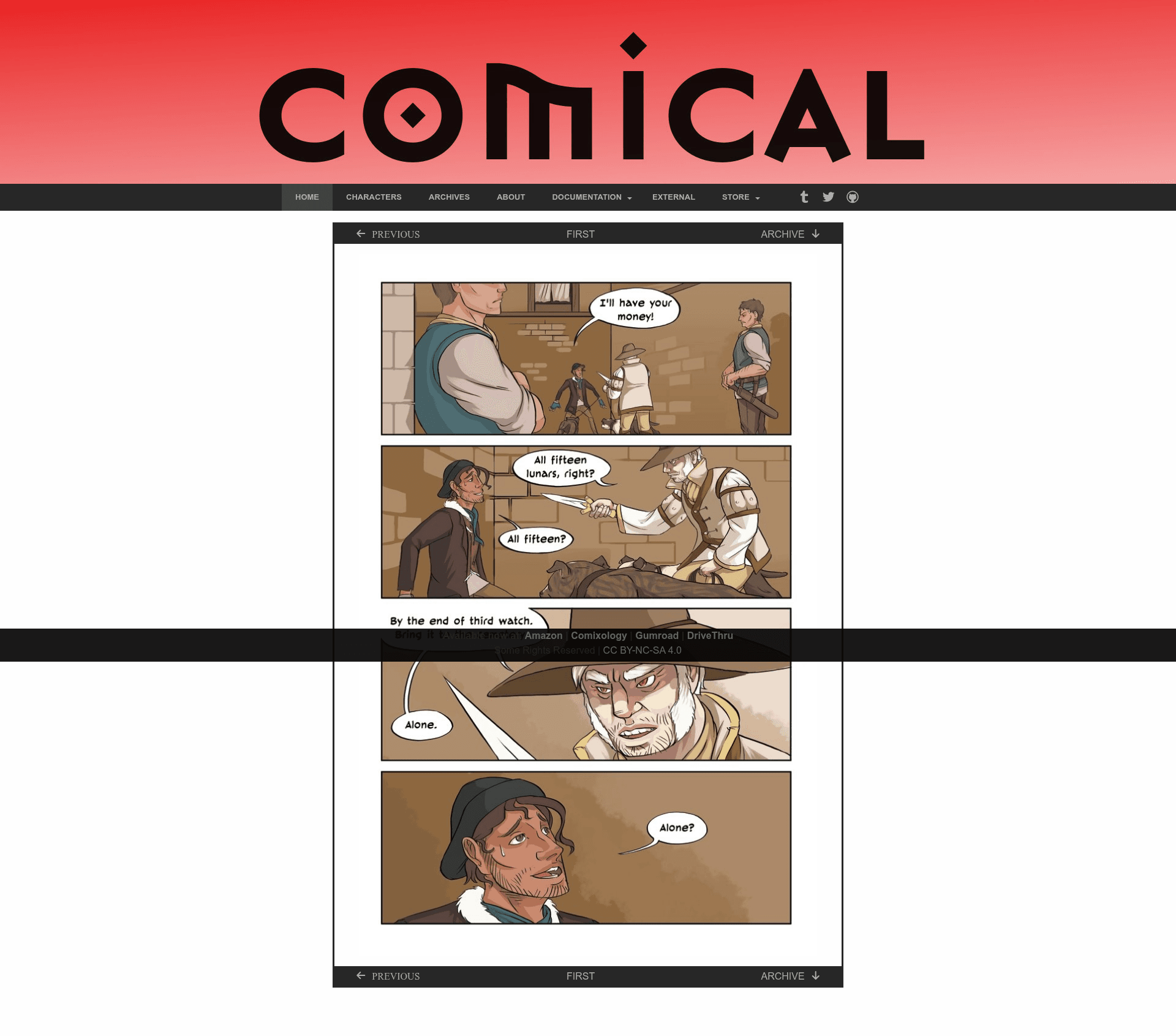
A configurable webcomic theme for Jekyll with responsive images, thumbnail archives, and a JavaScript-free layout.
About this template
Comical Jekyll Theme is a webcomic publishing template for Jekyll 3 that turns Markdown comic posts into a static site with a front-page comic, thumbnail archive, character bios, and about page.
What is Comical Jekyll Theme?
Comical Jekyll Theme is a Jekyll theme created by Chris Anthropic (GitHub: chrisanthropic), built on his Slim-Pickins Jekyll theming framework. It takes Jekyll posts with YAML front matter (categories, thumbnails, header images) and data files (_data/nav.yml, _data/socials.yml, _data/about.yml, _data/characters.yml) and generates a static webcomic site. The front page automatically displays the most recent comic and populates next/previous/archive navigation, while the archive page pulls thumbnails from post front matter. The theme is listed as "JavaScript free" except for optional Google Analytics.
Key Features
- Jekyll 3.0 compatible — Uses SASS for styling, has no JavaScript (except optional Google Analytics), and includes a Rakefile with tasks for building, minifying HTML, deploying, and notifying search engines.
- Responsive Foundation 6 grid — A minimal integration of Zurb Foundation's responsive grid and visibility classes, so the layout reflows on small screens without the full Foundation CSS.
- Responsive comic images with srcset — Comic images use the
srcsetattribute; a built-in thumbnailer plugin creates a 350x535 "small" version for mobile screens and a 182x280 "thumb" for the archive page. - Thumbnail archive page — Add
thumbnail: /path/to/thumb.jpgto a post's YAML front matter and the_includes/category.htmltemplate auto-populates the archive with those thumbnails. - Data-driven navigation — Two nav areas (primary links left, social links right) are populated from
_data/nav.ymland_data/socials.yml, so you edit links in YAML, not in HTML. - Configurable banner image — The theme supports a site-wide default header image via
header_imagein_config.yml, plus per-page overrides in YAML front matter; the layout is designed for a 1920px-wide banner. - Sticky footer — The footer is pinned to the bottom of the viewport with SASS variables for height and color.
- Built-in SEO — Optional Google Analytics (
google_universal_analytics), Facebook Open Graph tags, Twitter Cards, and site-wide or per-post keywords.
Who is it for?
- Webcomic creators who want a lightweight, self-hosted site without a CMS — they can publish each comic as a Jekyll post and get archive, navigation, and character pages for free.
- Jekyll developers looking for a scaffold with SASS variables for theming, a thumbnail generation plugin, and a deploy pipeline — the Rakefile includes
build,deploy,minify_html, andnotifytasks. - Fans of static sites who want a no-JavaScript front end; the only script is the optional Google Analytics snippet.
What can you do with Comical Jekyll Theme?
- Publish a daily webcomic: Add a new post with
categories: name-of-comicand a thumbnail path; the front page rotates to the latest comic and archive thumbnails update automatically. - Customize the design: Adjust SASS variables for base colors, link colors, navbar height, comic nav background, border widths, and footer styling without touching Hugo or npm build configs.
- Deploy to S3: Configure
s3_website.yml(after adding it to.gitignore) and run thedeployrake task to push the site and ping Google and Bing about sitemap updates.
How does it work?
After cloning the repo, run bundle install --binstubs --path=vendor, then transfer any existing posts or images. Edit _config.yml (at minimum title and description), update the four data files, and optionally add the mini_magick thumbnailer block to _config.yml to autogenerate thumbs and small-screen images. The Rakefile's build task runs jekyll build followed by HTML minification, and deploy runs s3_website push plus search-engine notification.
FAQ
Does Comical Jekyll Theme require JavaScript?
No. The theme is designed to be free of JavaScript; the only JavaScript in the output is the optional Google Analytics code if you add a google_universal_analytics ID to _config.yml.
How do I add a banner image?
Set a site-wide default by adding header_image: "path/to/image.jpg" to _config.yml, or override it per page by putting the same key in a page's YAML front matter. The theme checks page front matter first, then the config default.
How do I create thumbnails for the archive?
Add a thumbnail: /path/to/thumb.jpg entry to each comic post's YAML front matter. Alternatively, configure the built-in mini_magick plugin in _config.yml to generate 182x280 thumbs and 350x535 small images from files in /images/comics/.
What hosting options are supported?
The Rakefile includes a deployment task for S3 via the s3_website plugin. You can edit the Rakefile's deploy task to target other hosting; the build task works for any static host.
Is the demo content usable?
The demo posts are duplicated from Shamsee Comics and released under Creative Commons, so you can review them as examples but should not republish without respecting the license.