Template details
Cupper
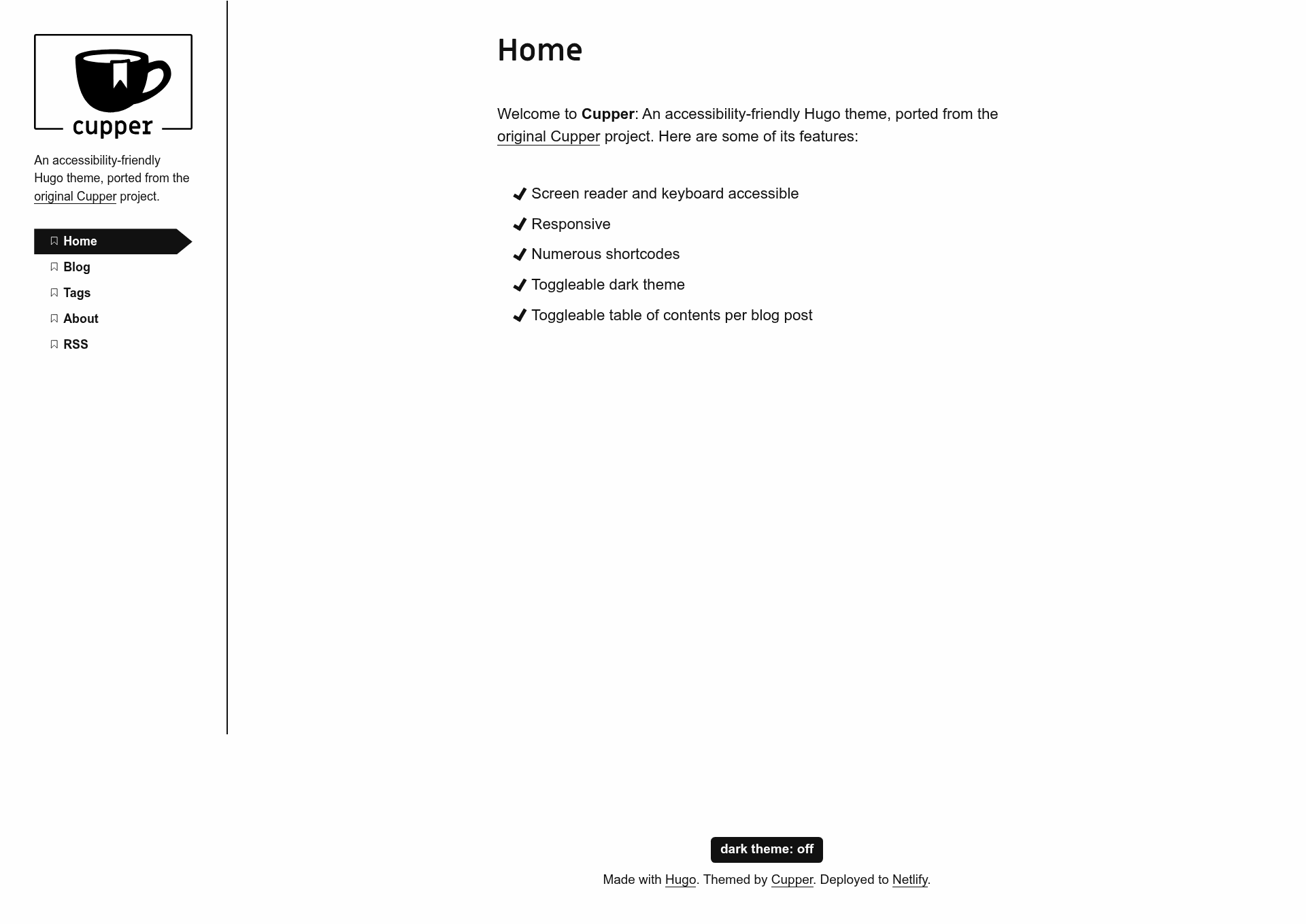
An accessibility-friendly Hugo theme, ported from the original Cupper project.
About this template
Cupper is a Hugo theme that puts accessibility first, ported from The Paciello Group's original Cupper project to work as a modern static-site theme for blogs and documentation sites.
What is Cupper?
Cupper is a static-site theme for Hugo, the Go-based static site generator. It accepts Markdown content and a config.yaml file, then outputs an accessible HTML website with syntax highlighting, dark mode, and comments via GitHub issues. The theme was created by zwbetz-gh and is installed as a git submodule from the cupper-hugo-theme repository. It is a direct port of the original Cupper project by Heydon Pickering and The Paciello Group, carrying over its inclusive design goals.
Key Features
- Accessibility-first structure — Inherited from the original Cupper, the theme is built around inclusive web practices and clean semantic HTML.
- Hugo compatibility — Requires Hugo version 0.81.0 or higher and is managed as a git submodule, with a separate update command (
git submodule update --remote --merge). - Prism syntax highlighting — Uses Prism.js to highlight code fences; the default language list is small, but you can download a custom build from prismjs.com and replace
static/js/prism.jsandstatic/css/prism.css. - Dark theme toggle — Set the
defaultDarkThemeparam totruein the site config to start visitors in dark mode; the preference is then saved in browser local storage. - Localization — Template strings can be translated by copying
i18n/en.yamlto your site's own i18n file and editing thetranslationvalues, enabling multilingual sites. - Utterances comments — Integrates the utterances widget, which stores comments as GitHub issues; requires a public repo and the utterances GitHub app.
- Custom CSS and JS — You can add your own stylesheets and scripts from the static directory; they load after the theme's defaults, so they override the built-in styles.
- Per-post table of contents — Enable a table of contents on individual posts by setting
toc: truein the front matter.
Who is it for?
- Accessibility-focused developers who need a Hugo theme that follows inclusive design practices out of the box, rather than bolting on accessibility later.
- Technical bloggers who want Prism-based syntax highlighting, per-post tables of contents, and a clean reading layout without building a site from scratch.
- Open-source maintainers who want a lightweight commenting system that ties directly to GitHub issues, avoiding a third-party comment service.
- Multilingual site owners who need template-level localization support and can manage a simple i18n file.
What can you do with it?
- Bloggers: Write posts in Markdown with code snippets, then enable
toc: truein front matter to generate a table of contents for long articles. - Documentation sites: Use the theme's clean typography and syntax highlighting to publish API docs or technical guides, with utterances comments for reader feedback.
- Portfolio or personal sites: Configure the nav title as either text or an SVG logo at
static/images/logo.svg, and customize favicons using RealFaviconGenerator output. - Experimenters: Run the demo site locally with
hugo server --themesDir ../..from the exampleSite folder to see all shortcodes and configuration options in action.
How does it work?
Installation is a single git submodule command: git submodule add https://github.com/zwbetz-gh/cupper-hugo-theme.git themes/cupper-hugo-theme. From there, copy the example site's config.yaml, adjust the parameters, and run hugo server to preview. The theme reads front matter (such as toc), config params (such as defaultDarkTheme and utterances.repo), and includes a list of shortcodes documented on the demo site.
FAQ
Is Cupper still actively maintained?
No. The repository is archived and read-only, meaning no new updates or bug fixes will be released. You can still use the theme, but you should be prepared to maintain it yourself or watch the archived status.
What Hugo version do I need to use Cupper?
Hugo version 0.81.0 or higher. The theme relies on features introduced in that version, so older Hugo binaries will not work.
How do I enable dark mode by default?
Set the parameter defaultDarkTheme to true in your site's config file, for example params: defaultDarkTheme: true. The theme stores the visitor's choice in browser local storage, so the default only applies on the first visit; clearing local storage (or using a private window) resets it.
Can I use Cupper without Git for my site?
Yes. If your site is not a Git repository, set enableGitInfo to false in your config file so Hugo does not try to read Git commit metadata.
Does Cupper include a comments system?
It ships with support for utterances, a lightweight widget that stores comments in GitHub issues. You need to install the utterances GitHub app on your repository and set the utterances.repo parameter in config.