Template details
Cutie
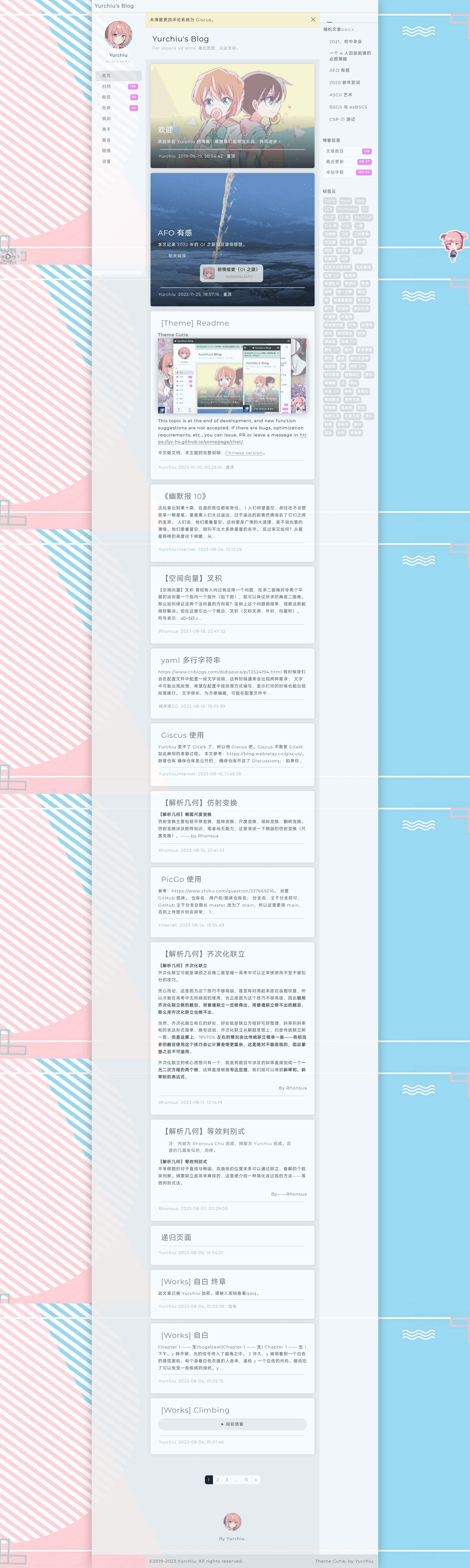
Cutie is an open-source Hexo theme with a handsome-inspired layout, created by Yurchiu and released under MIT.
About this template
Cutie is an open-source Hexo blog theme that replaces a default Hexo site with a new visual layout inspired by the handsome Typecho theme, originally coded by Yurchiu and released under MIT.
What is Cutie?
Cutie is a Hexo theme created and maintained by Yurchiu, designed to be installed into a Hexo blog by cloning its GitHub repository and setting the theme field to cutie in the _config.yml file. The layout is modeled after handsome, a Typecho theme, and some code is adapted from mkBlog. The repository is tagged with topics including blog, giscus, hexo, hexo-theme, and theme, and it has 16 stars on GitHub as of the metadata.
What makes Cutie stand out?
- handsome-inspired layout — The theme recreates the visual style of the handsome Typecho theme for Hexo, offering a familiar but distinct blog appearance.
- Original and adapted code — Most of the code was written from scratch by Yurchiu, while some parts come from mkBlog, giving a mix of original and community contributions.
- Easy installation — You can install it with a single git clone command into your Hexo themes directory and enable it via
_config.yml. - MIT license — The theme is free to use, modify, and distribute under the MIT License.
- giscus topic — The GitHub repository is tagged with giscus, a comment system that may be integrated or planned.
- Community contributions — Besides the author Yurchiu, contributor tsxc has also worked on the theme, and issues or PRs are welcome.
Who should use Cutie?
- Hexo bloggers — Individuals who run a Hexo blog and want a ready-made theme with a handsome-style layout without building one from scratch.
- Chinese-speaking users — Since most configuration documents are written in Chinese, users comfortable with Chinese will have an easier time customizing the theme.
- Open-source contributors — Developers interested in Hexo theme code can study, modify, and submit pull requests, as the project explicitly welcomes issues and PRs.
What can you do with Cutie?
- Set up a new blog look: Clone the theme into your Hexo project, change the theme setting to
cutie, and follow the Chinese docs to customize navigation, colors, and layout. - Learn Hexo theme development: Explore the codebase to see how a Hexo theme is structured, how it integrates with a blog configuration, and how to build features like comment integration.
- Build a theme based on it: Fork the MIT-licensed code and adapt it for your own blog or other projects, with credit to the original authors.
How does Cutie work?
After cloning the repository, you place it in the themes directory of your Hexo site. Then you set the theme value in _config.yml to cutie. To configure the theme further, you read its documentation (mostly in Chinese) and adjust options such as layout, navigation, and third-party integrations.
FAQ
Is Cutie free?
Yes, Cutie is released under the MIT License, so it is free to use, modify, and distribute.
What is Cutie's design inspired by?
The layout is inspired by handsome, a Typecho theme. Some code is also borrowed or adapted from mkBlog, and contributions from tsxc are included.
Who maintains Cutie?
The theme is primarily maintained by Yurchiu, with contributions from tsxc. The repository welcomes issues and pull requests from the community.
Do I need to know Chinese to use Cutie?
Not necessarily, but the theme's configuration documentation is mostly in Chinese, so having some Chinese reading ability makes customization easier.