Template details
Massively for Astro
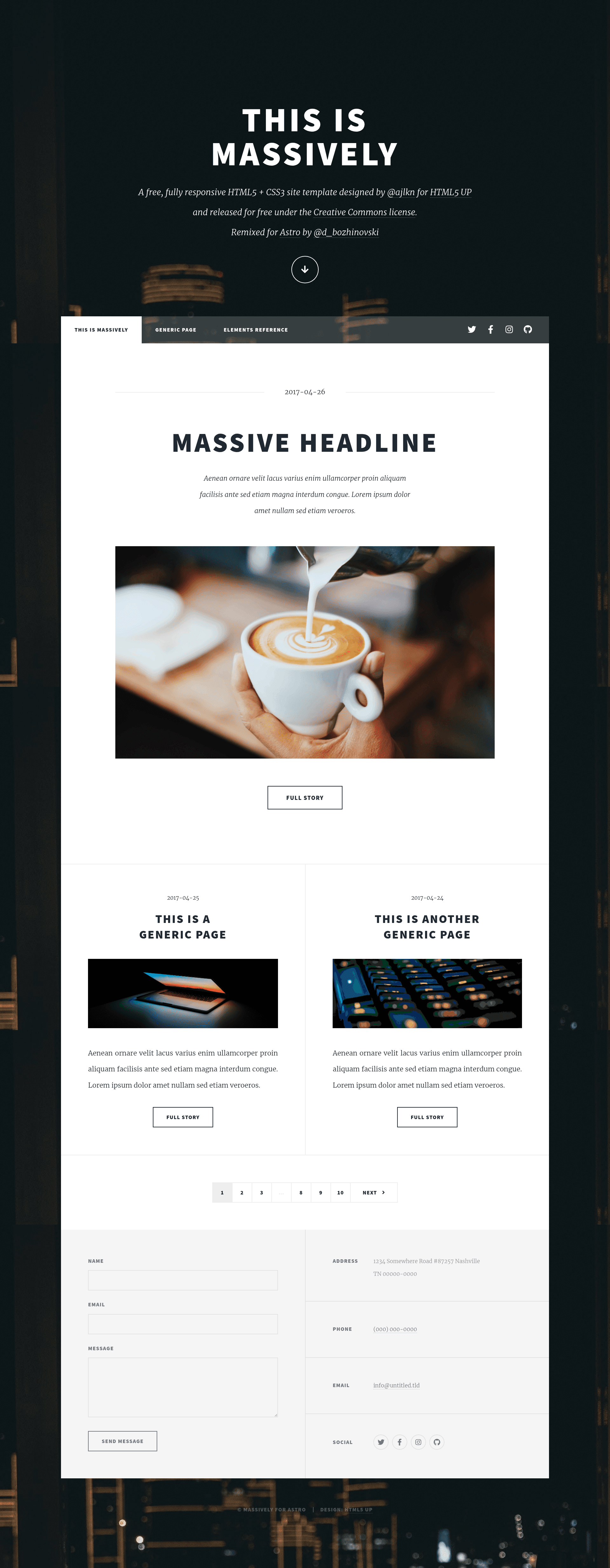
Free Astro port of the HTML5 UP Massively editorial template with parallax intro, SASS styles, and built-in RSS/sitemap.
About this template
Massively for Astro is a free, open-source port of the HTML5 UP Massively template, turning the classic parallax-heavy editorial design into a theme for the Astro static site generator.
What is Massively for Astro?
Massively for Astro is a remix of the popular HTML5 UP Massively design, ported to the Astro framework by Darko Bozhinovski. It takes the original editorial-style layout — large typography, a prominent full-screen intro, and a parallax animation — and packages it as an Astro project with reusable components, SASS stylesheets, and a central configuration file. The template runs on Astro 3.0.13 and can be scaffolded via npx degit and deployed as a static website. The original design is by AJ (ajlkn) and released under the Creative Commons license.
Key Features
- Astro port — Built on Astro 3.0.13 and structured to support newer Astro versions, with components and scoped scripts throughout.
- SASS styling — All styles reside in
src/styles/sass; they follow the original author's structure with a few arithmetic adjustments to fix modern SASS warnings. - Central configuration — Site title, navigation links, social media URLs, and site URL are defined in
src/config.ts; the animated logo is simply the page title text. - Component library — A large set of pre-styled HTML blocks and Astro components, demonstrated on the
/genericand/elementspages, covers buttons, image grids, typography, and more. - Built-in integrations — Includes sitemap generation, RSS feed, and Google Fonts Optimizer out of the box.
- Parallax intro animation — The original jQuery-based parallax effect for the header/logo transition is ported to ES modules so Astro can bundle it.
- Zero-JS option — Removing the animation scripts (and the conditional intro markup) yields a fully static, JavaScript-free page.
- Favicon customizable — Replace
public/favicon.svgor update the layout reference atsrc/layouts/Layout.astroline 24.
Who should use Massively for Astro?
Astro developers who want a production-ready editorial theme without writing styles or layout from scratch can start with this template. Bloggers and writers can set up a typography-focused publication by editing src/config.ts and adding markdown content. Creative professionals such as photographers and designers can use the built-in image sections and parallax hero as a portfolio showcase. Teams or individuals needing a fast, static site can also remove the animation to ship a lightweight page.
What can you do with Massively for Astro?
- Publish a blog — Configure the site metadata, add markdown posts, and let the built-in RSS feed and sitemap handle discoverability.
- Build a portfolio — Use the
/elementspage components for image grids, buttons, and typography to assemble a creative showcase. - Launch a landing page — Start with the cinematic intro header as a hero, then strip the parallax scripts if you prefer a lighter, non-animated page.
How does Massively for Astro work?
Scaffold a project by running npx degit https://github.com/DBozhinovski/astro-massively my-site-name inside a terminal, then install dependencies with npm install. Customization happens through src/config.ts and component files in src/components. The project includes a /scripts folder for the animation logic; remove those scripts and the conditional intro markup to disable animations entirely.
FAQ
Is Massively for Astro free?
Yes. The original Massively template is released for free under the Creative Commons license, and this Astro port keeps that attribution and license. The original author also offers non-attribution usage through pixelarity.com.
Can I remove the parallax animation?
Yes. Delete all script tags from src/components/IntroHeader.astro, remove the conditional element that renders when an intro prop is passed, and optionally delete the entire src/scripts directory to keep the site lighter.
Does this template support new Astro versions?
The template uses Astro 3.0.13 and was designed to support newer versions easily, according to the developer's notes.
How do I change the logo?
The logo is the text of the page title from src/config.ts. To replace it with an image, edit the <header id="header"> markup in src/components/IntroHeader.astro using any Astro-supported image import method.