Template details
CVTailor
CVTailor: free, open-source AI resume builder. Import a PDF, tailor it to the job with AI, and export an ATS-friendly resume. Built with Next.js 15.
About this template
CVTailor is a free, open-source AI resume builder that imports an existing resume PDF, tailors each section to a target job posting with AI, and exports an ATS-friendly PDF — built with Next.js 15 and React 19.
What is CVTailor?
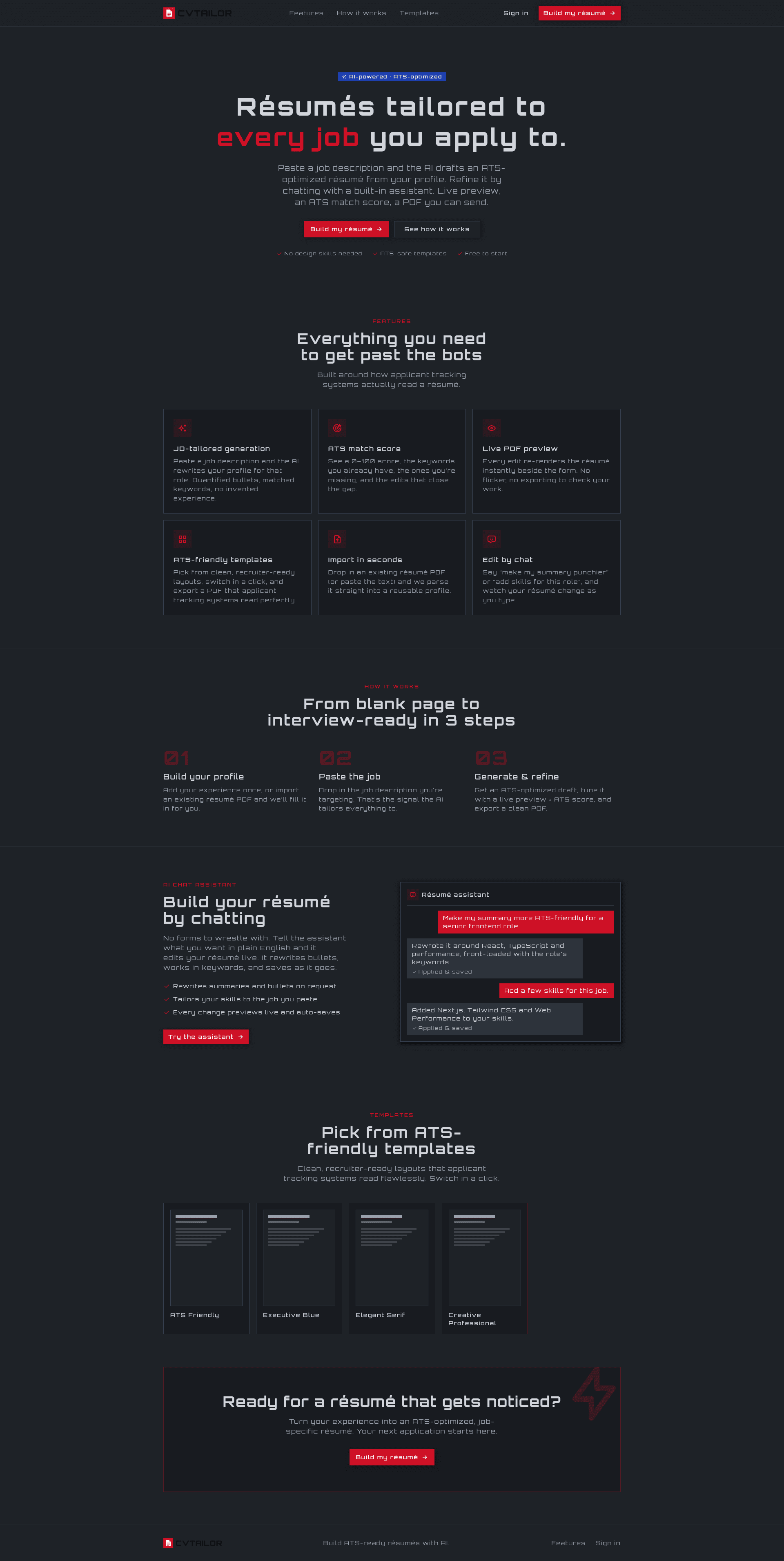
CVTailor is an open-source (MIT-licensed) web application created by GitHub user Kiranism that turns raw work history into a polished, ATS-friendly resume. You feed it a PDF resume or a saved profile, edit the parsed sections, ask AI to draft or improve summaries, experience bullets, and skills, and finally export a print-ready PDF. The app runs on Next.js 15 with the App Router, and a hosted live demo is linked at dub.sh/cvtailor. Five resume templates are included, with a single-column, parser-safe "ATS Friendly" layout as the default.
Key Features
- AI writing and tailoring — AI drafts summaries, experience bullets, and skills; when you paste a job description, company, and role, it rewrites your content to match the posting. Models run through OpenRouter with two configurable tiers: fast (default
anthropic/claude-haiku-4.5) and writing (defaultanthropic/claude-sonnet-4.5). - Resume import — Upload a PDF or paste raw text, and CVTailor extracts the content into an editable profile that you can review and correct.
- ATS-friendly templates — Five templates: ATS Friendly (default, single-column, parser-safe), Creative Professional, Professional Split, Modern Clean, and Minimalist. The default is designed for applicant tracking system keyword scanning.
- Live PDF preview — A split-pane editor shows the PDF rendering updating in real time as you type.
- Profiles and auto-save — Save your details in reusable profiles and edit multiple resumes from the same data; changes auto-save while you edit.
- One-click PDF export — PDFs are generated in the browser with
@react-pdf/renderer, so you download a print-ready file directly. - Dark and light mode — The interface supports both themes.
Who is it for?
- Job seekers who want to adapt one resume to many job postings quickly, using AI to reword bullets and match keywords.
- Career changers who need to reframe old experience around a new target role — the AI critique and rewrite features help translate skills.
- Students and recent graduates who have no formatted resume and want to start from a clean ATS-friendly template instead of wrestling with Word formatting.
- Developers and privacy-conscious users who want to self-host their own resume builder with their own API keys, or fork the MIT-licensed codebase.
Use cases
- Apply to a specific job: paste the job description, company, and role into CVTailor, and let AI rewrite your resume's bullet points to emphasize the skills that posting asks for.
- Modernize an old resume: import a dated PDF, review the parsed sections, and export a new PDF using the ATS Friendly or Modern Clean template.
- Maintain several resume variants: use profiles to store different versions of your work history and generate a separate tailored resume for each role you're pursuing.
- Self-host without AI costs: fork the repo, connect your own OpenRouter key, Neon Postgres database, and Clerk authentication, then run your own instance.
How does it work?
- Sign in with Clerk authentication.
- Create a profile or import a resume PDF to fill your details automatically.
- Pick a template (ATS Friendly is the default).
- Use AI to draft and refine sections, and tailor the content to a specific job description.
- Preview the PDF live in the split-pane editor.
- Export the PDF and download a print-ready file.
Pricing
CVTailor is free and open source under the MIT license. The hosted demo is free to use, but AI features run on your own OpenRouter API key, which is pay-as-you-go per model. If you self-host, you pay only for the Neon database, Clerk auth, and OpenRouter usage.
FAQ
Is CVTailor free?
Yes. CVTailor is free and open source under the MIT license. You can use the hosted demo or self-host your own copy. The AI features call OpenRouter with your own API key, so you pay only for the model usage.
Are the resumes ATS-friendly?
Yes. The default template is a single-column, parser-safe layout designed for applicant tracking systems, using standard fonts and clean text structure so ATS software can read your details and match keywords.
Can I import my existing resume?
Yes. Upload a PDF and CVTailor extracts the text into a profile you can review and edit, or paste resume text directly.
Can I tailor my resume to a specific job?
Yes. Add a job description, company, and role, and the AI rewrites your content to match that posting, adjusting bullet points and wording to emphasize relevant skills.
Which AI model does CVTailor use?
CVTailor routes through OpenRouter so you can use any supported model. There are two tiers: fast for chat edits and ATS analysis (default anthropic/claude-haiku-4.5) and writing for resume creation and critique (default anthropic/claude-sonnet-4.5), both configurable via environment variables.