Template details
Excalith Start Page
Terminal-inspired, clean, feature-rich and customizable browser start page for geeks. Has built-in editor for customizing.
About this template
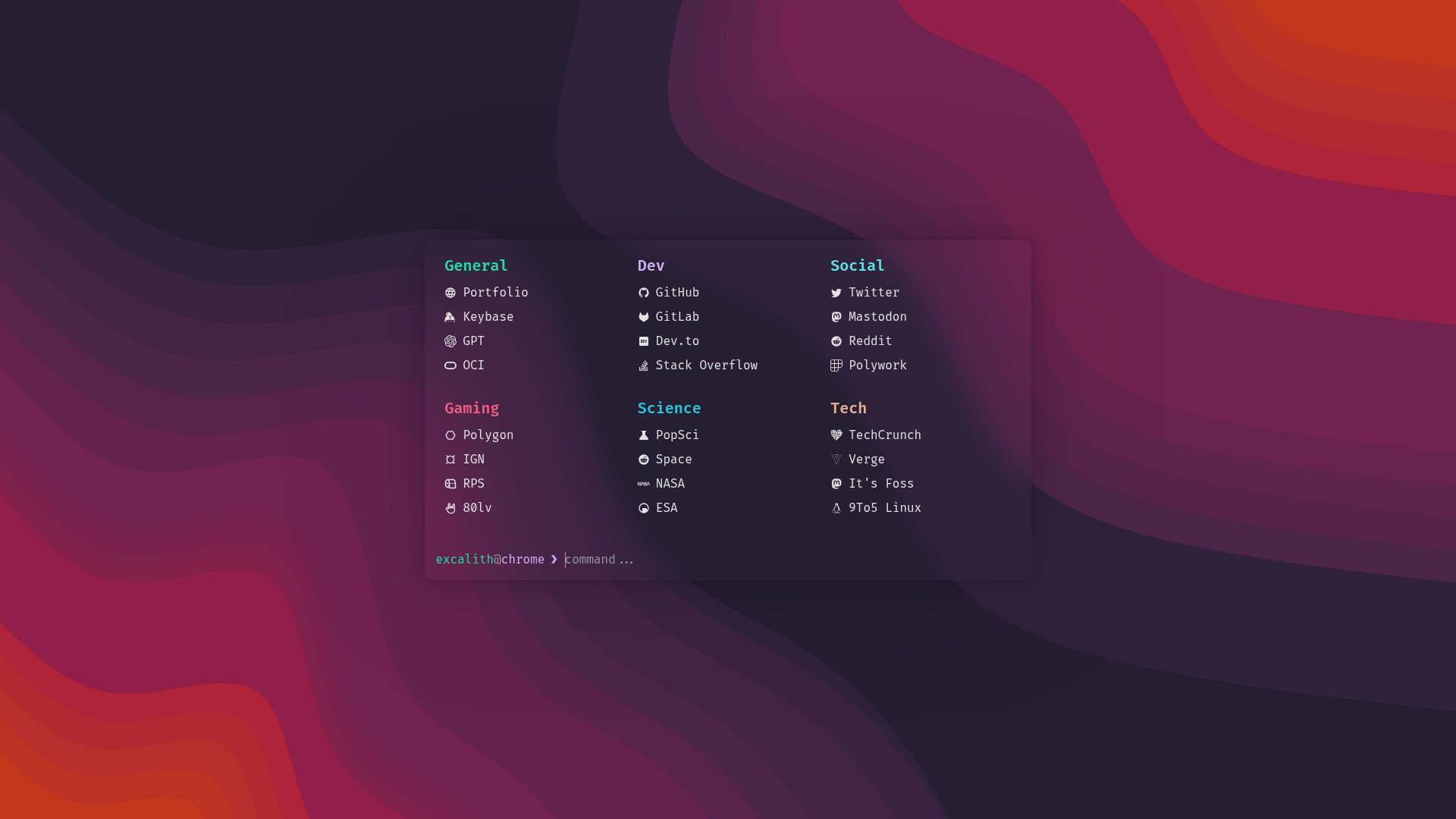
Excalith Start Page is a terminal-inspired, feature-rich browser start page built with Next.js and React that lets you filter, launch, and search links from a single command prompt.
What is Excalith Start Page?
Excalith Start Page is an interactive browser start page designed to mimic a terminal interface. It takes a user's typed input as a query and returns either filtered link results, direct URL launches, or search engine results, depending on the input. The project is built with Next.js and React, styled with Tailwind CSS, and can be run as a fork, a Docker image (amd64/arm64), or an online demo hosted on Vercel. It is an open-source project by Excalith, released under the MIT license.
Key Features
- Filter-as-you-type prompt — Typing in the prompt filters links in real time; pressing Enter opens all filtered links simultaneously, and if nothing matches, the text falls back to your default search engine.
- Direct URL launch — Type a bare domain like
github.comto open that site without needing a full URL. - Custom search commands — Define shortcuts like
s some weird bugto search StackOverflow directly; the built-inhelpcommand lists your configured search shortcuts. - Autosuggest and autocomplete — Suggestions and tab-completion work similarly to
zshandfish, with the Right arrow key accepting a suggestion. - Wallpaper and translucency — Set a wallpaper by URL with blur and fade effects, and adjust terminal window opacity for a translucent look.
- Themes and config editor — Switch between multiple built-in themes found in
data/themes/, or edit your configuration on the fly with theconfig editcommand using a built-in JSON editor. - Fetch UI — The
fetchcommand displays system and browser data, with support for custom images in the output. - Deployment options — Run it by forking the repository, pulling a Docker image from Docker Hub or GHCR, or using the online preview version.
Who is it for?
- Geeks and terminal lovers — Users who want their browser new-tab page to feel like a shell prompt, with keyboard-driven navigation and command-style interactions.
- Self-hosters — People who deploy their own start pages via Docker can use the provided amd64/arm64 images and customize
settings.jsonin their fork. - Developers — Those who want a customizable React/Next.js project to use as a new-tab page or landing page, with full source control through forking.
What can you do with Excalith Start Page?
- Speed up daily browsing — Filter your bookmarked links by typing, then hit Enter to open all matches at once instead of clicking through a grid of tiles.
- Create custom search shortcuts — Configure commands like
s bugorw termto instantly search StackOverflow or Wikipedia from the prompt, skipping the search engine middleman. - Run it as a Docker service — Deploy the start page to a NAS or home server using the official Docker images for both amd64 and arm64 architectures.
How does Excalith Start Page work?
You can get started three ways: fork the repository to edit data/settings.json directly, use the config edit command in the running app, or import a remote config with config import URL from a dotfiles repo. After configuration, the start page loads as your browser's new-tab or landing page, and all interaction happens through the prompt and key bindings.
FAQ
Is Excalith Start Page free?
Yes, the project is open source under the MIT license, so you can use, modify, and distribute it freely. No paid tiers or premium features are mentioned on the repository page.
Does it work on all architectures?
The Docker images support both amd64 and arm64. For other deployment methods, you run it from source with Node.js, so any platform that supports Next.js works.
Can I import my configuration from another machine?
Yes, the config import URL command lets you load a configuration file from a remote URL, which is useful if you keep your dotfiles in a repository.
How do I change the theme?
Use the config theme command to list available themes, then config theme theme-name to switch. You can also edit the configuration file directly.