Template details
Dante
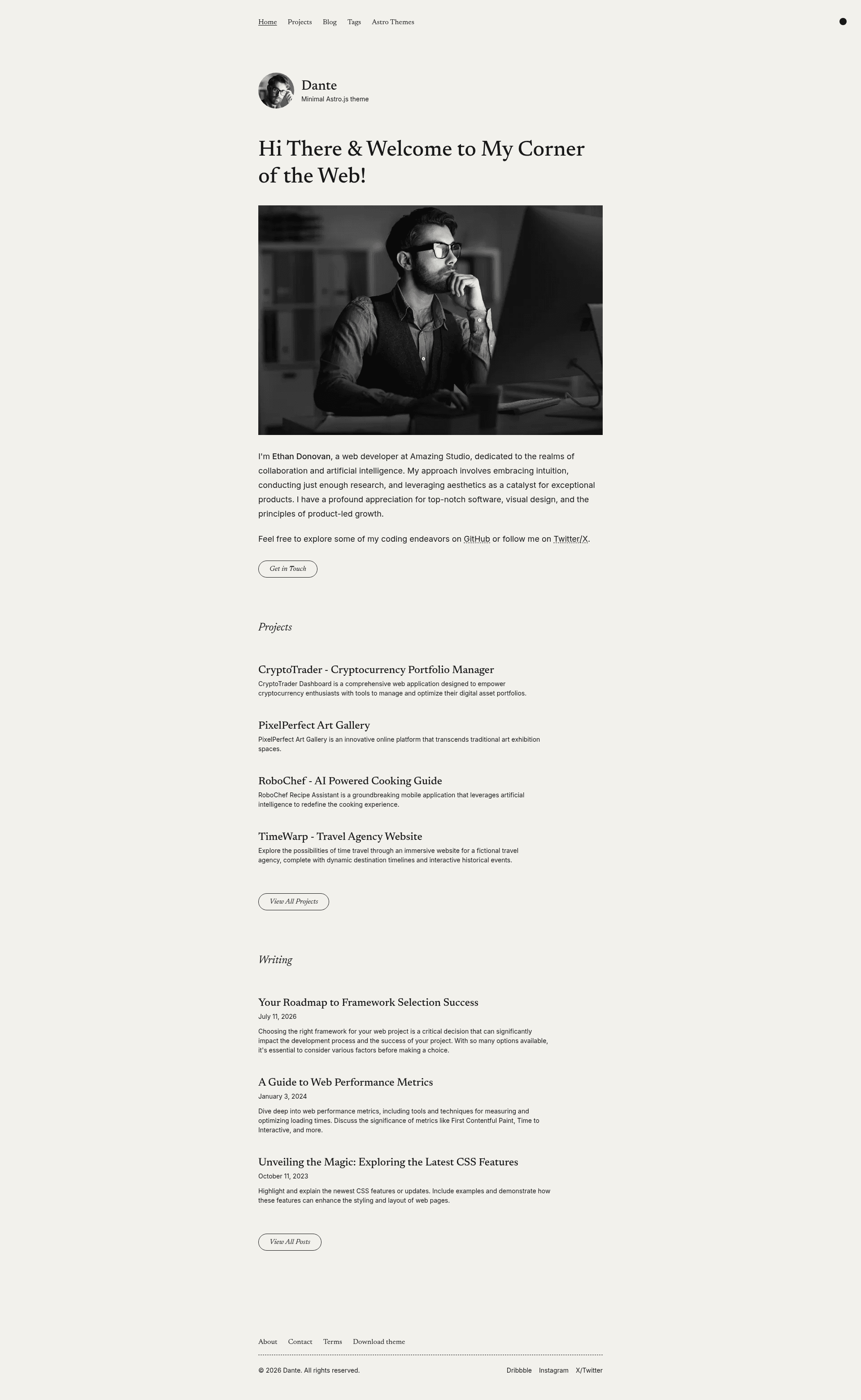
A free, open-source single-author blog and portfolio theme for Astro.js, styled with Tailwind CSS, created by Just Good UI.
About this template
Dante is a free, GPL-3.0-licensed single-author blog and portfolio theme for Astro.js, styled with Tailwind CSS, that turns Markdown and MDX content into an SEO-ready static site.
What is Dante?
Dante is a single-author blog and portfolio theme built on Astro.js, styled with Tailwind CSS via the @tailwindcss/vite plugin, and published by Just Good UI. It ingests Markdown and MDX posts from Astro content collections and outputs a static site with a hero bio, portfolio listings, pagination, post tags, RSS feed, and sitemap. The theme requires Node.js 22.12.0 or newer, and its source is available on GitHub under the GPL-3.0 license.
What makes Dante stand out?
Dante ships with SEO, performance, and content features wired up out of the box, including sitemap, RSS, and MDX integrations ready to use after install.
- Dark and light color mode — visitors can switch between light and dark themes, with the toggle built into the responsive layout.
- Portfolio collection with pagination — a dedicated content collection for projects sits alongside the blog, and both listings support posts-per-page settings from the site config.
- SEO-friendly output — every page ships with canonical URLs and OpenGraph data, plus sitemap generation via @astrojs/sitemap and RSS via @astrojs/rss.
- Markdown and MDX content — blog posts and pages are written in Markdown or MDX through the @astrojs/mdx integration, with optional frontmatter schema type-checking.
- Optimized images — a CustomImage component automatically uses Astro's Image component for content-collection images stored in src/assets, while site-config images can come from either src/assets or public.
- Subscription form — the newsletter block accepts a custom action URL and configurable email and hidden fields, working with Mailchimp, Formspree, ConvertKit, or any form-based provider, plus an optional honeypot field for spam protection.
- View transitions — Astro's built-in view transitions are enabled for smooth page navigation between routes.
- One-click Netlify deployment — a deploy button creates a new repository identical to the theme and sets it up for immediate deployment on Netlify.
Who should use Dante?
Dante fits creators who want a single-author site where writing stays in plain Markdown or MDX files and the theme handles layout, SEO, and feeds.
- Independent writers — publish a minimal, content-focused blog where posts are written as Markdown or MDX files and automatically included in pagination, tags, RSS, and sitemap.
- Designers and developers — combine a portfolio collection with a blog on one responsive, mobile-first site and customize branding, navigation, hero, and social links from a single site-config.ts TypeScript file.
- Astro.js learners — study a clean project structure with components, content collections, layouts, and utils folders, and use the npm run check command to type-check the project with astro check.
- Open-source projects — deploy the theme to Netlify with one click and reuse it as a starting point, since the GPL-3.0 license permits modification and redistribution under the same terms.
What can you do with Dante?
With Dante, you can publish and present content without touching layout code, since all site-wide settings live in one configuration file.
- Single-author bloggers: write posts in Markdown or MDX inside src/content/blog, and the theme generates tagged, paginated listing pages plus an RSS feed and sitemap for readers and search engines.
- Freelance designers: present case studies in the portfolio collection while maintaining a separate blog for writing, all styled with Tailwind CSS and a mobile-first responsive layout.
- Newsletter creators: connect the built-in subscription form to Mailchimp, Formspree, or ConvertKit by setting the action URL, email fields, and honeypot fields in site-config.ts.
- Hobbyist developers: start a personal site with a prefilled repository via the Netlify deploy button, then customize every site-wide option — title, description, avatar, hero, social links, and posts per page — in one configuration file.
How does Dante work?
Dante is configured in a single TypeScript file, src/data/site-config.ts, which holds site identity, navigation, social links, hero content, newsletter form settings, and pagination counts. Content authors add blog posts and portfolio items as Markdown or MDX files in src/content, and images for those posts must live in src/assets so they pass through Astro's image() schema. The project is built with npm run build, which outputs the production site to ./dist/, and can be previewed locally with npm run preview before deployment.
Pricing
Dante is free and open source, licensed under GPL-3.0, with the full source published on GitHub.
Alternatives
Just Good UI offers Ovidius as a comparable free single-author blog theme in the same Astro ecosystem.
- Ovidius — a free single-author blog theme from the same maker, Just Good UI, available on GitHub as a separate Astro theme.
FAQ
Is Dante free to use?
Yes. Dante is licensed under the GPL-3.0 license, and its complete source is publicly available on the JustGoodUI GitHub repository, so you can use, modify, and redistribute it with attribution under the same license terms.
What version of Node.js does Dante require?
Dante requires Node.js 22.12.0 or newer. All commands, including npm install, npm run dev, and npm run build, are run from the root of the project in a terminal.
Does Dante support Markdown and MDX?
Yes. Dante supports both Markdown and MDX content through the @astrojs/mdx integration. Content collection images used in posts must be stored in src/assets to use Astro's image() schema.
How do I customize the site title, navigation, and social links?
Open src/data/site-config.ts, the single configuration object used across the theme. It controls site identity — title, description, avatar, and subtitle — plus navigation links, social URLs, hero content, newsletter settings, and posts-per-page pagination.
Can I deploy Dante to Netlify?
Yes. The repository includes a Netlify deploy button that creates a new repository identical to the theme and sets it up for immediate deployment on Netlify.