Template details
docsify
An open-source documentation site generator that turns Markdown files into a website without a build step.
About this template
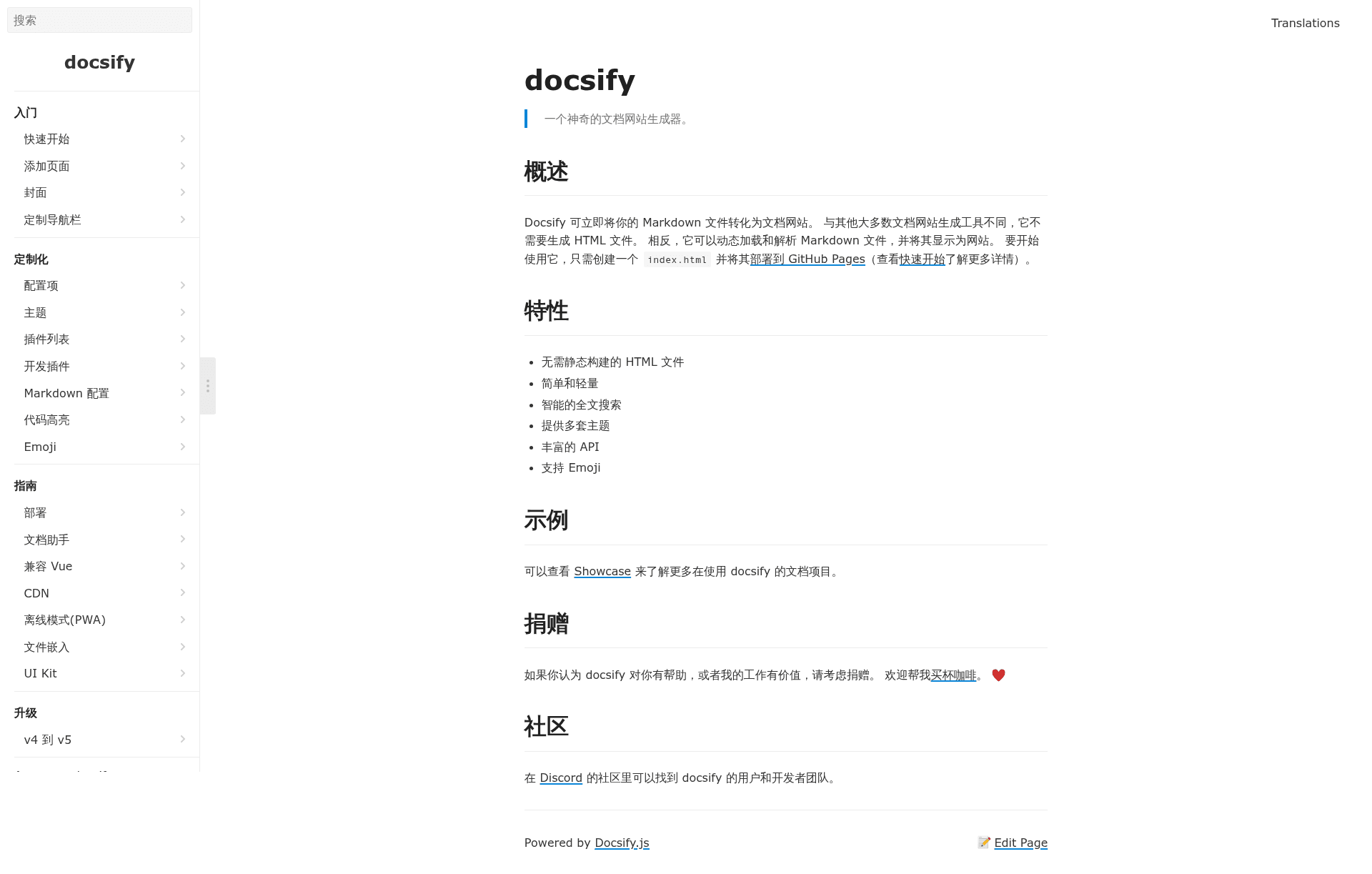
docsify is an open-source documentation website generator that converts Markdown files directly into a website at runtime, with no static build step. As a client-side JavaScript tool, it dynamically loads and parses Markdown files and displays them as a site, so a single index.html file plus your Markdown content is all you need to publish.
What is docsify?
docsify is a free, open-source documentation site generator that turns Markdown files into a website on the fly. It takes Markdown files and a single index.html as input and produces a live documentation site in the browser, without pre-rendering HTML files. The project is built on Vue.js and is maintained by the docsifyjs community on GitHub. Unlike static site generators such as VitePress or Hugo, docsify does not compile pages ahead of time – the browser fetches and renders the Markdown.
Key Features
- No static build step — There is no HTML generation or compile step; the browser fetches and parses Markdown on the fly, so you can deploy by simply uploading your Markdown files and one
index.htmlto any static host like GitHub Pages. - Intelligent full-text search — A built-in search feature indexes headings and content, giving visitors instant search results without external services or complex configuration.
- Multiple themes — Several built-in themes are available, and you can customize the look with CSS to match your brand.
- Rich API — docsify provides a plugin API with hooks, filters, and custom components, letting you extend behavior without forking the repository.
- Emoji support — Emoji shortcodes render natively, making documentation friendlier and more expressive.
- Simple and lightweight — The core is minimal and has no required runtime dependencies, making it fast to load and easy to understand.
- GitHub Pages integration — The official deployment guide walks you through hosting on GitHub Pages, and the showcase lists many real-world documentation sites built with docsify.
Who is it for?
- Open-source maintainers who want to publish project documentation quickly from existing README and docs files without setting up a build pipeline.
- Small technical teams that need an internal wiki or knowledge base and want to keep content in Markdown on Git.
- Technical writers who prefer Markdown and want to see changes instantly in the browser without a local build process.
- Anyone with a static host — because only a single
index.htmlis required, it can be dropped onto any existing static file server.
What can you do with docsify?
- Publish docs in minutes — Write Markdown files, create one
index.html, and deploy to GitHub Pages following the quickstart guide. - Live-preview content — Edit a
.mdfile and refresh the browser to see the updated page; no recompilation or restart is needed. - Add custom behavior via plugins — Use the API to integrate syntax highlighting, analytics, or other client-side features into your documentation site.
- Create a multilingual site — docsify supports a language switch, and the official documentation is available in both Chinese and English.
How does docsify work?
docsify runs entirely in the browser. When a visitor opens your site, the JavaScript reads the URL, fetches the corresponding Markdown file from the server, parses it into HTML, and injects it into the page. You never run a build command; you just upload your Markdown files and the index.html entry point.
Pros and cons
- Pros: zero build step, instantaneous updates, simple deployment, lightweight codebase, and a plugin system for extensibility.
- Cons: because content is rendered client-side, the raw HTML is not pre-rendered for search engines by default; you may need additional work for SEO if that matters for your site.
Pricing
docsify is completely free and open source, with no paid tiers or hosted plans. You only pay for the static hosting you choose, such as GitHub Pages, Netlify, or any other file server.
Alternatives
- VitePress — a Vue-powered static site generator that compiles Markdown to pre-rendered HTML.
- VuePress — an earlier Vue-based documentation generator with built-in theming and a development server.
- GitBook — a hosted documentation platform that supports Markdown and offers both web and PDF output.
- MkDocs — a Python-based static site generator focused on documentation with theming and plugin support.
FAQ
Is docsify free?
Yes, docsify is open-source and free to use. There are no licensing costs or hosted plans – you only pay for the static hosting where you deploy your site.
Does docsify need a build step?
No. Unlike many documentation generators, docsify has no build step. You write Markdown and an index.html, and the site renders in the browser at runtime.
Can I use docsify with GitHub Pages?
Yes. The official docs include a deployment guide for GitHub Pages. You can publish your site by pushing your Markdown files and index.html to a repository and enabling Pages.
Does docsify support full-text search?
Yes. docsify includes a built-in client-side full-text search feature that indexes your content and provides a search box without requiring a separate search service.
What languages does docsify support?
docsify supports multilingual documentation with a language switcher, and its interface can be translated. The project's own documentation is available in both Chinese and English, and the community has contributed other language translations.