Template details
Editr.js
Self-hosted HTML, CSS, and JavaScript playground built on ACE Editor, configurable via HTML attributes or JS.
About this template
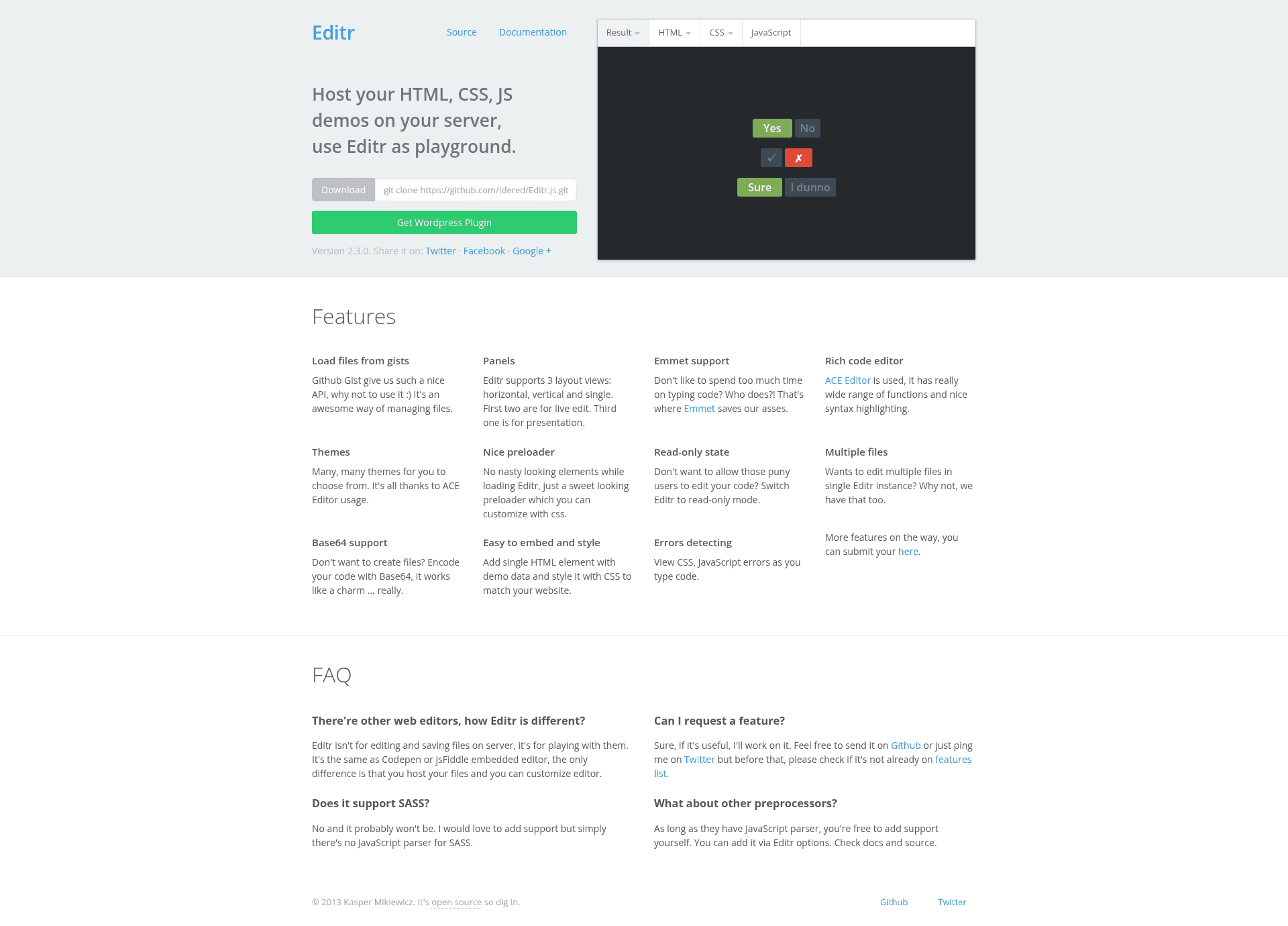
Editr.js is a self-hosted HTML, CSS, and JavaScript playground built on ACE Editor and jQuery, designed to embed live code editing on your own server or website. It runs entirely in the browser, takes HTML, CSS, and JS code as input through a mix of local project files, base64 strings, or GitHub Gists, and renders a live result pane alongside the editable code. Created by Kasper Mikiewicz, Editr is released under the MIT license.
What is Editr.js?
Editr.js is a self-contained code editor widget that mimics a miniature CodePen, with separate panes for HTML, CSS, and JavaScript and a preview area that updates as you type. The project consists of an editr folder with editr.js, editr.css, an items folder for your projects, and a libs folder containing preprocessors and the Emmet extension. You initialize it by placing a div with the editr class and configuring attributes, then calling new Editr() with that element. The editor is based on the ACE Editor library and requires jQuery, with optional LESS and CoffeeScript parsers.
Key Features
- Multiple instances per page — You can embed several independent Editr editors on a single page, each with its own configuration and file set.
- Dual configuration system — Options can be set through HTML
data-*attributes, which override JavaScript object properties, or directly via a JS options object passed tonew Editr(). - Flexible view layouts — Choose between
single,horizontal,vertical, andcartesianlayouts to arrange the editor panes to fit your design. - Multi-source file loading — Load code files from local project folders, from base64-encoded strings embedded in attributes, or from GitHub Gists using the
$GIST_ID,filesyntax; add!before a filename to hide it from the navigation bar. - Preprocessor support — Include
parser.less.jsfor LESS andparser.coffeescript.jsfor CoffeeScript, and prefix base64 strings withless:or use the parser scripts to compile in the browser. - Emmet integration — Ships with the Emmet extension for ACE, letting you use CSS-selector-style abbreviations to expand HTML and CSS quickly.
- Read-only mode — Set the
readonlyoption totrueor call thesetReadOnlyAPI method to prevent editing, useful for displaying code examples without modification. - Theme switching — Defaults to the Monokai theme; adding the
editr--lightclass changes the interface to a light theme for lighter contexts.
Who is it for?
Editr.js is for developers who want an embeddable, editable code sample on their own site. Documentation teams use it to let readers experiment with live HTML/CSS/JS examples inside tutorials. Educators can embed editr instances in course materials so students test snippets without leaving the page. Self-hosters who prefer not to rely on third-party services like CodePen can run their own playground and keep all assets locally.
What can you do with Editr.js?
- Embed live code demos in blog posts: Create a div with data attributes pointing to project files and get a working editor with a preview.
- Load example code from a local project folder: Store projects under
items/and reference them with theitemoption, or pass particular files viadata-files-html,data-files-css, anddata-files-js. - Include quick code snippets from base64: Encode small one-off CSS or JS rules directly into data attributes, optionally hiding them from navigation with a leading
!. - Pull public Gists into your editor: Configure the bundled PHP proxy with a GitHub personal access token, then reference any public gist by ID and file list.
How does Editr.js work?
Installation is a three-step process: copy the editr folder to the root of your website; add editr.css in the head and add jQuery, ACE Editor, Emmet extension, and editr.js before the closing body tag; then create a div element with the editr class and its data attributes. After that, run a script that iterates over such elements and instantiates new Editr({ el: this }). For Gist support, edit the libs/proxy.gist.php file to set your GitHub username and personal access token.
Pros and cons
- Pros: Free under MIT license; self-hosted, so no third-party dependency; supports multiple editors per page; includes Emmet and preprocessors for LESS and CoffeeScript; themes are customizable.
- Cons: Requires jQuery and the ACE Editor libraries to be loaded separately; Gist loading needs a PHP proxy and a GitHub personal access token; the default CSS is minimal, so visual styling is left to you.
Pricing
Editr.js is free and open source under the MIT License. The project also offers a commercial WordPress plugin called EditrWP on CodeCanyon, but the core library itself costs nothing.
FAQ
Is Editr.js free?
Yes, Editr.js is released under the MIT License, so you can use, modify, and redistribute it freely, including in commercial projects. There is no charge for the core editor; only the optional WordPress plugin is sold separately.
How do I embed Editr on my page?
Copy the editr folder to your site root, add the CSS link and required scripts (jQuery, ACE, Emmet, editr.js), then add a div element with the editr class and a data-item attribute, then run new Editr on it in a script. Full instructions are included in the project README.
Can Editr load files from GitHub Gists?
Yes. Editr can load public Gist files using the syntax $GIST_ID,file1,file2 in a file attribute. Before using this, you must configure the included proxy.gist.php file with your GitHub username and a personal access token, as the browser cannot directly access the GitHub API due to CORS.
Does Editr support preprocessors?
It supports LESS for CSS and CoffeeScript for JavaScript if you include the corresponding parser scripts (parser.less.js and parser.coffeescript.js) before loading editr.js. Base64-encoded strings can be prefixed with less: to trigger compilation.
What themes does Editr use?
Editr uses the ACE Editor theme system and defaults to Monokai. To get a light theme, add the editr--light class to the editor container alongside the default theme name.