Template details
Eleventy Plugin Syntaxhighlight
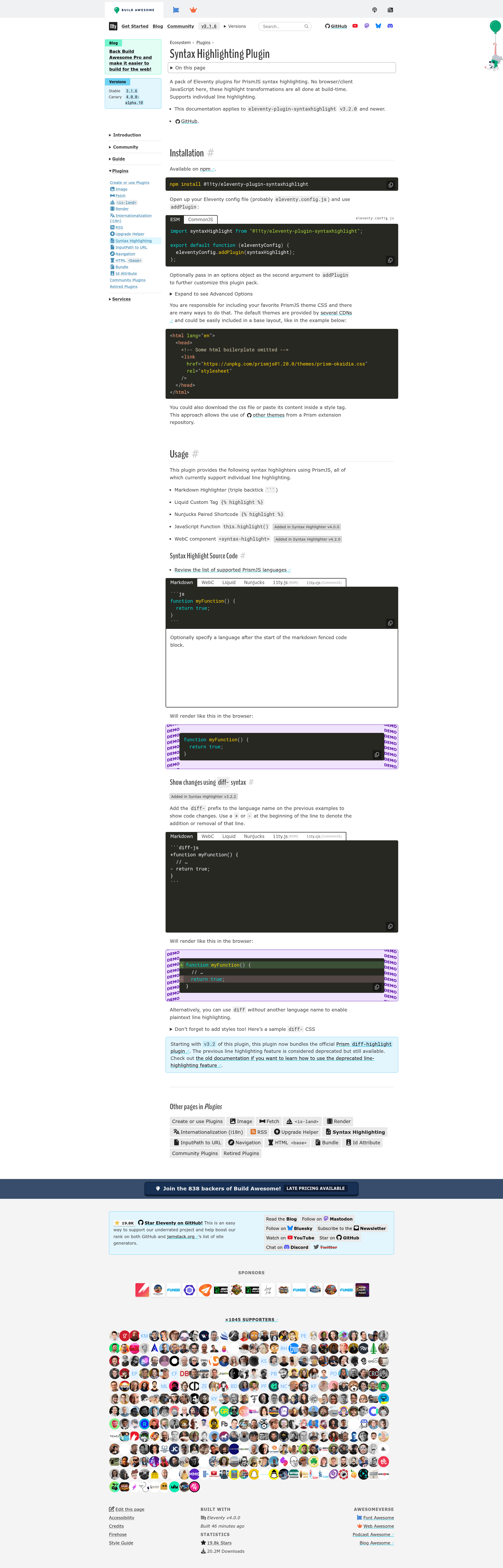
A pack of Eleventy plugins for syntax highlighting in Markdown, Liquid, and Nunjucks templates.
About this template
eleventy-plugin-syntaxhighlight is a pack of build-time syntax highlighting plugins for the Eleventy static site generator, converting code blocks in Markdown, Liquid, and Nunjucks templates into highlighted HTML with zero client-side JavaScript.
What is eleventy-plugin-syntaxhighlight?
This plugin pack is part of the Eleventy (11ty) ecosystem and performs syntax highlighting entirely during the static build process. It takes code blocks written in Markdown, Liquid, or Nunjucks templates as input and outputs highlighted HTML that is ready to be served directly to browsers. The repository is documented in full on 11ty.dev, and its GitHub metadata describes it as "a pack of Eleventy plugins for syntax highlighting in Markdown, Liquid, and Nunjucks templates." Because the transformations happen at build time, visitors never need to download or execute a syntax highlighting library on the client.
What makes eleventy-plugin-syntaxhighlight stand out?
- Build-time highlighting — All code transformations are executed during the Eleventy build, so the generated site contains static, fully highlighted HTML.
- Multi-template support — Works directly with Markdown, Liquid, and Nunjucks, covering the most commonly used template languages in Eleventy sites.
- Plugin pack design — Ships as a collection of related plugins, allowing site builders to select the specific integration that matches their content pipeline.
- Official documentation — A dedicated page on 11ty.dev provides usage instructions, configuration options, and examples for each plugin.
- No client-side JavaScript — Highlighted output requires zero browser scripts, improving page load speed and allowing code to render even without JavaScript enabled.
Who should use eleventy-plugin-syntaxhighlight?
- Eleventy developers building static sites, blogs, or documentation who want code blocks highlighted without adding front-end JavaScript.
- Technical writers authoring Markdown-based documentation on an Eleventy site, who need consistent highlighting in Liquid and Nunjucks layouts.
- Open-source maintainers maintaining project documentation with many code examples that must be fast, accessible, and dependency-free.
What can you do with eleventy-plugin-syntaxhighlight?
- Documentation sites: Embed API examples, configuration snippets, and installation commands in Markdown, and have them colorized during the build.
- Blogs and tutorials: Present code snippets in posts with readable highlighting that works even when JavaScript is disabled in the browser.
- Project landing pages: Showcase code examples inside Nunjucks or Liquid templates while keeping the site fully static and fast.
FAQ
Does eleventy-plugin-syntaxhighlight work without JavaScript?
Yes. All highlighting is performed at build time, so the output HTML is fully styled and does not require any client-side JavaScript to display syntax colors.
Which template languages are supported?
The plugin pack supports Markdown, Liquid, and Nunjucks templates, the three main formats used in Eleventy projects.
Where is the full documentation?
The complete documentation is available on the official Eleventy website at 11ty.dev/docs/plugins/syntaxhighlight/.