Template details
Eve
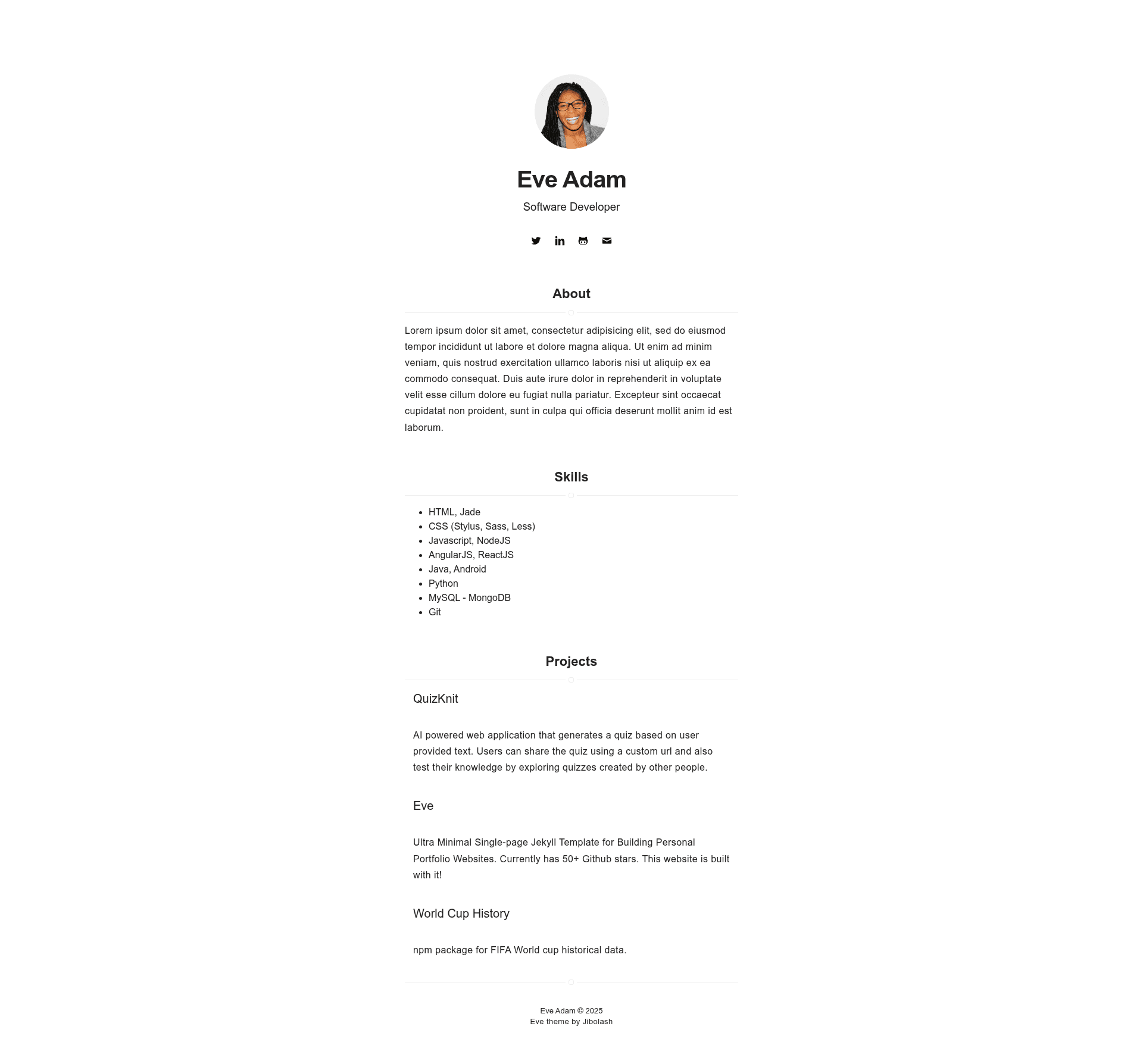
Ultra Minimal Single-page Jekyll Template for Building Personal Portfolio Websites
About this template
Eve is an ultra minimal single-page Jekyll theme for building personal portfolio websites, deployable to GitHub Pages and available under the MIT license.
What is Eve?
Eve is an ultra minimal, single-page Jekyll theme designed specifically for personal portfolio websites. It takes your site configuration and an about-me content file as inputs and produces a static one-page site with a clean, minimal layout. The theme runs on Jekyll, the Ruby-based static site generator, and is hosted on GitHub at jibolash/Eve, where it has 66 stars. It was inspired by the Indigo Jekyll theme and uses a demo profile photo by Tarzine Jackson.
Key Features
- Ultra minimal single-page layout — Eve renders exactly one page, focused on presenting a personal profile without navigation clutter or multiple subpages.
- Jekyll-based static site — Built on Jekyll, so the output is plain HTML that can be hosted anywhere, including GitHub Pages at no cost.
- GitHub Pages deployment — The README includes step-by-step instructions to fork or clone the repo, rename it to yourname.github.io, customize the config, and push to a gh-pages branch.
- Customizable via _config.yml — Site-wide settings such as title, author, and other Jekyll configuration values are edited in a single YAML file.
- About section via _includes/about.html — Personal bio and profile information are maintained by editing this dedicated include file.
- Local development environment — Setup requires Ruby, Bundler, Jekyll, and NodeJS; run bundle install then bundle exec jekyll serve with a dev config for local preview at localhost:4000.
- Link checking with htmlproofer — The repo suggests running bundle exec htmlproofer ./_site --only-4xx to validate links, images, and scripts on the built site.
- MIT licensed — The theme is free to use, modify, and distribute under the permissive MIT license.
Who is it for?
- Freelancers and independent professionals — Build a one-page portfolio that highlights skills, projects, and contact information without needing a complex CMS.
- Developers who use Jekyll — Since it's a Jekyll theme, developers already comfortable with Jekyll and GitHub Pages can get a portfolio live in minutes by editing config and content files.
- Students and job seekers — Create a clean personal page to share with recruiters, linking to a resume, GitHub profile, and selected work.
- Design-minded users looking for a minimal aesthetic — For anyone who wants a no-frills, content-first site, Eve's ultra minimal design keeps the focus on the profile.
What can you do with Eve?
- Launch a personal portfolio on GitHub Pages — Fork the repository, rename it to yourusername.github.io, update _config.yml, and push to gh-pages to publish your site.
- Showcase a bio and photo — Edit _includes/about.html to add your own bio, profile photo (the demo uses a Pexels photo), and any links you want to display.
- Learn Jekyll theming — Because Eve is small and focused, it makes a good starting point for learning how Jekyll layouts, includes, and config files work together.
- Run a quality-checked local build — Use the provided htmlproofer command to automatically verify that all links, images, and scripts on the generated site are valid before deploying.
How does Eve work?
Eve works like any standard Jekyll theme: you configure the site in _config.yml, fill in about content in _includes/about.html, and the Jekyll build system generates a single static HTML page. For local development, install Ruby, Bundler, Jekyll, and NodeJS, then run bundle install and bundle exec jekyll serve --config _config.yml,_config-dev.yml to preview at http://localhost:4000. To deploy to GitHub Pages, fork or clone the repo, rename it to your desired URL like yourname.github.io, push the code to a gh-pages branch, and visit the site at that URL.
FAQ
Is Eve free to use?
Yes, Eve is released under the MIT license, so you can freely use, modify, and distribute it, including for commercial projects, as long as you retain the copyright notice.
How do I deploy Eve to GitHub Pages?
Fork or clone the repository, rename it to your desired GitHub Pages URL (for example yourname.github.io), customize _config.yml, push to a gh-pages branch, and visit your website at that URL. The README links to GitHub Pages documentation for more details.
What files do I need to edit?
For site-wide settings, update _config.yml. For information about yourself, edit _includes/about.html. No other files are required for basic customization.
Does Eve require NodeJS?
The README lists NodeJS as a dependency for the local setup, alongside Ruby, Bundler, and Jekyll. For GitHub Pages deployment, you generally only need Git and a GitHub account, though the exact hosting environment is managed by GitHub.
What is Eve inspired by?
The theme is inspired by Indigo, a Jekyll theme by sergiokopplin. The demo profile photo used in the preview screenshot is by Tarzine Jackson from Pexels.