Template details
Portfolio Starter
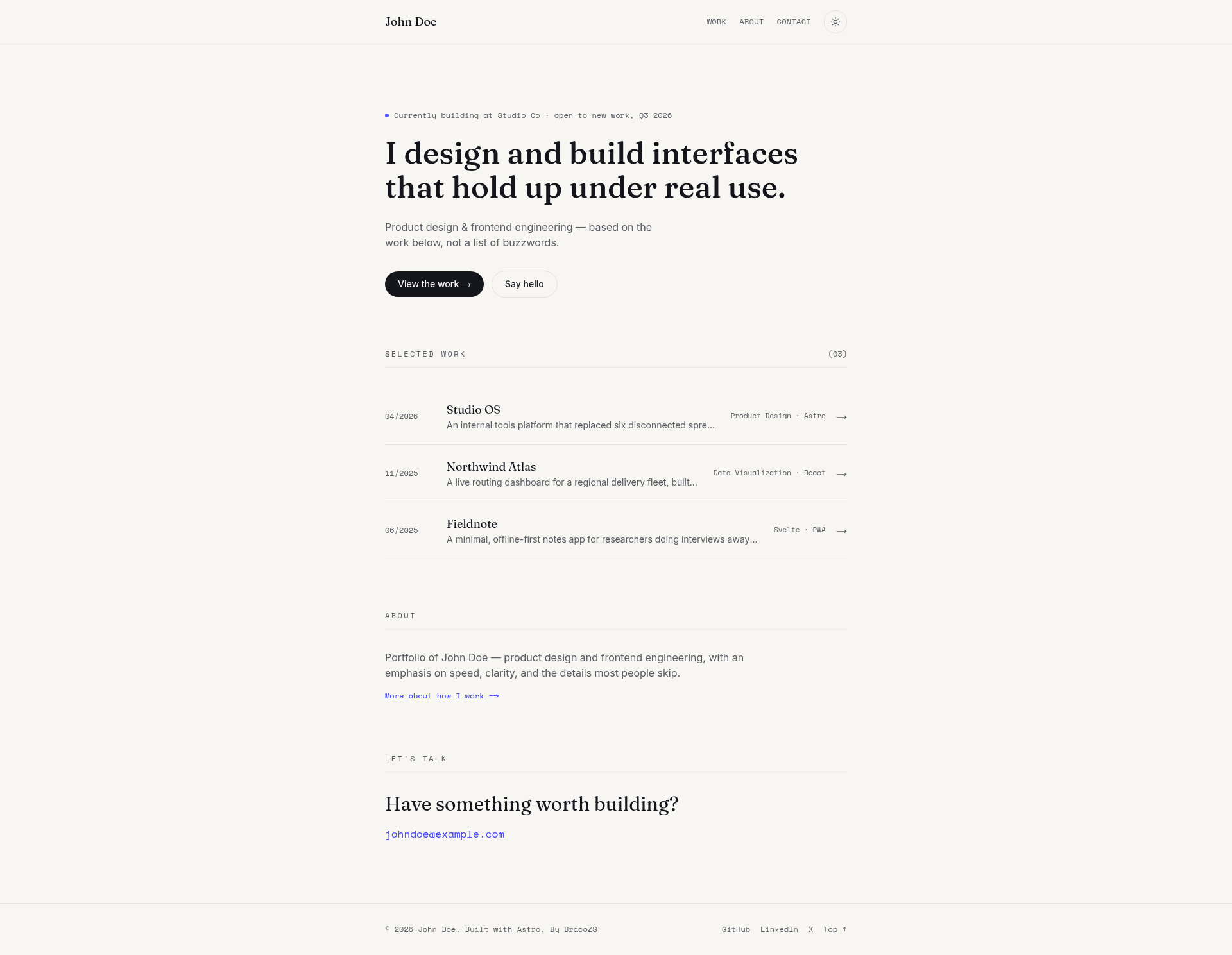
A minimal, professional portfolio template for Astro. Built with Astro 7, Tailwind v4, and strict TypeScript. Dark mode, minimal & fast.
About this template
Portfolio Starter is a minimal, professional portfolio template for Astro that generates a static personal site with zero client-side JavaScript by default.
What is Portfolio Starter?
Portfolio Starter is a minimal portfolio template built on Astro 7. It takes a site configuration file and a set of Markdown project files as input and produces a static personal portfolio website with a homepage, an about page, individual work detail pages, and a 404 page. The template is styled with Tailwind CSS v4 and written in strict TypeScript; it is developed by BracoZS and distributed under the MIT license.
Key Features
- Zero client-side JavaScript — Astro's static output means no framework JavaScript ships to the browser by default, so pages load fast and the final site is just HTML and CSS.
- Tailwind CSS v4 — CSS-first configuration requires no
tailwind.config.js; styling is driven by design tokens defined as custom properties insrc/styles/global.css. - Typed Content Collections — a Zod schema in
src/content.config.tsvalidates every project file added tosrc/content/work/, enforcing fields such as title, summary, role, date, tags, and optional url and repo links. - Light and dark mode — class-based theme switching with a ThemeToggle component and no flash of unstyled theme on initial load.
- Self-hosted Google Fonts — the Astro Fonts API downloads chosen font families at build time, eliminating third-party requests and preventing layout shift.
- View Transitions — smooth animated navigation between pages through Astro's built-in View Transitions API.
- SEO defaults — canonical URLs, Open Graph and Twitter card meta tags, and an auto-generated sitemap are included out of the box.
- Strict TypeScript — uses the
astro/tsconfigs/strictbase with path aliases such as@/components/*for clean imports. - Pre-configured Prettier — formatted for
.astrofiles and Tailwind class sorting, with apnpm formatcommand.
Who is it for?
Developers who want a professional-looking portfolio without adopting a heavy component library will find this template ready on day one. Designers who want to control the entire visual identity from a handful of CSS variables can re-skin the whole site by editing five custom properties. Anyone deploying to Vercel, Netlify, Cloudflare Pages, or another static host will appreciate that the build output is plain static files.
What can you do with Portfolio Starter?
- Freelancers — publish a project showcase with list and detail pages, each project written in Markdown and optionally linked to a live URL and a repository.
- Job seekers — build a personal site with an about page, featured projects flagged with
featured: true, and contact information drawn from a singlesite.config.tsfile. - Open-source developers — fork the repository, replace the placeholder Open Graph image, add project files under
src/content/work/, and deploy with sitemap and canonical URLs already configured.
How does Portfolio Starter work?
Clone the repository from GitHub, run pnpm install and pnpm dev (any package manager works), then edit src/site.config.ts with your name, bio, email, and social links. Add one Markdown file per project to src/content/work/, modify the color tokens in src/styles/global.css and the font families in astro.config.mjs, and run pnpm build to type-check and generate a production build in ./dist/.
FAQ
Does Portfolio Starter include a CMS or a UI kit?
No. The template explicitly omits state management, UI kits, and CMS integrations; you add those dependencies yourself only if your project needs them.
How do I change the colors of the site?
Edit the five custom properties at the top of src/styles/global.css — --paper, --ink, --ink-soft, --signal, and --line. Every component reads from these tokens, so changing them re-skins the whole site.
Is Portfolio Starter free to use?
Yes, the project is released under the MIT license, so it is free for personal or commercial use, with attribution appreciated but not required.
Where can I deploy the generated site?
The output is a static site, so it can be deployed anywhere that serves static files. Astro's deployment guides cover Vercel, Netlify, and Cloudflare Pages; you should update the site value in astro.config.mjs to your real domain before building so the sitemap and canonical URLs are correct.