Template details
Hugo Coder Portfolio
A Hugo blog and portfolio theme forked from hugo-coder, adding SNS sharing, multilingual support, and a fixed promotional bar.
About this template
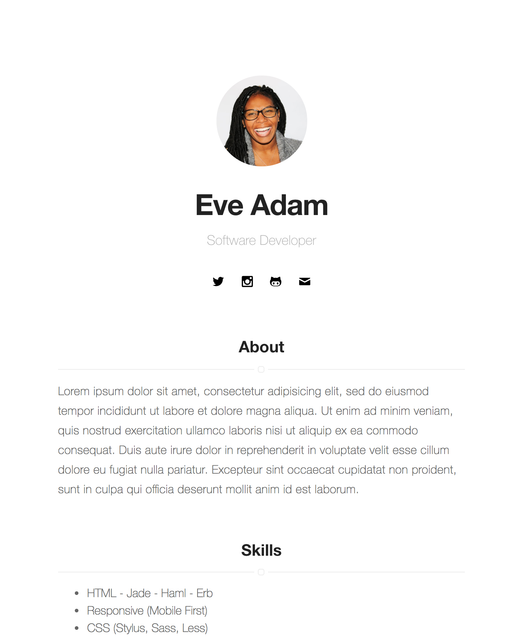
hugo-coder-portfolio is a Hugo theme for a personal blog and portfolio, forked from the popular hugo-coder theme. It takes standard Hugo markdown content and a config.toml file, and produces a static website with a clean, minimal design. The theme was created by Yusuke Ishimi to help site owners "tell yourself more" — adding features beyond the original hugo-coder.
What is hugo-coder-portfolio?
hugo-coder-portfolio is a Hugo theme that turns Markdown content into a static personal website. It is based on hugo-coder by luizdepra and modified by Yusuke Ishimi to add portfolio-oriented features. The theme accepts an exampleSite configuration and outputs a blog with social sharing, multilingual support, and a fixed promotional bar.
Key Features
- Bottom SNS share bar — Displays share buttons on posts for Twitter, Facebook, Hatena, Line, and LinkedIn, each individually toggleable via config flags such as
enableTwitterShare. - Multilingual mode — Supports multiple languages with per-language site title, author, menu, and parameters; a
langseparatorseparates menus from language selectors. - Fixed promotional bar — A fixed bar with custom text before and after a click (
fixedbarContentandfixedbarContentAfter) to drive visitors to a private page. - Disqus comments — Enable with
disqusShortname; individual posts can opt out withdisable_comments: true. - Custom CSS — Add extra stylesheets through the
custom_cssarray in configuration. - RTL support — Set
rtl = truefor right-to-left languages. - Social link menu — Define social icons with Font Awesome classes (e.g.
fab fa-github,fab fa-twitter) and optional text-only entries. - Syntax highlighting — Configurable via Pygments settings including
pygmentsstyle, code fences, and syntax guessing.
Who is it for?
- Portfolio-seeking developers — Display your projects and posts with a minimal, code-focused layout.
- Multilingual bloggers — Publish content in English and Japanese (or other languages) with per-language menus and metadata.
- Privacy-focused personal sites — Use the fixed bar to share a private page while controlling copyright and credit visibility via
hideCreditsandhideCopyright.
What can you do with hugo-coder-portfolio?
- Share posts socially — Enable a combination of Twitter, Facebook, Hatena, Line, and LinkedIn share buttons at the bottom of each post.
- Customize the look without touching HTML — Add custom CSS, set an avatar, change footer content, and toggle credits from config.toml.
- Run a bilingual blog — Switch between English and Japanese with language-specific titles, menus, and descriptions.
How does hugo-coder-portfolio work?
Clone the repository into your Hugo project's themes folder, add the theme name and parameters to config.toml, then run hugo server to preview. Building the theme's CSS requires less and uglifycss installed globally; use make build to regenerate minified CSS and make demo to preview the exampleSite.
FAQ
Is hugo-coder-portfolio free?
Yes, it is licensed under the MIT license, so you can use and modify it freely, including for commercial sites.
Does hugo-coder-portfolio support comments?
Yes, it supports Disqus. Set disqusShortname in your config to enable comments on all posts, and add disable_comments: true to a post's front matter to disable them for that post.
Can I use it for a multilingual site?
Yes. The theme includes a multilingual mode with per-language parameters and menus. You can also force all default content under a language code with defaultContentLanguageInSubdir = true.
How do I add social share buttons?
In the theme parameters, set snsShare = true and enable the services you want with enableTwitterShare, enableFacebookShare, enableHatenaShare, enableLineShare, and enableLinkedInShare. A thumbnail image can be set with thumbnail.