Template details
Iconic Resume
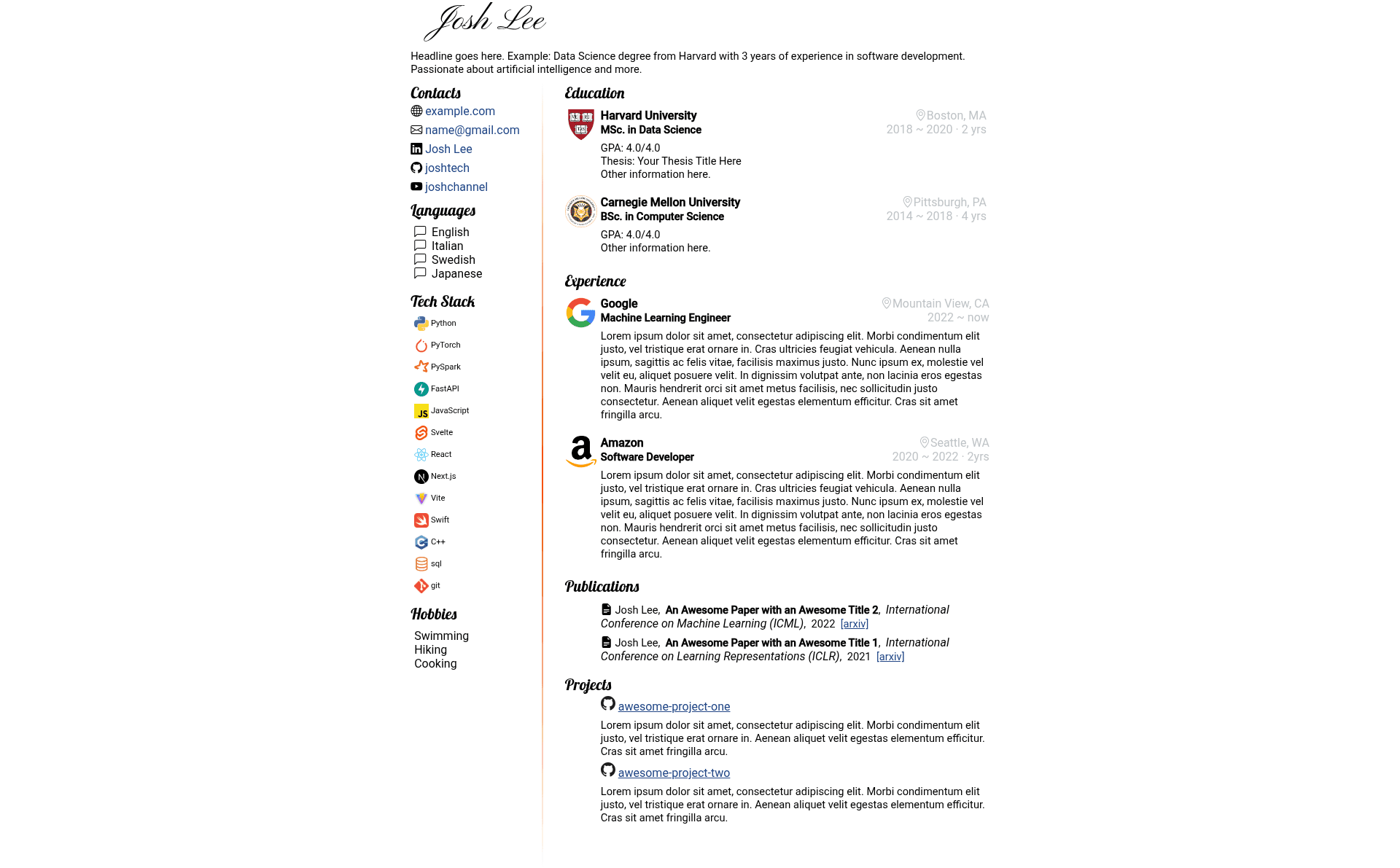
A LinkedIn-style resume template built with Jekyll, featuring a two-column A4 layout with logos and icons.
About this template
Iconic Resume is a Jekyll-based, LinkedIn-style resume template that generates a two-column A4 CV with company logos and icons from a single YAML configuration file.
What is Iconic Resume?
Iconic Resume is a CV/resume template written for the Jekyll static site framework. It takes your career details—such as work history, education, social media links, code repositories, papers, and projects—defined in a _config.yml file and renders them into a two-column A4 HTML page styled by style.scss. The template is distributed as a GitHub repository that you can fork, and you can be deployed to GitHub Pages or run it locally with bundle exec jekyll serve.
Key Features
- Two-column A4 layout — The output is sized for A4 paper and organized in two columns, so your resume fits a single standard page (or more if content requires).
- Company logos and icons — You can add square images (e.g., 512x512) for employers and projects to make entries more visual.
- Links to social media and projects — The template supports URLs for LinkedIn, GitHub repositories, papers, and other projects directly in the resume.
- Separation of content and design — All resume data lives in
_config.yml, while all visual styling lives instyle.scss, keeping content and presentation independent. - Lightweight — The template uses minimal dependencies beyond Jekyll, so builds are fast and simple.
- GitHub Pages ready — Fork the repository, create a
gh-pagesbranch, and edit_config.ymlto publish your resume atusername.github.io. - Automatic rebuilds with GitHub Actions — Committing changes triggers a GitHub Action that rebuilds the public page; you can watch progress under the Actions tab.
- PDF export via browser print — Open the live page, right-click, and select print to save the resume as a PDF, with margins adjustable in the print dialog.
Who is this template for?
- Job seekers — Create a polished A4 resume with icons and clickable links to your LinkedIn and GitHub, then export it to PDF for applications.
- Developers and designers — Keep your resume in a version-controlled YAML file under Git, and deploy it for free on GitHub Pages without touching a database.
- Academics and researchers — Showcase publications and papers by linking to them from the resume, along with project repositories.
- Students — Build a clean CV for internships by replacing the dummy data in
_config.ymland publishing it online.
Use cases
- Non-technical users: Edit the resume entirely on GitHub by forking the repository and modifying
_config.yml; the page builds automatically through GitHub Actions, and no Ruby or Jekyll installation is needed. - PDF-first job applications: Print the live page to PDF using your browser's print function, then submit the file to employers.
- Personal career site: Host the resume at a
username.github.ioaddress and link to it from your social profiles. - Template developers: Use this project as a starting point to build your own Jekyll resume theme by customizing
style.scss.
How does Iconic Resume work?
The template uses Jekyll to read the resume details from _config.yml and render them into a static HTML page styled by style.scss. To run it locally, you install Ruby and Jekyll, clone the repository, edit the config, and run bundle exec jekyll serve, viewing the result at localhost:4000. When deploying to GitHub Pages, you create a gh-pages branch and let GitHub Actions rebuild the site on every commit.
Pros and cons
- Pros — Single-file content management via
_config.yml; styles isolated instyle.scss; works without local Ruby installation when using GitHub Pages; automatic rebuilds through GitHub Actions; free hosting on GitHub Pages. - Cons — Requires manual YAML editing, so it has a learning curve if you are not familiar with YAML; icons and logos must be square images (ideally 512x512) for proper display; browser print margins may add whitespace to the PDF, so you need to adjust them in the print dialog.
Pricing
The template is free to use. You fork the GitHub repository and can host the resulting resume on GitHub Pages at no cost; there is no mention of paid tiers or licenses in the page content.
FAQ
Is Iconic Resume free?
Yes, the template is free. It is a public GitHub repository that you can fork and use for your own resume, and hosting on GitHub Pages is free for public repositories.
Does Iconic Resume require Ruby and Jekyll installed?
No. You can use the template without installing Ruby or Jekyll by forking the repository, creating a gh-pages branch, and editing _config.yml directly on GitHub. GitHub Actions will build the site automatically. For local preview, however, you need to install Ruby and Jekyll.
How do I export my resume to PDF?
Open the published page in your browser, right-click anywhere on the page, and choose "Print". In the print dialog, select "Save as PDF" and adjust margins as needed. This uses your browser's built-in print-to-PDF function.
What image size should I use for logos and icons?
The template notes that you should use square images, such as 512x512 pixels, for icons and logos. Place them in the imgs folder (or wherever you reference them) and reference them in _config.yml.
How do I deploy Iconic Resume to GitHub Pages?
Fork the repository, create a branch named gh-pages, uncomment the baseurl: '/iconic-resume' line in _config.yml (or set it appropriately), and replace the dummy data with your own. Then go to Settings then Pages, choose the gh-pages branch as the source, and wait for your site to go live at https://username.github.io/iconic-resume/.