Template details
Free Figma Bootstrap 5 UI Kit
Design faster with a collection of prebuilt Figma components with powerful auto layout and resizing constraints.
About this template
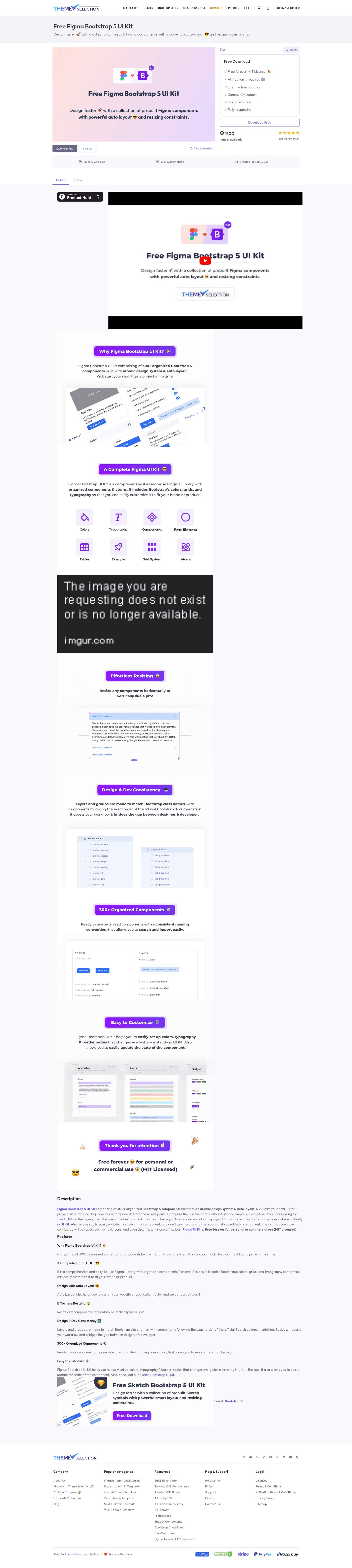
The Free Figma Bootstrap 5 UI Kit is an open-source Figma design resource from ThemeSelection that provides 300+ prebuilt Bootstrap 5 components organized with an atomic design system and auto layout, enabling designers to assemble interfaces quickly and hand off to developers with class-name-matched layers.
What is the Free Figma Bootstrap 5 UI Kit?
The Free Figma Bootstrap 5 UI Kit is a downloadable Figma library that translates Bootstrap 5's design tokens — colors, grids, and typography — into editable components and atoms. It includes 300+ organized components built with an atomic design system and Figma's Auto Layout. The kit takes the official Bootstrap 5 class structure and mirrors it in the layer naming and grouping, so the design file stays consistent with the documentation that developers use. ThemeSelection publishes it under the MIT license, and it is available for both Figma and Sketch as separate downloads.
What makes the Free Figma Bootstrap 5 UI Kit stand out?
- 300+ organized components — Components follow a consistent naming convention, so searching and importing them into a project is straightforward.
- Atomic design system — The kit is built from small atoms (colors, text, buttons) that combine into larger components, keeping the system maintainable.
- Auto Layout support — Every component uses Figma's Auto Layout, which maintains spacing and alignment automatically when edited.
- Resizing constraints — Components can resize horizontally or vertically without breaking layout, cutting down on repetitive manual adjustment.
- Bootstrap class-name mapping — Layer names and groups match Bootstrap class names and follow the order of the official Bootstrap documentation, which reduces friction between design and development.
- Global styling controls — Colors, typography, and border radius can be updated once and the changes propagate across the entire kit, making rebranding fast.
- State variants — Component states are set up so you can update them easily within Figma.
- MIT licensed — The kit is free to use, and ThemeSelection requests that a credit link be kept when sharing or posting about it.
Who should use the Free Figma Bootstrap 5 UI Kit?
- UI/UX designers — who need a ready-made set of Bootstrap 5 components in Figma to speed up mockups and avoid rebuilding common patterns from scratch.
- Front-end developers — who want a design file with layers that mirror Bootstrap class names, making inspection and translation to code more predictable.
- Product teams — building websites or web applications that follow Bootstrap 5's grid and component conventions, as the kit aligns with the framework's official documentation.
- Freelancers and agencies — who want a free starting point for client projects and need to customize a kit to fit a brand quickly through global style changes.
What can you do with the Free Figma Bootstrap 5 UI Kit?
- Designers: Assemble layouts for landing pages, dashboards, and admin panels by dragging in prebuilt Bootstrap components such as navigation bars, forms, cards, and alerts.
- Prototypers: Use Auto Layout and resizing constraints to simulate responsive behavior and test how components behave at different screen sizes inside Figma.
- Developers: Inspect the organized layers to extract spacing, colors, and typography that match Bootstrap utilities, which helps close the gap between design mockups and production code.
- Educators and students: Use the kit to teach Bootstrap 5 concepts with a hands-on design file that mirrors the framework's classes and structure.
Pricing
The Free Figma Bootstrap 5 UI Kit is free to download and use under the MIT open-source license. ThemeSelection also offers a separate Sketch version of the kit for download.
FAQ
Is the Free Figma Bootstrap 5 UI Kit really free?
Yes, it is free to download and use. The kit is released under the MIT license, and ThemeSelection asks that you keep their credit link if you share or post about the resource.
What is included in the kit?
The kit includes 300+ organized Bootstrap 5 components, plus Bootstrap's color palette, grid system, and typography styles, all set up as Figma styles and atoms.
Can I use the kit in Sketch?
Yes, but as a separate download. ThemeSelection provides a standalone Sketch Bootstrap UI Kit in addition to the Figma version, so you need to download the file for the tool you work in.
Does the kit follow official Bootstrap documentation?
Yes. Layers and groups in the Figma file match Bootstrap class names and follow the same order as the official Bootstrap documentation, which helps with developer handoff.
How do I customize the colors and fonts?
The kit exposes global color, typography, and border-radius styles. Update those styles once and the changes apply immediately to all components that use them.