Template details
Gatsby Starter Bee
A Gatsby blog starter with Prism code highlighting, a CLI post generator, Disqus/utterances comments, and configurable dark/light themes.
About this template
Gatsby Starter Bee is a Gatsby-based blog starter by JaeYeopHan (Jbee) that turns Markdown files into a static blog complete with code highlighting, a CLI post generator, comments, and analytics.
What is Gatsby Starter Bee?
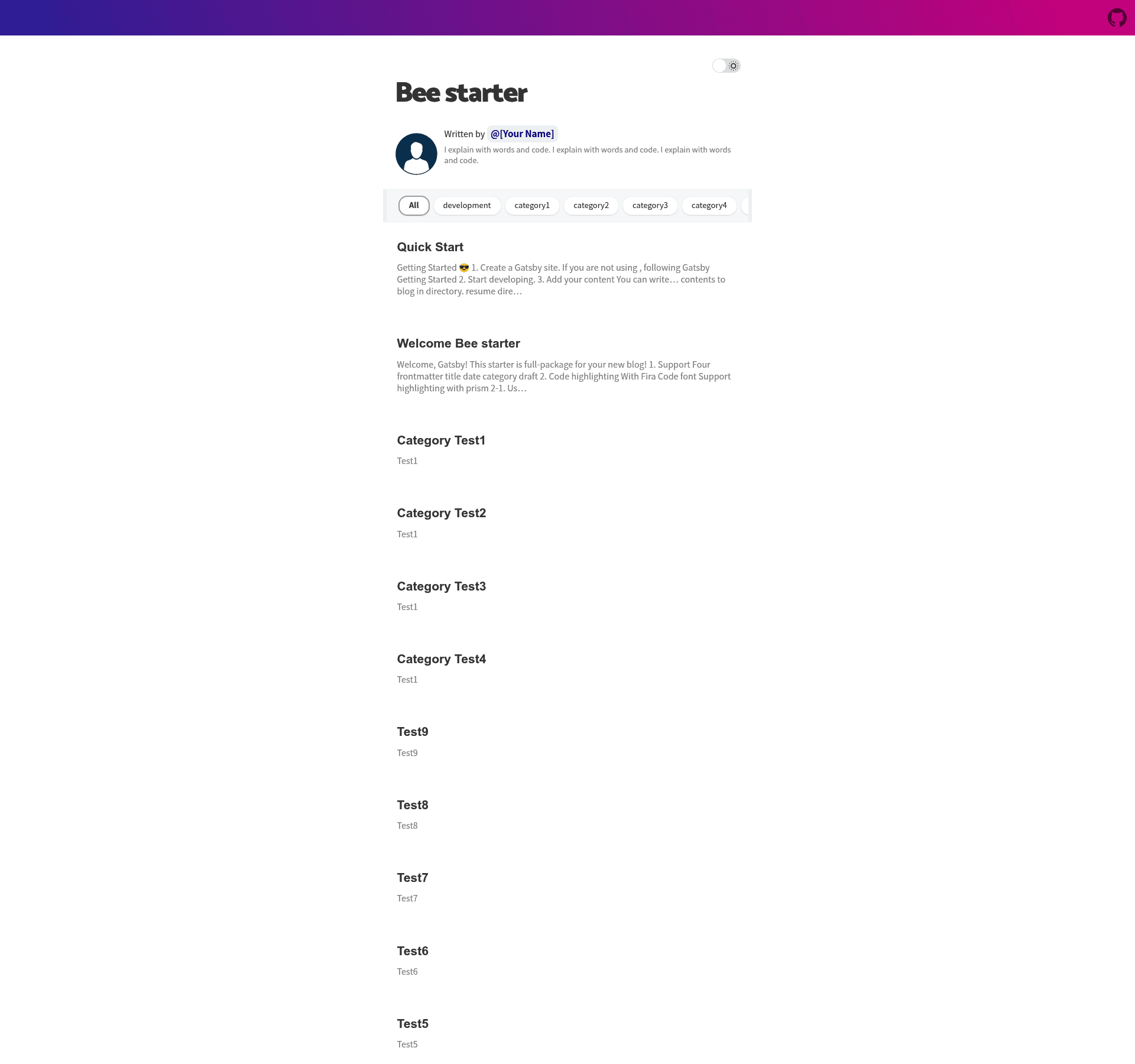
Gatsby Starter Bee is a full-featured blog starter for Gatsby, the React-based static site generator, created by developer JaeYeopHan (also known as Jbee). It accepts Markdown files with metadata as input and outputs a pre-configured blog with a post list, post detail pages, an About/Resume page, and RSS-ready structure. The template runs on Gatsby and is designed to be deployed to Netlify or GitHub Pages. The official demo is hosted at gatsby-starter-bee.netlify.com.
Key Features
Gatsby Starter Bee packs these features directly in the starter:
- Code highlighting and font — Code blocks are highlighted using Prism and rendered with the Fira Code monospace font for better readability.
- CLI post generator — Running
npm run postinvokes the gatsby-post-gen tool to scaffold a new Markdown post with frontmatter in thecontent/blogdirectory. - Comment systems — Disqus and utterances are both supported, configured through the
gatsby-meta-config.jsfile. - Social sharing — Each post includes share buttons for Twitter and Facebook.
- Analytics and funding — Google Analytics is built in, and a "Buy me a coffee" button can be enabled.
- Dark and light themes — The template ships with
dark-theme.scssandlight-theme.scssstyle files; gradients and colors live insrc/styles/variables.scss. - Emoji support — Emojis are rendered with the Emojione library.
- Configurable metadata — Site title, author, and other blog settings are edited in a single
/gatsby-meta-config.jsfile.
Who is it for?
Gatsby Starter Bee is aimed at people who want a self-hosted blog with minimal setup and a clean, modern look.
- Developers starting a tech blog — they can scaffold a Gatsby blog in one command with
npx gatsby new my-blog-starter https://github.com/JaeYeopHan/gatsby-starter-beeand begin writing posts in Markdown. - Medium writers migrating to a self-hosted blog — the README suggests pairing this starter with the medium-to-own-blog migration tool to move existing posts.
- Job seekers needing a resume page — the template includes a
content/__aboutdirectory for building a resume/about page alongside the blog. - Korean-speaking developers — the repository provides a Korean-language README (README.ko.md), reflecting its large Korean user base visible in the listed use cases.
Use cases
Here are concrete ways the starter is being used based on the project's documented use cases:
- Indie developers: publish a personal blog with comments, analytics, and social sharing without configuring each integration manually.
- Open-source contributors: use the built-in CLI to create consistent blog post scaffolds, then deploy automatically to Netlify via the included Deploy to Netlify button.
- Portfolio builders: customize the profile image and header gradient in
src/stylesand thecontent/assetsfolder to match their personal brand.
How do I get started with Gatsby Starter Bee?
The quick start is a three-step process: create a new Gatsby site with npx gatsby new, start the development server with npm start, then add Markdown files to content/blog. The template also includes a npm run post script for generating new post files, and a /gatsby-meta-config.js file for site-wide metadata. For deployment, a one-click Deploy to Netlify button is provided, and a gh-pages deploy script can be added to package.json.
FAQ
Here are common questions about setting up and using Gatsby Starter Bee.
Is Gatsby Starter Bee free to use?
Yes, the starter is open source under the MIT License, and the GitHub repository has 678 stars at the time of analysis.
What do I need to install to run it?
You need Node.js and the Gatsby CLI. The README instructs installing the CLI globally with npm install -g gatsby-cli, then running gatsby new with the starter's repository URL.
Does the template support comments?
Yes, it supports both Disqus and utterances. The utterances integration requires you to replace the repository address in gatsby-meta-config.js and follow the setup guide at utteranc.es.
Can I deploy to GitHub Pages?
Yes, the README suggests adding a deploy script that runs gatsby build and uses the gh-pages package to publish the public directory to a GitHub Pages branch.