Template details
Gatsby Starter Grayscale
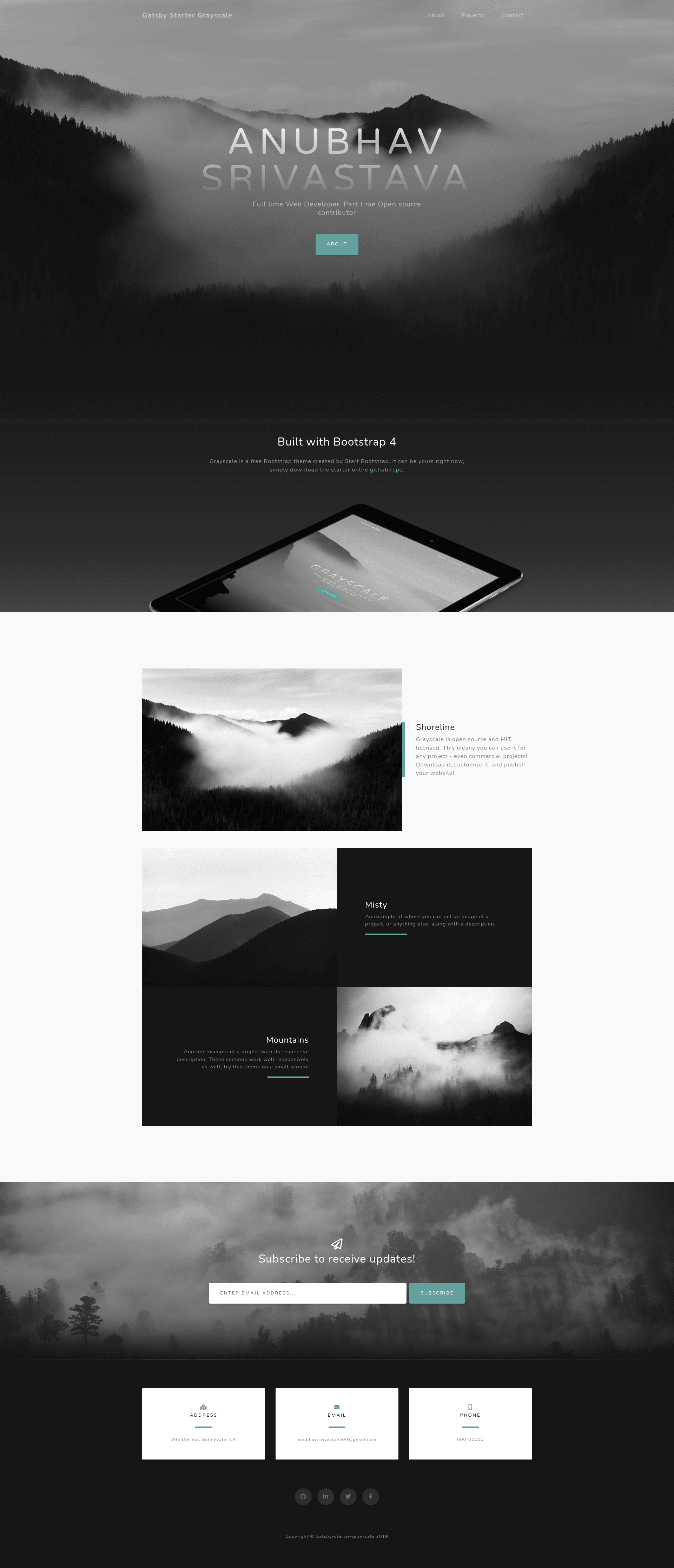
Gatsby.js V4 starter template based on the Grayscale theme by Start Bootstrap for one-page sites with GitHub Pages deployment.
About this template
Gatsby Starter Grayscale is a Gatsby.js V4 starter template that creates a one-page website using the Grayscale theme by Start Bootstrap, with site content managed through a single configuration file and one-command deployment to GitHub Pages.
What is Gatsby Starter Grayscale?
Gatsby Starter Grayscale is a starting point for building a one-page personal or small-business website with the Gatsby static site generator. It takes a JavaScript configuration file (config.js) containing your name, heading, subheading, and social links, and produces a static site that you can host anywhere. The template is developed and maintained by Anubhav Srivastava, and is one of a series of Gatsby starters based on Start Bootstrap themes. The project uses Gatsby v4 and the Grayscale visual style, a dark, image-heavy one-page design.
Key Features
- Config-driven content — Edit config.js to set the site title, heading, subheading, and social media links; no component edits are needed for basic personalization.
- Font Awesome social icons — Social links accept icon names like fa-github and render with Font Awesome icons, letting you link to GitHub, Twitter, and other profiles.
- GitHub Pages deployment — A gh-pages based npm script lets you publish the site by running
npm run deploy, and the package.json already handles the build. - Path prefix support — The config.js file includes a pathPrefix value, so the site can be hosted on a subpath such as https://example.com/mysite/ without extra configuration.
- Built with Gatsby v4 — The starter uses Gatsby's modern build system for fast static output, based on React, with the Gatsby CLI required for installation.
- MIT licensed — The project is released under the MIT open-source license, so it can be freely used and modified.
- Part of a larger starter family — The author maintains 20+ similar Gatsby starters for different Start Bootstrap themes, making it easy to switch layouts later.
Who is it for?
- Freelance developers looking to set up a personal one-page portfolio with project highlights and social links in under five minutes.
- Open-source maintainers who need a clean project landing page that can be deployed to GitHub Pages with a single command.
- Design-conscious beginners who want a pre-styled, responsive site without writing CSS from scratch, and who only need to edit a config file.
What can you do with it?
- Launch a personal landing page: Replace the placeholder heading and subheading with your own name and tagline, and link to your profiles.
- Create a product teaser page: Use the Grayscale one-page layout to showcase a product or service with a strong visual background.
- Prototype a Start Bootstrap design: Developers can study how the Grayscale HTML theme is structured as Gatsby components and then extend it.
How does the template work?
First, install the Gatsby CLI globally with npm install --global gatsby-cli. Then scaffold a site with gatsby new my-site https://github.com/anubhavsrivastava/gatsby-starter-grayscale, run npm install and gatsby develop to preview locally. To go live, edit config.js with your details and run npm run deploy to publish to GitHub Pages.
Pricing
Gatsby Starter Grayscale is free and open-source under the MIT license.
Alternatives
The author offers other Gatsby starters based on different Start Bootstrap themes, including gatsby-starter-casual and gatsby-starter-resume, if the Grayscale design is not what you need.
FAQ
Is Gatsby Starter Grayscale free?
Yes. The starter is released under the MIT license, so you can use, modify, and redistribute it without cost, including for commercial projects.
How do I install this template?
Make sure you have the Gatsby CLI installed, then run gatsby new my-site https://github.com/anubhavsrivastava/gatsby-starter-grayscale. After that, enter the directory, run npm install, and use gatsby develop to start a local server.
How do I personalize the site?
All basic personalization happens in the config.js file at the root of the project. Edit fields such as siteTitle, heading, subHeading, and the socialLinks array to set your name, tagline, and profile URLs, then rebuild the site.
Can I host the site on a subpath?
Yes. The config.js file includes a pathPrefix setting. Change it to your subpath, such as /somePath/, if your site is hosted under a domain subpath; if it's at the root, remove or leave the pathPrefix empty.