Template details
Gatsby Theme Photography Portfolio
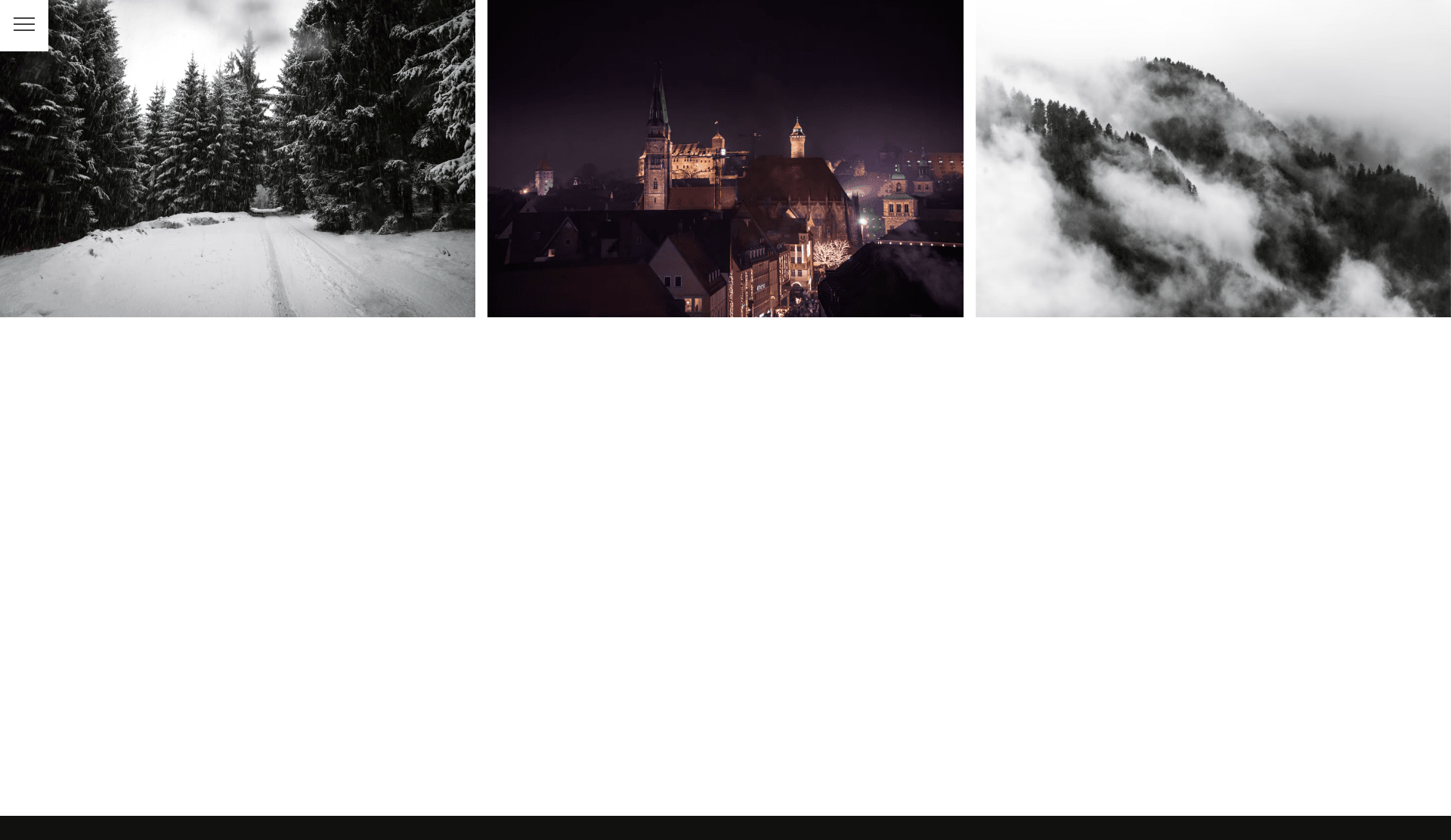
A gatsby theme featuring a minimalistic design based on a bold image grid.
About this template
Gatsby Theme Photography Portfolio is a Gatsby theme that converts a folder of images into a minimalistic photography portfolio built around a bold image grid, with every photo opening its own fullscreen page. It was created by AlexanderProd and is published on npm as gatsby-theme-photography-portfolio.
What is Gatsby Theme Photography Portfolio?
Gatsby Theme Photography Portfolio is a Gatsby theme for building a photography portfolio site whose main interface is a large image grid; the rest of the UI is hidden behind a hamburger menu so the photos remain the focus. As input it takes a directory of images (default images at the site root), and as output it produces a static Gatsby site with a grid homepage, fullscreen pages per image, and category grouping based on subfolders. It is built on Gatsby and uses gatsby-plugin-sharp and gatsby-plugin-image to generate optimized image sizes, which keeps loading times short. The project is maintained by AlexanderProd and a live demo is available at photography.alexanderhoerl.de.
Key Features
- Minimalist grid UI — The site is an intentionally simple image grid; navigation, captions, and menu content appear only when opened through the hamburger menu, preventing the interface from competing with the photography.
- Fullscreen image pages — Each image gets its own page, and all images within a category can be flipped through quickly, making it suitable for browsing a photo set.
- Category folders — Images placed in subfolders of the images directory are automatically grouped into categories, so no database or CMS configuration is required.
- Swipe gesture support — Viewers can swipe between fullscreen images on touch devices, and use arrow-key navigation on desktop.
- Social media share images — The theme includes share-image handling for social media, so shared links display an appropriate preview.
- Adaptive background color — The page background is derived from the main color of the currently viewed image, giving the site a customized feel per photo.
- Short loading times —
gatsby-plugin-sharpandgatsby-plugin-imageproduce responsive, compressed image variants so the grid and fullscreen views load quickly. - Theme option for image path — The
imagesPathoption (defaultimages) lets you point the theme at a different source directory.
Who is it for?
- Photographers can publish a portfolio without a CMS by dropping images into folders; each photo automatically gets a fullscreen page and category grouping.
- Creatives who want a minimal site can use the theme when they want the images to dominate and are comfortable with a hidden menu rather than a persistent navigation bar.
- Developers building a Gatsby site can install the theme into an existing Gatsby project and configure it in gatsby-config.js, or scaffold a new one with the companion starter.
- Anyone who values fast, image-focused pages benefits from the sharp/plugin-image pipeline that generates optimized images for quick loading.
What can you do with Gatsby Theme Photography Portfolio?
- Photography portfolios: Showcase a body of work as a grid, with each photo opening in a fullscreen page so visitors can focus on one image at a time.
- Event or travel galleries: Group photos by location or event using subfolders, letting visitors flip through each category's images quickly.
- Social sharing: When a fullscreen image page is shared on social media, the theme's share-image support provides a preview, so links look intentional.
- Self-hosted deployment: Combine the theme with AlexanderProd's JAMStackBox project to continuously deploy the Gatsby site on your own server.
How does the theme work?
After installing the theme with npm install gatsby-theme-photography-portfolio, you add it to the plugins array in your gatsby-config.js file and optionally set a basePath. Images are placed in the images directory (or a custom imagesPath); the theme scans that directory and builds the grid, fullscreen pages, and category sections from the folder structure.
FAQ
How do I install Gatsby Theme Photography Portfolio?
For a new site, run npx gatsby new gatsby-photography-portfolio https://github.com/AlexanderProd/gatsby-starter-photography-portfolio. For an existing Gatsby site, install the theme with npm install gatsby-theme-photography-portfolio, add it to your gatsby-config.js plugins array, and put images in the images directory.
How do I create image categories?
Place images in subfolders inside the images directory. Each subfolder becomes a category automatically, and the theme groups those images for quick flipping between fullscreen pages.
Does the theme support touch devices?
Yes — the theme includes swipe gesture support, so visitors can swipe between fullscreen images on touch screens. Keyboard arrow navigation is also possible on desktop.
What are the theme's default settings?
The default image path is images in the site root, and the basePath defaults to /. Both can be changed in the theme options in gatsby-config.js.
Where can I see a live example?
A live demo of the theme is hosted at photography.alexanderhoerl.de, and AlexanderProd provides a starter repository for quickly creating a new Gatsby site with the theme.