Template details
Revive
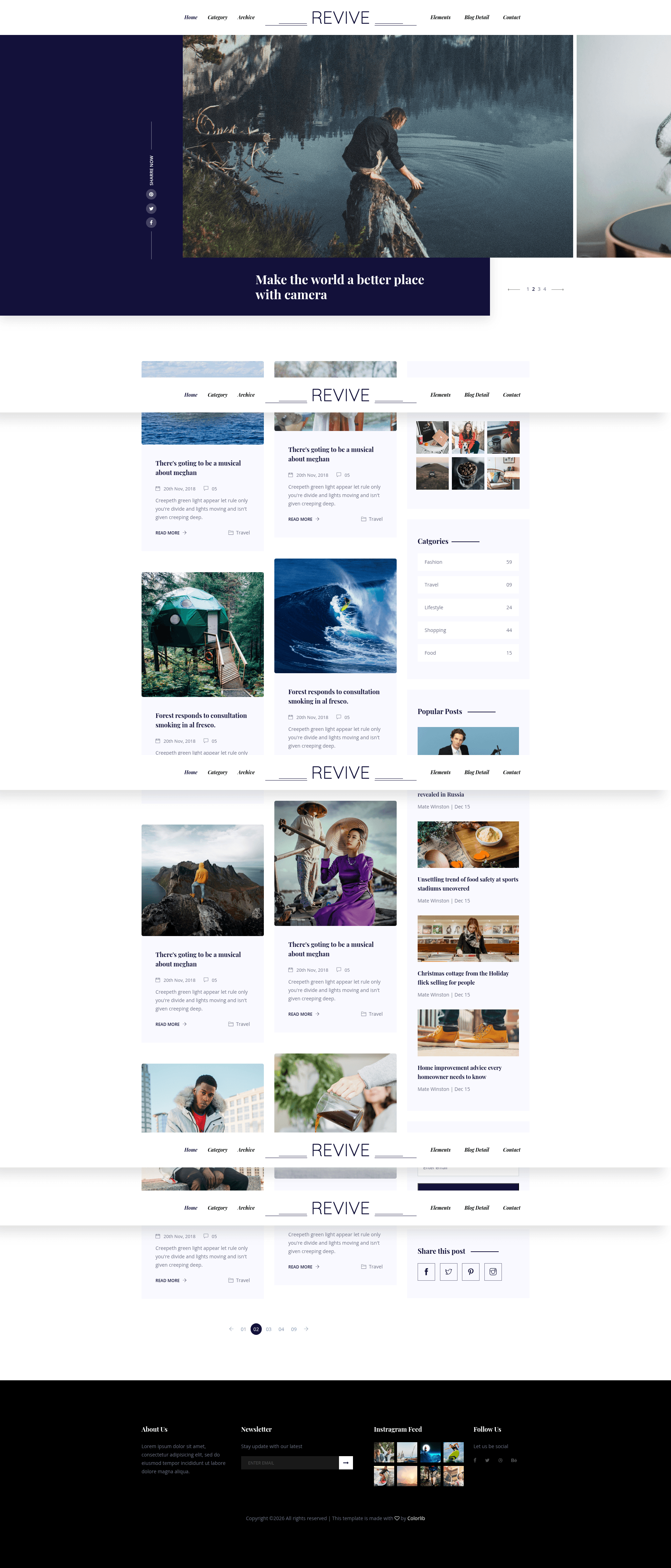
Free Bootstrap 4 HTML5 multi-page portfolio template with slider header, sticky nav, Instagram feed, Google Maps, and contact form.
About this template
Revive is a free, open-source Bootstrap 4 HTML5 multi-page portfolio website template created by Colorlib and distributed by ThemeWagon, built for photographers and creative professionals to present their work through a slider header, sticky navigation, Instagram feed, and a full set of page templates.
What is Revive?
Revive is a free, open-source Bootstrap 4 HTML5 multi-page portfolio website template created by Colorlib and distributed by ThemeWagon. It provides the complete front-end of a portfolio site — six HTML files, SCSS and CSS source files, JavaScript plugins, and documentation — which you download, edit, and upload to any web host. The template runs directly in the browser with no framework runtime or build step, and it is fully responsive across Chrome, Edge, Firefox, Opera, Safari, and mobile devices.
What makes Revive stand out?
Revive differentiates itself with a full multi-page structure, slider header, and a set of engagement widgets including an Instagram feed, newsletter form, and Google Maps. The key features visible in the listing are:
- Bootstrap 4 + HTML5/CSS3 — Site structure uses the Bootstrap 4 grid and UI components, with SCSS source files included so you can recompile custom styles.
- Multi-page layout — The download contains 6 HTML files covering home, blog, and inner pages, making it a full website rather than a single-page theme.
- Header with slider — The home page opens with an animated Owl Carousel slider in the header, paired with a call-to-action button.
- Sticky navigation bar — A fixed top menu remains visible while scrolling, and links include hover effects.
- Instagram feed + newsletter form — A section displays recent Instagram photos alongside an email subscription form to build an audience.
- Google Maps + contact form — An embedded Google Map and a contact form UI give visitors a direct way to find and message you.
- 10+ UI elements — The package includes reusable components like a comment form, pagination, and icon sets from FontAwesome and Linearicons.
- Cross-browser responsive — Compatible with all major browsers (Chrome, Edge, Firefox, Opera, Safari) and mobile, with a clean minimal design.
Who should use Revive?
- Photographers — Display a visual portfolio with the slider header, hover effects, and an Instagram feed that links to real-time photo updates.
- Freelancers and creative professionals — Use the multi-page layout to separate services, about, blog, and contact content under one cohesive design.
- Small businesses and agencies — Add a Google Map, contact form, and call-to-action button to turn visitors into leads.
What can you do with Revive?
- Photographers: Build a gallery-style home page with a slider and hover effects, then link to individual project pages to show fuller case studies.
- Freelancers: Launch a personal brand site with a blog section, newsletter subscription form, and email contact form to collect client inquiries.
- Small business owners: Create a multi-page company website with an embedded Google Map and search option so customers can locate and navigate your offerings.
Pricing
Revive is free to download and use, including in commercial projects. The ThemeWagon listing describes it as open source with lifetime free updates; no premium tier is mentioned.
Alternatives
- Clark — a free one-page Bootstrap 4 personal portfolio template from ThemeWagon.
- Cassi — a free Bootstrap 4 photography website template from ThemeWagon.
- Evans — a free Bootstrap 4 personal portfolio template from ThemeWagon.
FAQ
Is Revive free?
Yes, Revive is completely free to download from ThemeWagon. The license allows use in commercial projects, and the listing states that it is open source with lifetime free updates.
What files are included in the Revive download?
The package includes all demo images, 6 HTML files, CSS and SCSS source files, documentation, JavaScript source files, font icons, and library and plugin files such as Bootstrap, jQuery, and Owl Carousel.
Which browsers and devices does Revive support?
Revive is listed as compatible with Chrome, Edge, Firefox, Mobile, Opera, and Safari. It is also described as 100% responsive.
Who created Revive?
Revive was created by Colorlib, as indicated on the ThemeWagon author page. It is distributed and maintained through the ThemeWagon free-template directory.