Template details
Rushikesh Nimkar's Portfolio
Open-source Next.js 15 portfolio template with AI chat, email generation, vector-search memory, and natural-language theme editing.
About this template
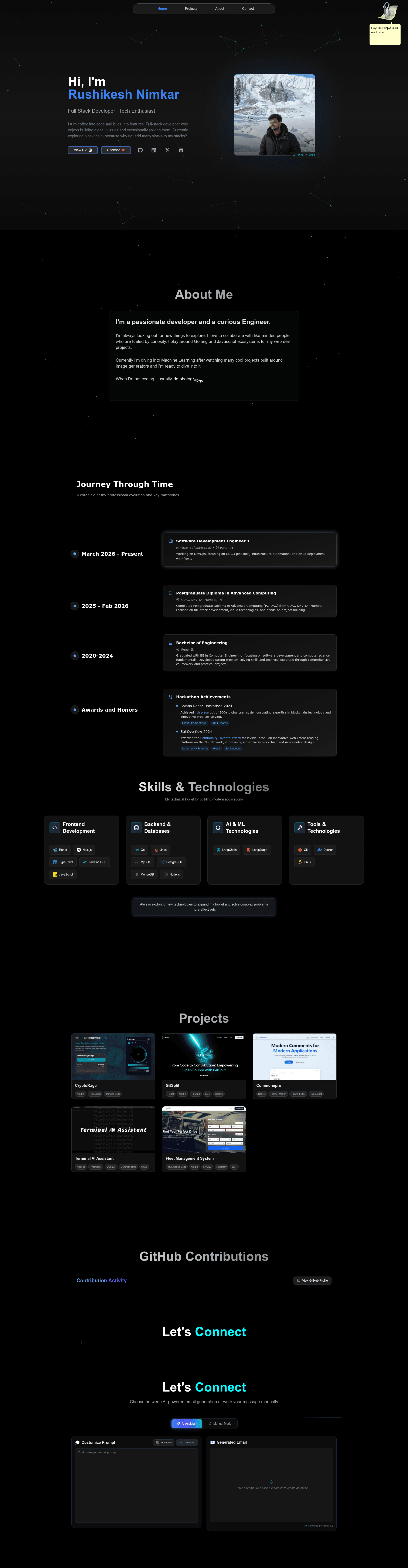
Rushikesh Nimkar's Portfolio (repository: portfolio2025) is an open-source personal portfolio template built on Next.js 15 and TypeScript that adds AI chat, AI email generation, and natural-language theme editing to a classic developer-portfolio layout. The template is developed by Rushikesh Nimkar, is deployed at rushikeshnimkar.xyz, and is licensed under MIT.
What is Rushikesh Nimkar's Portfolio?
Rushikesh Nimkar's Portfolio is a Next.js 15 application that serves as both a personal showcase and a functional AI assistant interface. It takes a developer's profile information — edited in components/character/character.ts — plus a set of API keys, and produces a deployed portfolio site with an interactive chat widget, an email composer, a natural-language theme editor, and animated project galleries. The entire app runs on Next.js API Routes with Node.js on the backend, Tailwind CSS and Framer Motion on the frontend, and is set up for deployment on Vercel with Edge Functions.
What makes this template stand out?
- AI chat with retrieval — Visitors can ask the AI version of the portfolio owner about their skills, experience, and projects; the chat uses OpenRouter models, Tavily web search for real-time facts, and maintains conversation context.
- AI email generation — A built-in email tool creates professional emails from short prompts, validates sender addresses through Abstract API, and lets users toggle between AI-generated and manual composition with animated text output.
- Natural-language theme customization — Typing a request such as "make it dark with a blue gradient" generates custom JavaScript that restyles the page in real time, supporting both page-specific and site-wide changes while preserving responsive design.
- Vector memory — Pinecone stores Google Gemini embeddings of the profile content (768 dimensions, cosine similarity, free starter pod), enabling semantic search for relevant chat replies.
- Live model status badges — The README includes an SVG status endpoint showing real-time uptime for OpenRouter models like x-ai/grok-4-fast:free and tngtech/deepseek-r1t-chimera:free.
- Security basics — CORS protection on API routes, email validation, and rate limiting on sensitive endpoints are included.
- Dark mode and responsive layout — The UI is described as eye-friendly and seamless across all device sizes.
Who should use this template?
- Developers building a personal brand — get a portfolio that showcases projects while letting visitors chat with an AI trained on your background.
- Job seekers and freelancers — use the email generator to draft polished outreach messages and validate addresses before sending.
- AI engineers — get a working integration of OpenRouter, Tavily, Pinecone, and Google Gemini in one Next.js codebase, useful as a reference or starting point.
- Developers who enjoy live theming — experiment with natural-language requests that restyle the site without touching CSS.
Use cases
- Project showcase: Display contributions and work in interactive, animated cards with dark mode support.
- Recruiter Q&A: Let hiring managers ask the AI about your experience and get context-aware answers pulled from your profile embeddings.
- Email outreach: Generate a professional introduction or follow-up in a few seconds, then validate the recipient's address with Abstract API.
- Live redesign: Type a theme request and watch the chosen colors, spacing, or effects apply instantly on the current page or across the whole site.
How does this template work?
The README gives a five-step setup: clone the repository, run npm install, edit components/character/character.ts, add the required environment variables, and run npm run dev. On first launch the app creates embeddings from your profile and saves them to Pinecone, which is why the first run takes longer. In development you must also uncomment the http://localhost:3000 origin line in api/chat/route.ts and api/theme/route.ts.
Pros and cons
- Pros: MIT-licensed and open source; uses free-tier APIs for development; combines chat, email, semantic search, and theming in one codebase; deployable to Vercel with Edge Functions.
- Cons: requires nine environment variables, including API keys for OpenRouter, Tavily, Pinecone, Google AI, and Abstract API; first startup is slower because of embedding creation; chat/theme features depend on the availability of free-tier AI models.
FAQ
Is Rushikesh Nimkar's Portfolio free?
Yes, the code is open source under the MIT License. The development environment is built on free-tier API keys from OpenRouter, Tavily, Pinecone, Google AI, and Abstract API, though production usage of those services may have its own costs.
What AI models does the portfolio use?
Chat uses OpenRouter-hosted models; the README shows status badges for x-ai/grok-4-fast:free and tngtech/deepseek-r1t-chimera:free. Google Gemini produces the 768-dimension embeddings for vector search, and Tavily powers real-time web lookup.
What environment variables do I need to set?
The required variables are EMAIL_USER, EMAIL_APP_PASSWORD, ABSTRACT_API_KEY, OPENROUTER_API_KEY, TAVILY_API_KEY, PINECONE_API_KEY, PINECONE_INDEX_NAME, GOOGLE_API_KEY, JWT_EXPIRY, and JWT_SECRET. The README explains how to generate the app password and JWT secret.
How do I make the AI represent me?
Edit components/character/character.ts with your own details. The app embeds that profile content into the Pinecone index on first run, so the chatbot answers questions using your information rather than generic responses.
Does the template work on mobile?
Yes, the README says the design is responsive across all devices and includes dark mode. The AI theme generator is also stated to maintain responsive design for any page-specific or site-wide modifications.