Template details
Gatsby Theme Timeline
A Gatsby theme that aggregates posts, tweets, Instagram media, YouTube videos, Hacker News, and Reddit into a single timeline.
About this template
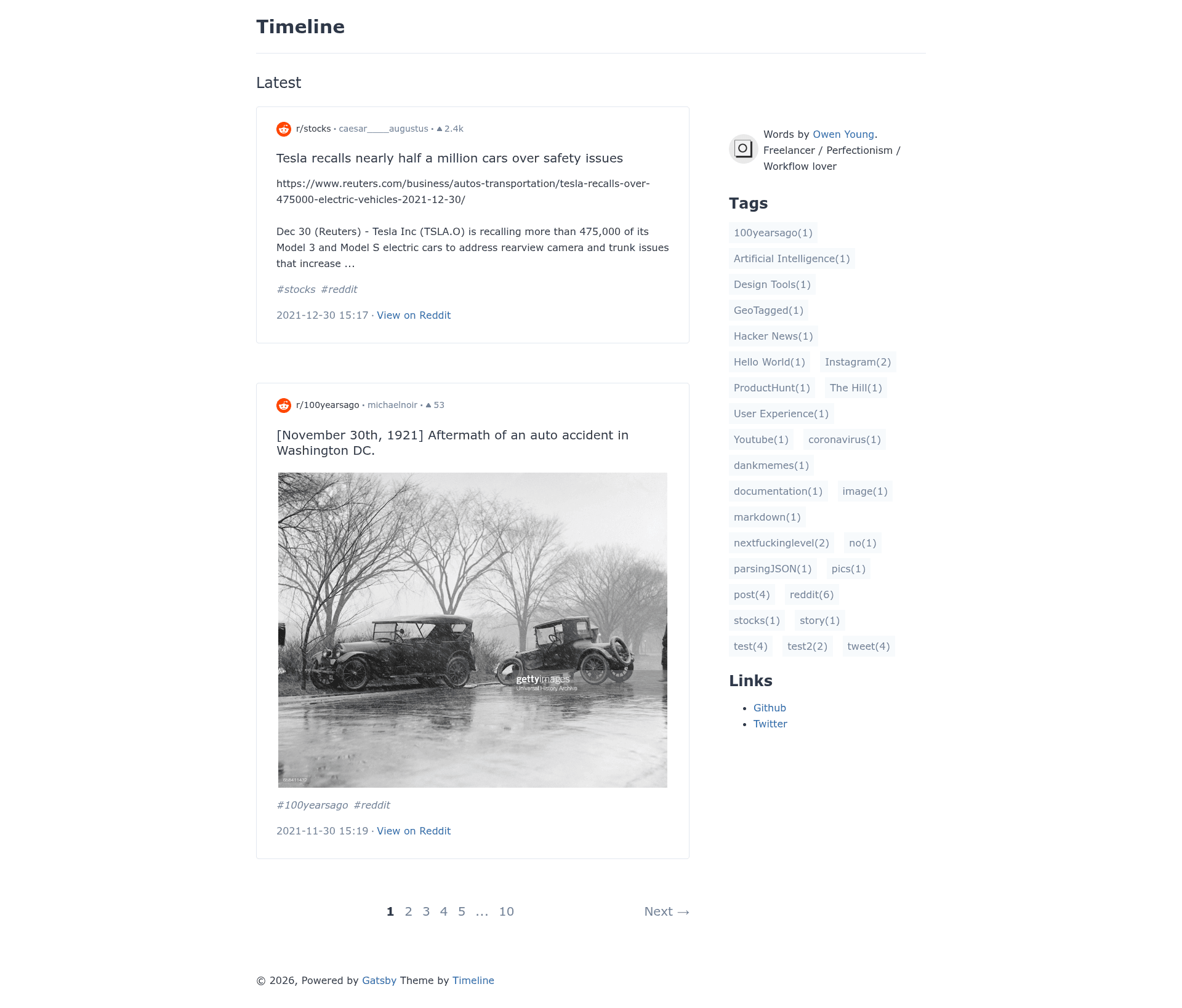
Gatsby Theme Timeline is a Gatsby theme that merges blog posts, tweets, Instagram media, YouTube videos, Hacker News submissions, and Reddit posts into a single chronological timeline site.
What is Gatsby Theme Timeline?
Gatsby Theme Timeline is a Gatsby-based theme and starter that aggregates content from multiple sources into one timeline-style blog. It takes MDX posts from a content folder, raw JSON data for tweets and Reddit posts, and optional Twitter and Instagram API data, then outputs a static Gatsby site with a unified chronological feed.
The theme is maintained by Owen Young (GitHub user theowenyoung) and is distributed as part of the gatsby-theme-timeline repository. It is designed to be customized through Gatsby theme shadowing, allowing you to override components and theme UI colors in your own site.
Key Features
The key features of Gatsby Theme Timeline are its multi-source feed, i18n support, comment integration, and pagination.
- Multi-source timeline — Combine MDX blog posts, tweets, Instagram media, YouTube videos, Hacker News items, and Reddit posts into one scrollable timeline feed on a single page.
- Internationalization (i18n) — Built-in support through gatsby-theme-i18n, letting you choose your preferred i18n library for multilingual sites.
- Comment systems — Integrate either Disqus or utterances as the comment engine for your posts.
- Tags and pagination — Organize content by tags, and both the main timeline and tag-specific pages include pagination for navigating large archives.
- SEO optimization — The theme includes built-in search engine optimization defaults for a Gatsby site.
- Twitter and Instagram ingestion — Optionally configure TWITTER_CONSUMER_KEY, TWITTER_CONSUMER_SECRET, TWITTER_ACCESS_TOKEN, TWITTER_ACCESS_SECRET, and INSTAGRAM_ACCESS_TOKEN in a .env file, then enable the corresponding source plugins to fetch live posts.
- Theme shadowing — Override theme components and gatsby-theme-ui colors by adding files under src/gatsby-theme-timeline in your project.
Who is it for?
Gatsby Theme Timeline is for developers who want a personal site that combines their writing with their social media activity. It is also a fit for content creators who post across Twitter, Instagram, YouTube, and Reddit and want a single destination for all their updates. Additionally, anyone building a news or stock aggregator like Buzzing on stocks can reuse its multi-source data model.
What can you do with it?
With Gatsby Theme Timeline you can build a timeline site from your own posts and social media, create aggregated news feeds, and extend the theme for custom needs.
- Personal bloggers: Publish MDX posts in the content folder and have them appear in the same timeline as your latest tweets and Instagram photos without manual copying.
- Stock and news aggregators: Feed Reddit and Hacker News JSON data into the data folder to build a topic-focused timeline site, as demonstrated by Buzzing on stocks.
- Multilingual site owners: Pair the theme with a Gatsby i18n library so each timeline can be displayed in multiple languages.
- Open-source contributors: Use the theme as a foundation for a custom Gatsby blog and customize its layout through shadowing.
How does it work?
To get started, create a new Gatsby site with the starter using the CLI command gatsby new my-themed-blog https://github.com/theowenyoung/gatsby-starter-timeline. Optionally, add Twitter or Instagram credentials to a .env file and uncomment the corresponding plugins in gatsby-config.js. Run gatsby develop to start a local server at http://localhost:8000, then replace the demo content under /content and /data with your own.
FAQ
What content sources does Gatsby Theme Timeline support?
The theme supports MDX blog posts, tweets, Instagram media, YouTube videos, Hacker News items, and Reddit posts. Tweets and Reddit posts can be supplied as raw JSON files in the data directory, while Twitter and Instagram can also be fetched live via optional source plugins.
Does it support multiple languages?
Yes. The theme integrates with gatsby-theme-i18n so you can set up a multilingual timeline. You are free to choose which i18n library to use, such as those listed in the Gatsby themes repository.
Which comment systems can I use?
You can choose between Disqus and utterances. Both are supported by the theme; you configure the one you prefer when setting up your site.
How do I add my tweets or Instagram posts?
For tweets, add Twitter API credentials to a .env file (consumer key, consumer secret, access token, access secret) and enable the gatsby-source-twitter plugin. For Instagram, add INSTAGRAM_ACCESS_TOKEN and enable gatsby-source-instagram. Alternatively, you can place pre-fetched tweet JSON under data/tweets.
Does the theme have pagination?
Yes. Both the main timeline and pages that list posts by tag support pagination, so large collections of posts are split into multiple pages.