Template details
Glide.ai
A dark, modern website template powered by Nuxt and Prismic.
About this template
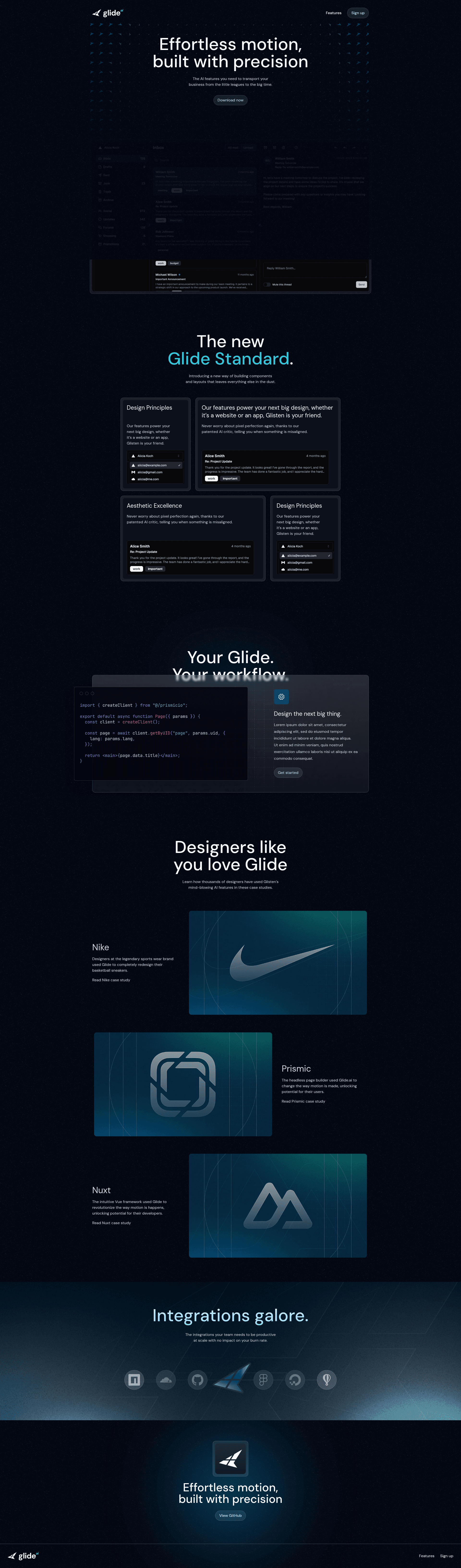
Glide.ai is a dark, modern website template that combines Nuxt and Prismic into a ready-to-use starter, giving developers a pre-configured base for building content-driven websites.
What is Glide.ai?
Glide.ai is an open-source website template built by Prismic, the headless CMS company. It takes a Nuxt application and wires it to a Prismic content repository, so site content lives in Prismic while the presentation layer runs on Nuxt. The template outputs a fully styled dark-themed website, and the source code is published under the Apache 2.0 license.
What makes Glide.ai stand out?
- Nuxt framework — Built on Nuxt, a Vue-based meta-framework that offers file-based routing, server-side rendering, and static site generation out of the box.
- Prismic CMS integration — The starter is pre-wired to Prismic, including Slice Machine for modeling page sections that content editors can assemble.
- Tailwind CSS — Utility-first styling with Tailwind, so design tweaks are done through class names rather than custom CSS files.
- GSAP animations — Includes the GSAP animation library for scroll-driven and timeline-based motion effects.
- TypeScript — The template is written in TypeScript, giving type safety for props, component data, and Prismic API responses.
- Dark modern design — A dark-themed, minimal layout that suits AI, tech, and startup websites, demonstrated in the live demo.
- One-click NuxtHub deploy — A deploy button sends the project to NuxtHub without manual server setup.
- Apache 2.0 license — Free to use, modify, and redistribute for commercial or personal projects.
Who should use Glide.ai?
- Nuxt developers — want a starter that already integrates Prismic, Tailwind, and GSAP, saving project setup time.
- Agencies and freelancers — building dark-themed marketing sites for clients need a fast starting point with a clean content CMS.
- Content editors — manage text and images in Prismic without touching code, using the content models set up by the template.
- Developers learning Prismic — can follow the linked YouTube course to see how the template is constructed step by step.
Use cases
- Launch a product website — Publish a modern landing page for an AI or tech product, with page sections editable through Prismic.
- Create a portfolio — Adapt the dark theme and content structure to showcase work or agency services.
- Learn Nuxt + Prismic — Use the starter and accompanying YouTube course as a hands-on tutorial for building content-driven Nuxt apps.
How does Glide.ai work?
Start by cloning the starter with the command npx nuxi@latest init -t github:prismicio-community/nuxt-starter-prismic-glideai#HEAD glideai. Next, run npx @slicemachine/init@latest to link the project to your own Prismic repository, then install dependencies with npm, pnpm, yarn, or bun. The development server starts at http://localhost:3000 via npm run dev.
Pricing
Free. The template is open source under the Apache License 2.0.
FAQ
Is Glide.ai free?
Yes. Glide.ai is open source under the Apache License 2.0, so you can use and modify it without cost, including in commercial projects.
How do I install Glide.ai?
Run the nuxi init command shown in the README, then run npx @slicemachine/init@latest inside the project to set up a Prismic repository. After that, install dependencies and launch the dev server.
What tech stack does Glide.ai use?
It uses Nuxt with Vue, Tailwind CSS, GSAP, and TypeScript, with Prismic as the content management system and Slice Machine for content modeling.
How do I deploy Glide.ai?
The template includes a "Deploy to NuxtHub" button. Since it is a standard Nuxt app, you can also deploy to any platform that supports Nuxt, such as Vercel or Netlify, following Nuxt's deployment docs.
Does Glide.ai come with a tutorial?
Yes. The README links to a YouTube video explaining how to build the website from the template.