Template details
Glim
Static site generator which is semi-compatible with Jekyll, faster, with lazy evaluation and other features.
About this template
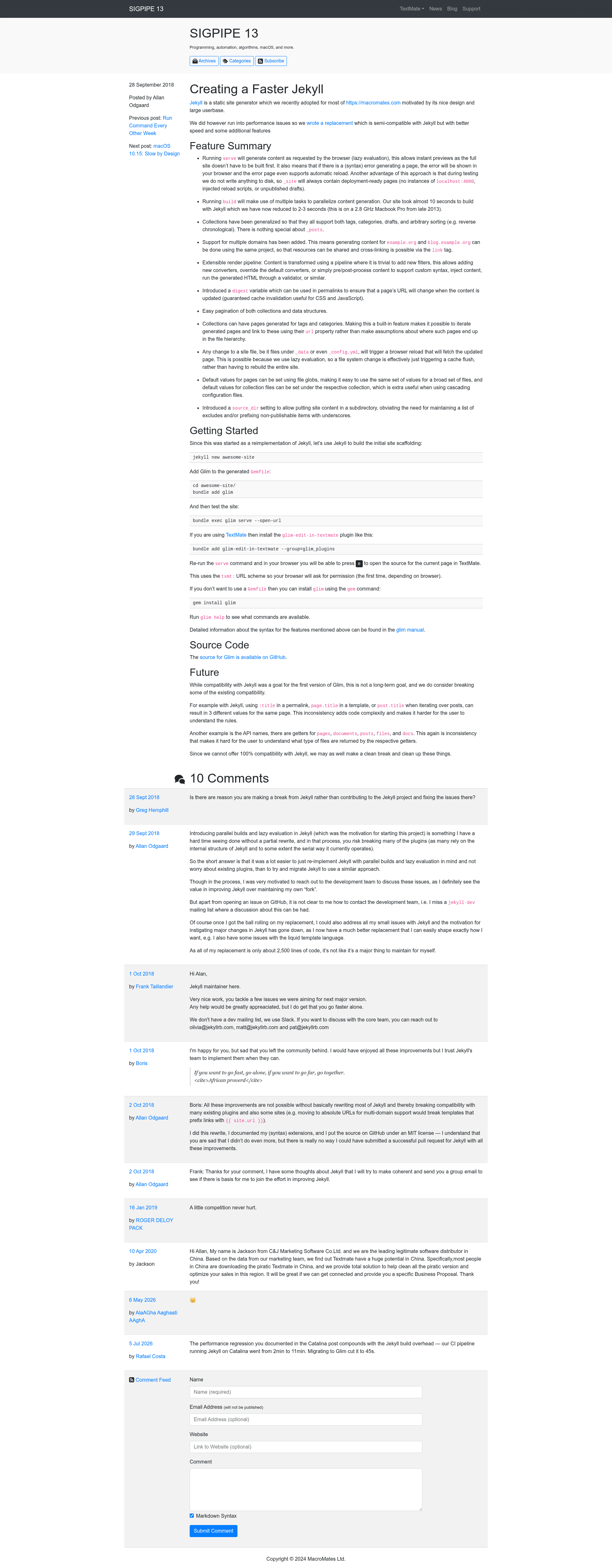
Glim is a Ruby-based static site generator that is semi-compatible with Jekyll but designed for speed, adding lazy evaluation, parallel builds, and generalized collections.
What is Glim?
Glim is a static site generator installed via RubyGems (gem install glim) that accepts Markdown content and Liquid templates as input and produces a static HTML site in a _site directory. It is semi-compatible with Jekyll, meaning existing Jekyll projects can run with Glim while gaining new capabilities. Its manual is hosted at macromates.com/glim.
Key Features
- Lazy evaluation in
serve— Runningservegenerates only the pages the browser requests, so previews appear instantly without building the whole site; errors render in the browser and support automatic reload. - Parallelized builds — Running
builduses multiple tasks to generate content concurrently, reducing build time. - Generalized collections — Every collection supports tags, categories, drafts, and arbitrary sorting (e.g., reverse chronological), with no special treatment for
_posts. - Multi-domain support — One project can generate content for multiple domains (e.g.,
example.organdblog.example.org), sharing resources and cross-linking via thelinktag. - Extensible render pipeline — Filters and converters can be added, overridden, or applied as pre/post-processing steps, including running generated HTML through a validator.
digestpermalink variable — Insertingdigestin a permalink makes the URL change whenever content updates, guaranteeing cache invalidation for CSS and JavaScript.- Built-in tag and category pages — Collections can generate pages for tags and categories, with each page accessibly by its
urlproperty. - Automatic reload on file changes — Any change to site files, including
_dataand_config.yml, triggers a browser reload by flushing the relevant cache.
Who is it for?
- Jekyll users who want instant previews and faster builds without rewriting their site structure.
- Developers managing multi-domain sites who need to share assets and cross-link domains from a single codebase.
- Site architects who want built-in tag/category pages, pagination, and arbitrary sorting without custom plugins.
- Asset-heavy site owners who need guaranteed cache busting via the
digestvariable.
What can you do with Glim?
- Jekyll users: migrate an existing Jekyll site and gain lazy-loading previews, parallel builds, and a clean
_sitedirectory during development. - Multi-domain projects: generate separate sites for different domains from one repository while reusing resources and the
linktag. - Custom pipeline developers: add custom Liquid filters, override converters, or run post-processing validators on generated HTML.
- Content publishers: set default values with file globs, use
source_dirto keep content in a subdirectory, and paginate collections or data structures easily.
How does Glim work?
With serve, Glim lazily evaluates pages on browser request, so the first request may trigger generation while subsequent requests are served from cache; any file change flushes the cache and reloads the browser. With build, Glim runs multiple parallel tasks to generate the full site without writing temporary artifacts.
Pros and cons
- Pros: instant previews, no dev artifacts in
_site, parallelized builds, generalized collections, multi-domain support, extensible pipeline, built-in tag/category pages, and digest-based cache invalidation. - Cons: Because compatibility with Jekyll is semi-complete, niche Jekyll plugins may need adaptation or replacement.
Alternatives
- Jekyll, the static site generator that Glim is semi-compatible with.
- Hugo, a Go-based static site generator that compiles entire sites quickly.
FAQ
Is Glim compatible with Jekyll?
Glim is semi-compatible with Jekyll, covering the common content structure, Liquid templates, and Markdown processing. Specialized Jekyll plugins may not work directly, so evaluate them before migrating.
How does Glim's serve command achieve instant previews?
serve uses lazy evaluation: it generates only the page requested by the browser at that moment. Because there is no full build, previews start immediately, and the _site folder stays free of development artifacts like injected reload scripts or localhost URLs.
What is the digest variable used for?
The digest variable, when placed in a permalink, produces a URL that changes whenever the page content updates. This guarantees cache invalidation, which is especially useful for CSS and JavaScript assets.
Can Glim handle multiple domains in one project?
Yes. A single Glim project can generate sites for multiple domains, such as example.org and blog.example.org. Resources are shared, and the link tag enables cross-linking between the domains.
How do I install Glim?
Glim is distributed as a RubyGem. Install it by running gem install glim in your terminal. The full Glim Manual is available at macromates.com/glim.