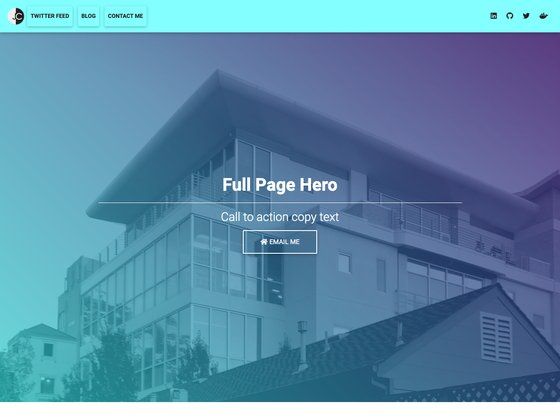
Template details
Grayscale
A free, multipurpose one-page HTML theme built on Bootstrap by Start Bootstrap.
About this template
Grayscale is a free, one-page HTML theme built on Bootstrap by Start Bootstrap, designed to let developers and designers quickly create single-page websites for personal, product, and landing-page use.
What is Grayscale?
Grayscale is a free, open-source one-page HTML theme for Bootstrap created and maintained by Start Bootstrap. It accepts source files written in Pug, SCSS, and JavaScript, and compiles them into a dist directory containing the final index.html and associated CSS/JS assets. The theme is based on the Bootstrap framework and is released under the MIT license, which permits personal and commercial use.
Key Features
Grayscale combines a minimal one-page layout with both straightforward and advanced customization paths.
- One-page layout — a single-page template with a grayscale color scheme that can be adapted for various purposes, from personal profiles to product announcements.
- Bootstrap powered — built on the Bootstrap framework, so it inherits responsive design, the grid system, and the component library.
- Pug and SCSS source files — the source includes Pug templates in
src/pug/and SCSS files insrc/scss/, enabling structured customization beyond plain HTML and CSS. - Basic and advanced usage — edit the HTML and CSS inside the
distdirectory directly, or use the npm-based build environment for a full development workflow. - Live preview and watch mode — running
npm startopens a preview in your default browser, watches for changes to source files, and live reloads as you save. - Multiple installation options — download the latest release from Start Bootstrap, install via
npm i startbootstrap-grayscale, clone the GitHub repository, or fork it directly. - MIT licensed — free for any purpose, including commercial projects, with no attribution requirement.
- npm build scripts — includes scripts for building assets, HTML, JS, and CSS (
npm run build), plus individual scripts for Pug and SCSS compilation.
Who is it for?
Grayscale is aimed at anyone who needs a single-page website, from beginners editing files by hand to developers wanting a full source-level build pipeline.
- Developers who need a quick, lightweight one-page site without spending time on layout and responsive setup.
- Designers who want to customize a theme at the source level using Pug and SCSS, with a build toolchain to compile changes.
- Freelancers who frequently build simple landing pages or personal sites and want a free, legally safe starting point under MIT.
- Students and hobbyists learning Bootstrap or web development who want a real-world example to modify and experiment with.
What can you do with Grayscale?
The one-page structure supports a variety of common website types with minimal customization.
- Personal profile sites: use the single page to introduce yourself, link to socials, and summarize your work or résumé.
- Product landing pages: customize the hero, content sections, and call-to-action to promote a product or service.
- Event or coming-soon pages: adapt the one-page structure to display event details or a teaser for a launch.
- Portfolio showcase: present selected works with text and images in a clean, minimal style.
How does Grayscale work?
Grayscale offers two workflows. In basic usage, you download the theme, edit the HTML and CSS inside the dist directory, and open index.html in a browser to preview changes. For advanced usage, you clone the repository, install dependencies with npm install, and run npm start to launch a live preview with watch mode. Running npm run build compiles the Pug, SCSS, and JavaScript source files into the dist folder.
Pricing
Grayscale is free to download and use under the MIT license, with no registration or attribution required.
FAQ
Is Grayscale free?
Yes. The theme is released under the MIT license, so it is free to use, modify, and distribute, even in commercial projects.
What framework does Grayscale use?
Grayscale is built on Bootstrap, the open-source CSS framework created by Mark Otto and Jacob Thornton. It uses Bootstrap's grid system and components for responsive layout.
How do I customize Grayscale?
You can edit the HTML and CSS directly in the dist directory for quick changes. For deeper customization, clone the source, run npm install, and use npm start for a live preview or npm run build to compile the Pug and SCSS source files.
Do I need npm to use Grayscale?
No. Basic usage only requires editing files in the dist directory and opening index.html. npm is only needed for the advanced build environment with live reload and source compilation.
Can I use Grayscale for commercial projects?
Yes, the MIT license permits commercial use without restriction. The only requirement is to include the copyright notice and license text if you redistribute the template.