Template details
Gulp Front
Frontend boilerplate and framework based on gulp, pug, stylus and babel
About this template
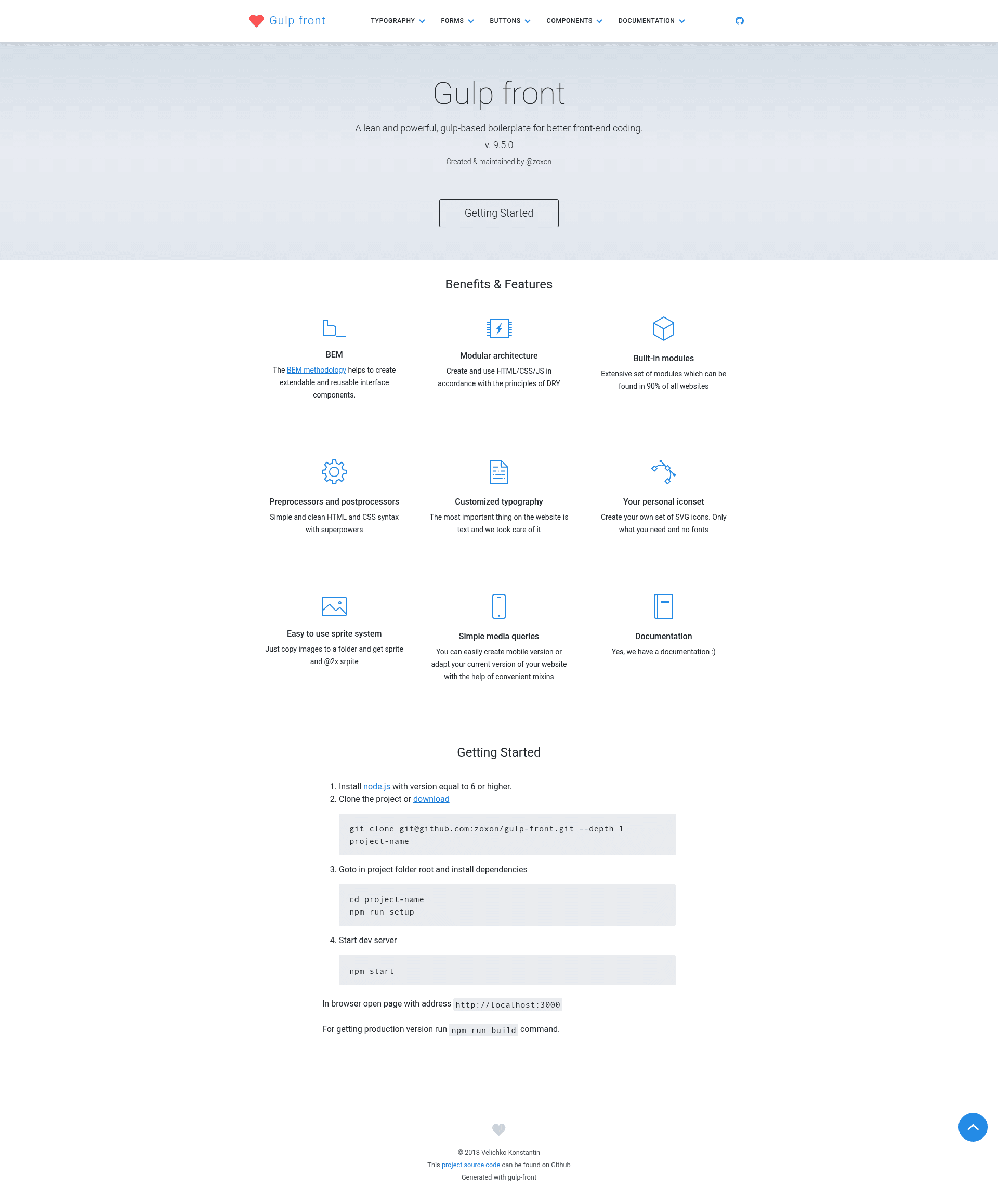
Gulp Front is a front-end boilerplate and build tool that uses Gulp to compile Pug templates, Stylus stylesheets, and Babel-processed JavaScript into a static website, while bundling an SVG icon system and PNG sprite generator.
What is Gulp Front?
Gulp Front is an open-source (MIT-licensed) front-end boilerplate created by developer zoxon and published on GitHub. It runs on Node.js and uses Gulp as its task runner, taking Pug, Stylus, and Babel source files as input and producing a compiled static project as output, ready for development or deployment. The project includes a demo site at zoxon.github.io/gulp-front and full documentation in the docs folder.
Key Features
- Gulp-based build tool — Automates compilation of Pug HTML, Stylus CSS, and Babel JavaScript with watch mode and a local dev server on port 3000.
- Module-based BEM CSS framework — Organizes styles and templates into reusable modules, each with its own Pug and Stylus files, with an optional JavaScript module generator.
- SVG Symbol icon system — Automatically generates an icon sprite from SVG files, letting you reference icons by symbol.
- PNG sprite generation — Creates PNG sprites, including retina-ready @2x versions, from source images.
- @media mixins — Provides convenient Stylus mixins for writing responsive media queries without repeating breakpoint syntax.
- Smart image compression — Optimizes images during the build to reduce file size for production.
- Module generator — The
npm run newcommand scaffolds an empty module (Pug and Stylus by default; optionally addjsorymlfiles) in thesource/modulesfolder. - Deploy task —
npm run deploycompiles the project and pushes the result to thebuildbranch of a git repository.
Who is it for?
Front-end developers who want a ready-made Gulp workflow with Pug and Stylus, without configuring a build pipeline from scratch. Teams adopting BEM methodology can use the module structure to keep components isolated and reusable. Developers working on projects that need icon sprites or CSS sprites get these systems pre-built into the boilerplate.
What can you do with Gulp Front?
- Prototype a static site quickly — After cloning and running
npm run setupandnpm start, you get a dev server with livereload at localhost:3000, so you can start editing Pug and Stylus immediately. - Generate new modules — Run
npm run new <module-name>to create a new module folder with Pug and Stylus files, then extend it with JavaScript or YAML data files as needed. - Build for production —
npm run buildcompiles the project with image compression and sprite generation;npm run zipwraps the compiled site in a zip archive. - Deploy to GitHub —
npm run deploycompiles and pushes the result to abuildbranch, giving you a hosted static site.
How does Gulp Front work?
After installing Node.js, clone the repository and run npm run setup to install dependencies (you can also run npm start to launch the dev server on http://localhost:3000/). The main npm scripts handle the rest: npm run dev starts watchers and a server, npm run build compiles the project, and npm run cleanup removes the demo application so you start with a clean project.
Pricing
Gulp Front is free and open source under the MIT License, so there are no paid tiers or subscription plans.
FAQ
Is Gulp Front free?
Yes, Gulp Front is released under the MIT License, which means you can use, modify, and distribute it freely, including in commercial projects, as long as the license notice is preserved.
What technologies does Gulp Front use?
It uses Gulp as the task runner, Pug for HTML templating, Stylus for CSS preprocessing, and Babel for modern JavaScript. It also includes Stylus mixins for responsive design and an automatic SVG symbol icon system.
How do I create a new module?
Run npm run new <module-name> from the project root. This creates a module in the source/modules folder with Pug and Stylus files; add the js or yml argument to generate JavaScript or YAML files in the module as well.
How do I deploy my compiled site?
Use the npm run deploy task, which builds the project and pushes the compiled output to the build branch of your git repository. For a local archive, npm run zip creates a zip file of the compiled project.