Template details
Help-Article
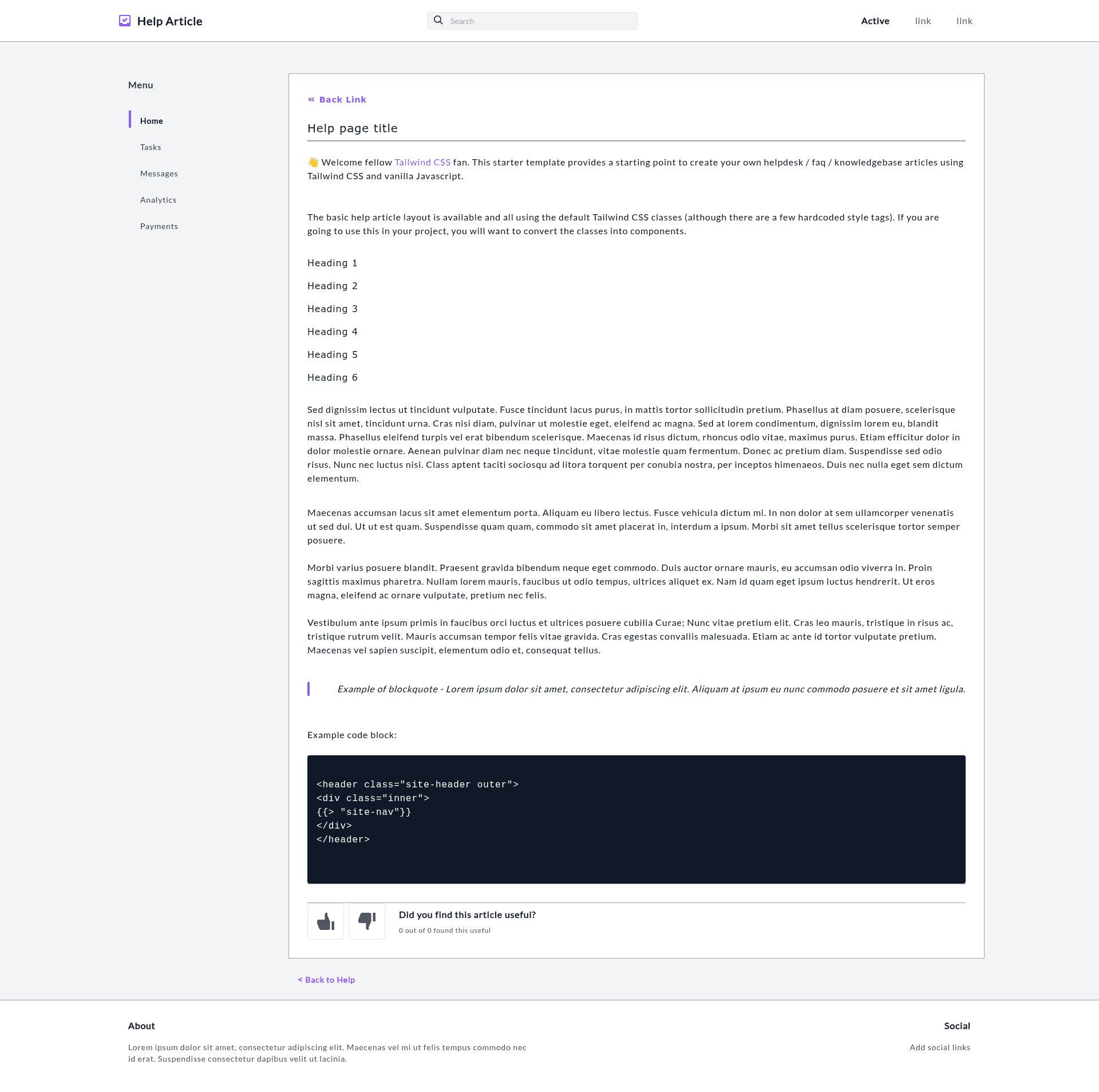
Tailwind CSS starter template for a Help (or FAQ or KB) Article, cloned from Weebly Support.
About this template
Help-Article is a free, open-source Tailwind CSS starter template from Tailwind Toolbox that builds a single-page help or FAQ article layout modeled on the Weebly Support documentation.
What is Help-Article?
Help-Article is a single HTML file that replicates the look of a support or help article page, styled entirely with Tailwind CSS loaded from a CDN. It was created by Tailwind Toolbox, maintained by Amrit Nagi of Astrava.Solutions, and released under the MIT license. The template is designed to be a starting point for help, FAQ, or knowledge-base (KB) articles.
Key Features
- Single HTML file — the template ships as one HTML file that can be opened directly in a browser or deployed to any static host without a build step.
- CDN-hosted Tailwind CSS — styling comes from a full CDN-hosted Tailwind CSS file, so no local build tools or package managers are required.
- Documentation-page layout — the page structure mirrors the Weebly Support article design, offering a familiar layout for help and FAQ content.
- GitHub integration — the source is available on GitHub with options to download the latest release as a zip, clone the repository, or fork it.
- Open-source customization — the template encourages customization; Tailwind Toolbox provides a setup guide for tweaking the Tailwind configuration.
- MIT licensed — the code is released under the MIT license, allowing free use, modification, and redistribution.
Who is it for?
- Documentation authors — use this template to quickly create help articles, FAQ pages, or knowledge-base entries without designing a layout from scratch.
- Tailwind CSS learners — study the single HTML file and CDN Tailwind classes to understand how utility-first CSS structures a content page.
- Open-source project owners — fork the repository on GitHub to build a documentation page that matches their project’s branding.
What can you do with Help-Article?
- Product teams — publish a support article that mimics the popular Weebly Help layout, giving users a familiar reading experience.
- Support portals — structure FAQ and troubleshooting content with a clean, readable layout that separates article headings and body text.
- Developers — use the template as a base for a docs site and integrate it with other static pages, then customize the Tailwind theme via the setup guide.
How does Help-Article work?
To start, download the latest release from GitHub, clone the repository with git clone, or fork the repo. The template is just an HTML file with a full CDN-hosted Tailwind CSS file, so you can edit the content directly in the markup. For deeper design changes, follow the Tailwind Toolbox setup guide to customize the Tailwind configuration.
Pricing
Help-Article is free and open source under the MIT license, so you can use it for personal or commercial projects without paying licensing fees.
FAQ
Is Help-Article free?
Yes, Help-Article is released under the MIT license, which means it is free to use, modify, and distribute, including in commercial projects. No payment or attribution is required.
What does Help-Article do?
Help-Article is a starter template for help, FAQ, or knowledge-base articles. It provides a single HTML page styled with Tailwind CSS, mirroring the layout of the Weebly Support help articles.
How do I get started with Help-Article?
Download the latest release from the GitHub repository, clone the repository using git clone, or fork it. Open the HTML file in a browser or code editor, then edit the content. Tailwind is loaded from a CDN, so no build tools are needed.
Does Help-Article require a build step?
No. The template uses a single HTML file with Tailwind CSS loaded from a CDN, so there is no local compilation. You can open the file directly in a browser and deploy it as a static page.
Can I customize the Tailwind configuration?
Yes. Tailwind Toolbox provides a setup guide that explains how to tweak the Tailwind configuration. Since the template uses the CDN version, you may need to switch to a locally compiled build for advanced customization.