Template details
Hexo Material
Material Design theme for hexo.
About this template
Hexo Material is a pure Material Design theme for the Hexo static site generator that renders Markdown-based blog content into a Material-styled front-end.
What is Hexo Material?
Hexo Material is a theme for Hexo, a static site generator, that applies Google's Material Design visual language to a blog. It takes Hexo's Markdown source files and outputs a static site with a Material-style interface. The theme is authored by bollnh, hosted on GitHub under the GPL v3.0 license, and distributed through npm as hexo-material. It requires Hexo 3.0 or newer and Node.js 6.0 or newer.
Key Features
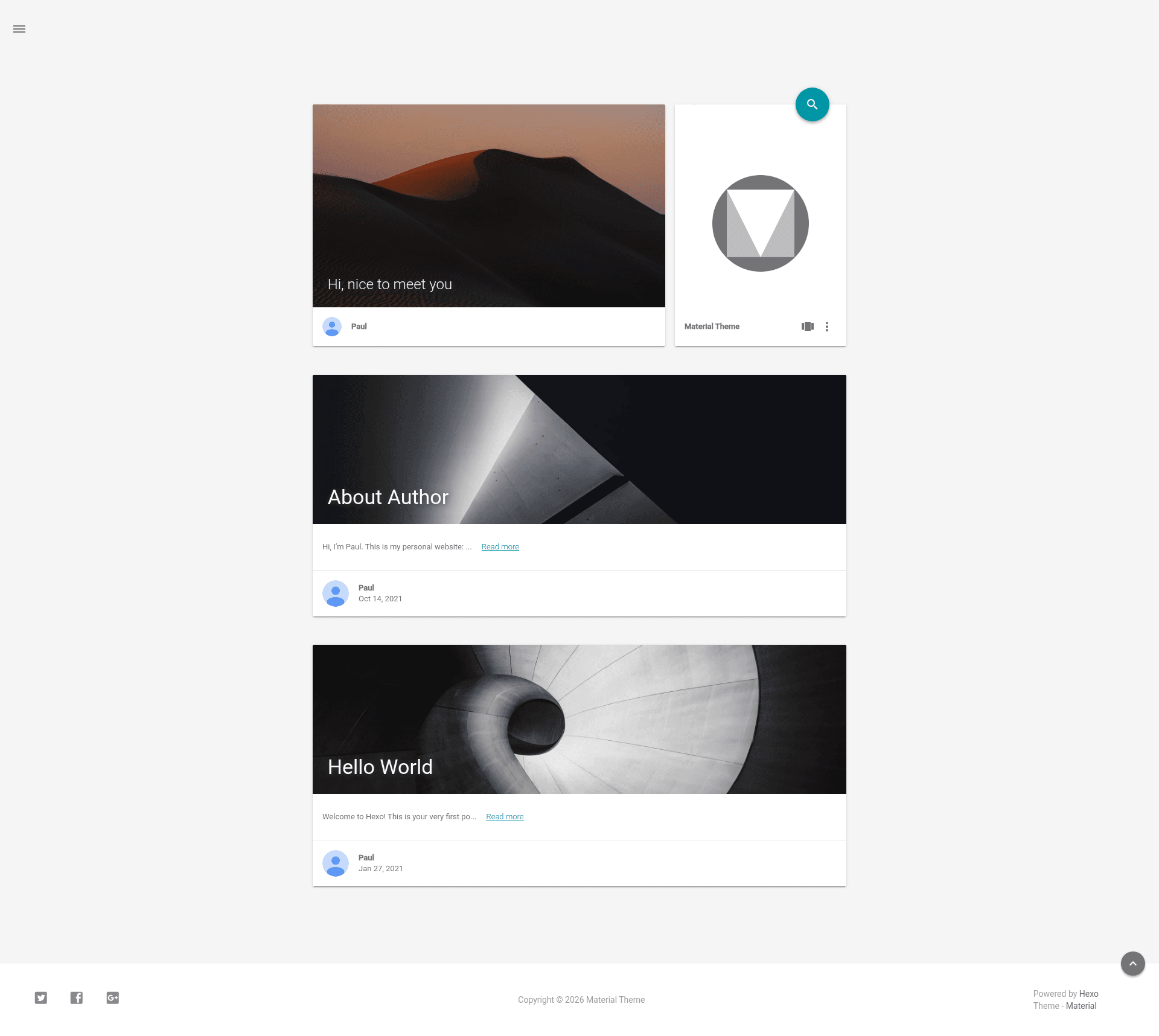
- Material Design implementation — The theme presents a clean, card-based layout with Material Design components like floating action buttons and responsive grids, visible in the demo.
- Hexo integration — Works as a standard Hexo theme: place it in the themes directory and configure via _config.yml.
- Config template system — Ships a _config.template.yml that you copy to _config.yml, preventing git pull conflicts when upgrading.
- Release and canary branches — Stable releases are tagged, while a canary branch offers the latest features for developers.
- npm distribution — The theme is published as the hexo-material package, so it can be installed via npm.
- CDN support via jsDelivr — Static assets can be served through jsDelivr from npm or GitHub.
- Documentation site — A dedicated docs site (material-theme-docs) provides usage instructions and configuration reference.
- Cross-browser testing — The project uses BrowserStack to test the theme across browsers and operating systems.
Who is it for?
- Hexo bloggers — Anyone running a Hexo blog who wants a Material Design look without building a theme from scratch.
- Developers — Developers who want to customize or contribute to an open-source theme; the canary branch provides the latest features.
- Design-conscious writers — Writers who prefer a clean, card-based layout and can rely on the project's documentation to configure it.
What can you do with Hexo Material?
- Publish a personal blog — Create Markdown posts in Hexo and have them rendered with Material Design styling, including the responsive layout shown in the demo.
- Customize the theme — Use the config template to adjust menus, colors, and other settings without editing theme source files.
- Contribute improvements — Report issues, submit enhancements, or fork the repository to add features under the GPL v3.0 license.
How does Hexo Material work?
To install, download the latest release or clone the repository into the themes directory of a Hexo project. Then copy _config.template.yml to _config.yml and edit it to match your site. The theme then reads your Hexo content and generates a static Material-styled website when you run the Hexo build command.
Pricing
Hexo Material is free and open source under the GPL v3.0 license. There are no paid tiers or premium features mentioned on the page.
FAQ
Is Hexo Material free?
Yes, Hexo Material is released under the GPL v3.0 license and is freely available on GitHub and npm. You can use, modify, and distribute it under the terms of that license.
What versions of Hexo and Node.js are required?
The theme requires Hexo 3.0 or newer and Node.js 6.0 or newer. These version badges are displayed in the repository README.
How do I upgrade without losing my configuration?
The theme stores its configuration template as _config.template.yml. When upgrading, copy this file to _config.yml and re-apply your settings, which avoids conflicts from git pull.
Where can I find the documentation?
The README links to a dedicated documentation site at Material Docs, and the source for the docs is available in the neko-dev/material-theme-docs repository.
Is there a demo?
Yes, the README links to a live demo at Material Demo, which shows the theme's phone and overview renders.