Template details
Hexo Theme Amazing
A modern, feature-rich Hexo theme forked from Icarus with Gitalk/Valine comments, dark mode, PJAX, media pages, and more.
About this template
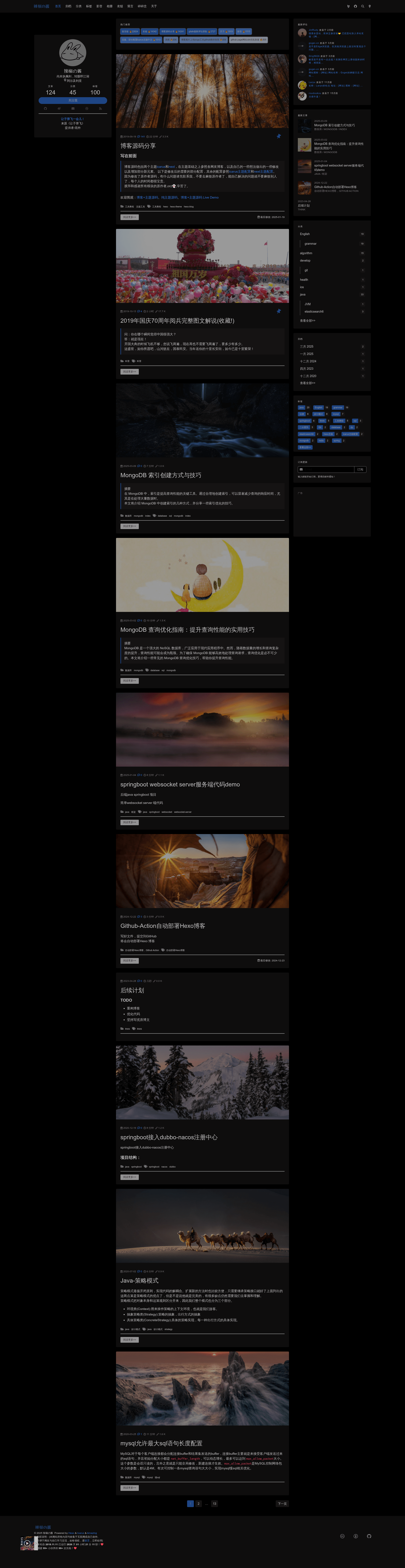
Hexo Theme Amazing is a simple, delicate, and modern theme for the Hexo static site generator, built as a feature-packed fork of the popular Icarus theme. It takes a standard Hexo blog with Markdown posts and YAML configuration and outputs a static site with a two-column article layout, fixed navigation, dark mode, multiple comment systems, media galleries, and a collection of widgets. The theme is maintained by removeif on GitHub and is licensed under the MIT License, with a live demo at removeif.github.io and a separate demo source on GitHub Pages.
What is Hexo Theme Amazing?
Hexo Theme Amazing is a free, open-source Hexo theme forked from Icarus. It accepts the usual Hexo project structure — Markdown posts in source/_posts and settings in _config.yml — and generates a static blog with enhanced visuals and functionality. The theme adds features such as hot recommended posts, latest comments, media pages, friend links, and a configurable Live2D mascot. It can be installed by cloning the repository into themes/amazing or via npm as hexo-theme-amazing.
Key Features
- Comment system enhancements — Supports Gitalk and Valine with optional latest-comment widgets and hot recommendations; hot recommendations are Gitalk-only and based on comment count multiplied by 101 for display.
- Media and content pages — Ships with ready-to-copy Markdown templates for music, video, album, friend-link, message board, and "self-talking" (microblog) pages driven by JSON data files.
- Dark mode and transparent style — Includes a dark theme toggle and an optional "transparent borderless" style that removes cards, shadows, and backgrounds for a cleaner look.
- Post management tools — Front-matter controls for pinning posts (top value), encrypting posts with a password, setting a recommendation weight for related articles, and toggling comments per post (comments: false).
- PJAX and music continuity — Optional PJAX support (use_pjax: true) refreshes only part of the page so a background music player from the NetEase Cloud sidebar keeps playing across navigation.
- Home page customization — Configurable banner, hot recommendation list, and a one-sentence hitokoto quote toggle (has_hitokoto).
- Live2D mascot — A switchable Live2D character (has_live_2D_switch) can be displayed on the site.
- Widget simplifications — Archive, category, and tag widgets are limited to 5, 10, and 20 items respectively with a "view all" button to reduce clutter.
Who is it for?
- Personal bloggers who want a modern, feature-rich Hexo theme without maintaining custom code — the theme provides documented configuration for comments, media, and dark mode.
- GitHub-heavy users who already host code and are comfortable with Gitalk — hot recommendations and latest comments are powered by GitHub Issues.
- Customizers who want a base theme to modify — it's a fork of Icarus, so all Icarus configurations still work, and the author documents where the fork diverges.
Use cases
- Tech blogs — Publish articles with pinned posts, encrypted content, and same-category related posts, plus a fixed navbar and two-column reading layout.
- Media or hobby sites — Use the music and video pages (JSON-fed) to present collections alongside regular posts.
- Community sites — Set up a friend-link page and message board that collect comments through Gitalk.
How does the theme work?
Installation follows the standard Hexo flow: clone or npm-install the theme, copy the ex_pages folder into the site, update the site and theme config files, then run hexo clean, hexo g, and hexo s to preview locally. For Gitalk features, you must create a GitHub OAuth app and configure owner, repo, client ID, client secret, and admin before hot recommendations and latest comments will work.
FAQ
Does the theme support Valine comments?
Yes, Valine is supported for comments and for the latest-comment widget. However, the hot recommendation feature (has_hot_recommend) works only with Gitalk, not Valine.
Why don't my latest comments appear immediately?
The latest-comment feature caches results locally for 1 minute to reduce API load. After you post a comment, it may take up to a minute to show up in the widget.
How do I encrypt a post?
Add encrypt: true and a password value to the post's front matter, plus optional abstract, message, wrong_pass_message, and wrong_hash_message fields. Encrypted posts are excluded from the latest-posts widget and related-article list, and setting top: -1 places them at the bottom of the homepage.
Is this theme different from Icarus?
Yes. This theme is a fork of Icarus with modifications including new widgets, media and friend-link pages, dark mode, PJAX, Live2D, article encryption, and a transparent style. Because the source is modified, the author asks that issues be reported to the fork's own issue tracker, not the original Icarus repo.