Template details
HugoTeX
A LaTeX-inspired Hugo theme for elegant technical writing and academic content with server-side math rendering.
About this template
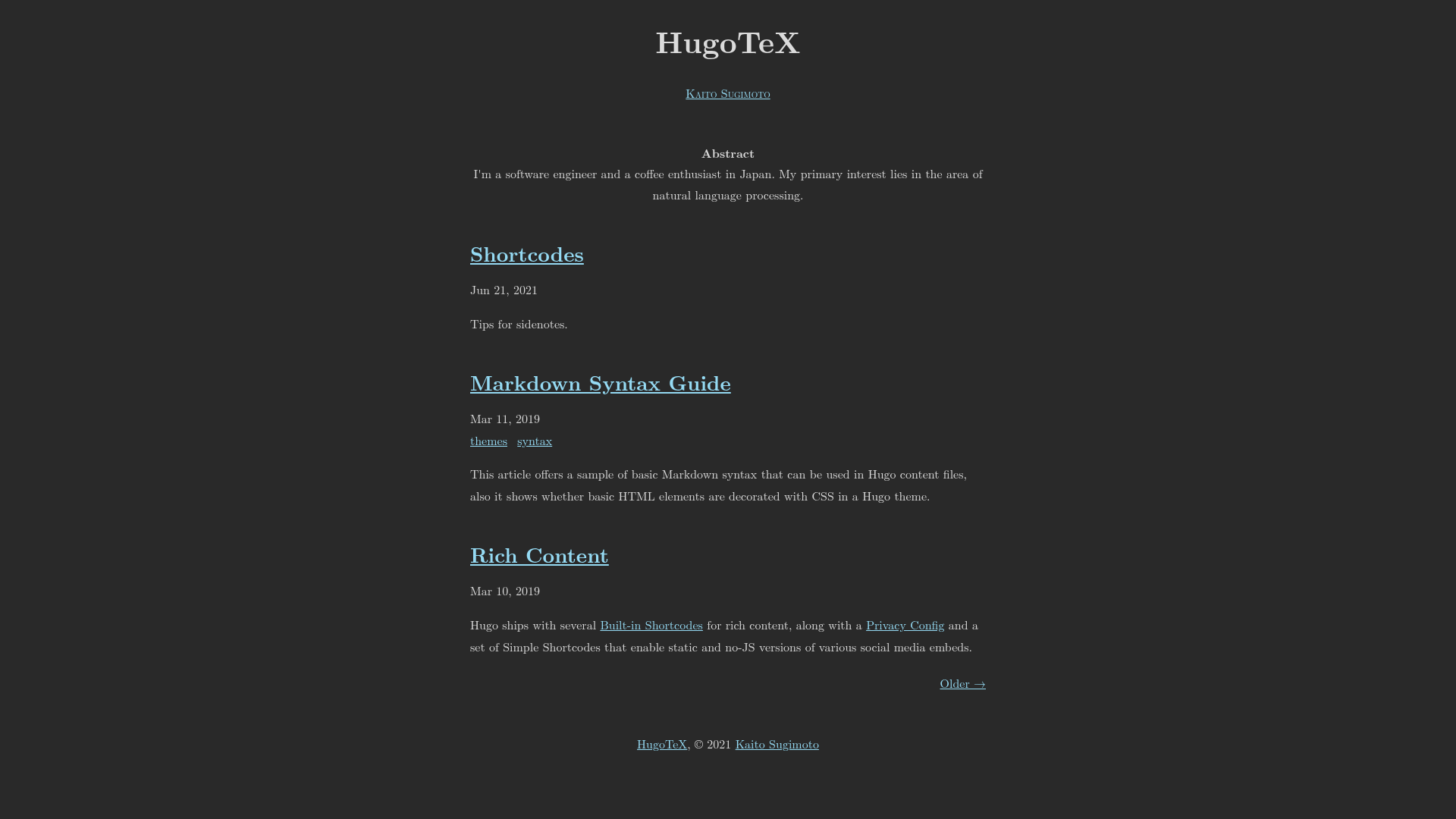
HugoTeX is a free and open-source Hugo theme that replicates the typography and layout conventions of LaTeX documents for technical blogs, academic notes, and documentation sites. It runs on the Hugo static site generator and converts Markdown content—including LaTeX-style math—into fully static HTML with no client-side math rendering needed.
What is HugoTeX?
HugoTeX is a Hugo theme designed around the classic visual style of LaTeX, built by the HugoTeX team and distributed on GitHub under the MIT License. It takes standard Hugo content folders and front matter as input and produces a static website with academic-style page layout, abstract blocks, sidenotes, and automatic dark mode. The theme requires Hugo version 0.158.0 or later, and a live demo is hosted at hugotex.pages.dev.
What makes HugoTeX stand out?
- Server-side math rendering — Uses KaTeX via Hugo's built-in
transform.ToMathfunction during the build, so equations appear without loading any JavaScript client-side; inline math uses$...$delimiters and block math uses$$...$$. - LaTeX.css styling — Typography, headings, footnotes, and margins are styled with LaTeX.css, giving pages a documented, print-like appearance.
- Built-in sidenote shortcode — Place supplementary notes in the margin; on mobile the notes are hidden behind a clickable reference number.
- Automatic dark mode — The theme detects the user's system
prefers-color-schemeby default; settingdarkmode = trueorlightmode = truein the config forces either mode site-wide. - SEO and social metadata — Includes OpenGraph and Twitter Card support, plus a meta description generator that prioritizes page front matter, then an article summary, then site-level description.
- No-JS accessibility — The generated site works with JavaScript disabled; math is already rendered server-side and the layout remains fully navigable.
- Flexible syntax highlighting — Uses Hugo's Chroma styles and supports separate light and dark highlighting styles via
[Params.SyntaxHighlighting].
Who should use HugoTeX?
- Researchers and academics — Publish papers, lecture notes, or lab notebooks with LaTeX-quality equations and references while working entirely in Markdown and Git.
- Technical bloggers — Write tutorials and deep dives that mix code snippets and math formulas; HugoTeX handles both cleanly with no extra build steps.
- Mathematics and science communicators — Present complex equations in a readable format that stays intact across desktop, tablet, and mobile viewports.
What can you do with HugoTeX?
- Create academic-style articles: Use the built-in abstract feature; content placed before a
<!--more-->comment is rendered as a summary block at the top of the post. - Publish mathematical content: Write inline and display equations with LaTeX syntax directly in Markdown; they are converted to static KaTeX output at build time.
- Customize the look without coding: Select from many Chroma syntax themes, add your own CSS through
assets/css/custom.css, and switch between light and dark modes with a single flag.
How does HugoTeX work?
You install HugoTeX by adding it as a Git submodule, a Hugo module, or a direct clone into the themes directory of a Hugo site. The theme reads your hugo.toml configuration, including enabled taxonomies for categories, tags, and series. Mathematical content is processed by Hugo's Goldmark renderer with the passthrough extension enabled, then transformed server-side via transform.ToMath. The result is a static HTML site with no JavaScript dependencies for the core presentation.
Pricing
HugoTeX is free to use and modify under the MIT License. There are no paid tiers, subscriptions, or license fees; you can use it for personal and commercial projects alike.
Alternatives
- hugo-theme-texify — another LaTeX-inspired Hugo theme that the HugoTeX README references as a similar project; compare its feature set to find the right fit.
FAQ
Is HugoTeX free?
Yes, HugoTeX is published under the MIT License, meaning it is free to download, customize, and use in personal or commercial projects without payment.
What Hugo version is required?
HugoTeX needs Hugo 0.158.0 or newer. The configuration also enables Goldmark's passthrough extension, which must be present in your Hugo installation to support math delimiters.
How are math equations rendered?
Math is rendered server-side during the Hugo build using the transform.ToMath function, which converts KaTeX math to HTML at build time. No client-side JavaScript is required to display equations, so they load instantly.
How do I force dark mode?
Dark mode follows your users' system setting automatically. To force dark mode, add darkmode = true under [Params] in your hugo.toml. To force light mode, use lightmode = true instead.
What is the sidenote shortcode?
The sidenote shortcode adds margin notes to your content. On desktop, notes appear in the right margin; on mobile, they are folded behind a clickable reference number. The feature is powered by LaTeX.css.