Template details
hexo-theme-Wikitten
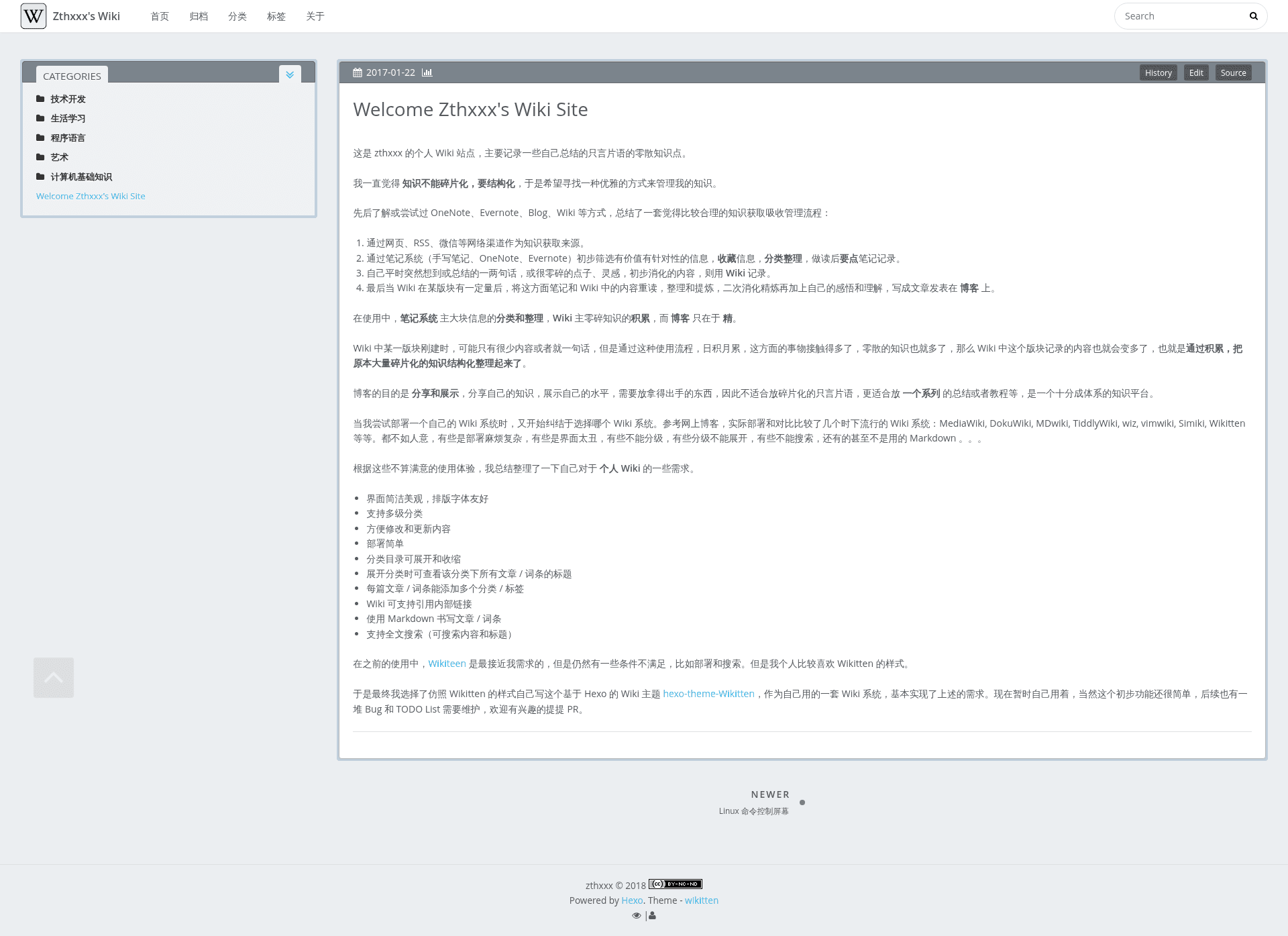
A theme of Hexo for personal wiki which seems like Wikitten style.
About this template
Hexo Theme Wikitten is a Hexo theme for building personal wikis, imitating the Wikitten style with a double-column layout and automatic categorization based on file directories.
What is hexo-theme-Wikitten?
hexo-theme-Wikitten is a Hexo theme designed to transform a Hexo static site into a personal wiki. It takes Markdown files organized in folders as input and produces a static website with a sidebar that lists categories and articles. The theme is built on top of the Icarus Hexo theme, so it inherits Icarus's base functionality and configuration. It requires Hexo version 3.6 or later.
Key Features
- Double-column layout — A sidebar for navigation and a main content area, designed for wiki-style reading and browsing.
- Directory-based categorization — Uses the hexo-directory-category plugin to automatically assign articles to categories based on their file directory, with multi-level sorting and expandable sidebar categories.
- External link handling — The hexo-autonofollow plugin automatically makes user clicks on external links open in a new browser tab.
- RSS/Atom feed — The hexo-generator-feed plugin generates Atom 1.0 or RSS 2.0 feeds for the wiki.
- Site search — The hexo-generator-json-content plugin generates a JSON content file used for site-wide search.
- Sitemap generation — The hexo-generator-sitemap plugin produces a sitemap.xml for better search engine indexing.
- MathJax support — Optional configuration allows rendering mathematical formulas using MathJax with the pandoc-based hexo-renderer-pandoc (or hexo-renderer-krammed) renderer.
- History version control — The history_control option connects the site to a GitHub repository, enabling readers to view page source, edit online, and compare historical changes.
- Customizable widgets — Available sidebar widgets include category, recent posts, archive, tag, tagcloud, and links, with category as the default.
Who is it for?
- Personal knowledge managers — Organize notes, snippets, and research into a navigable wiki with folder-based categories and expandable sidebar.
- Hexo users — Existing Hexo users who want to switch from a blog layout to a wiki layout without changing the underlying Hexo workflow.
- Technical writers and developers — Publish documentation or knowledge bases with version control integration and search functionality.
What can you do with hexo-theme-Wikitten?
- Knowledge base publishing: Create a personal wiki where each top-level folder becomes a category and subfolders create multi-level hierarchies, all reflected automatically in the sidebar.
- Version-controlled documentation: Configure history_control with a GitHub repository to give every page a view-source and edit-online link, plus commit history comparison.
- Searchable notes: Enable hexo-generator-json-content to add a JSON search index, then use a client-side search script to let visitors search the whole wiki.
- Feed and sitemap distribution: Use the built-in feed and sitemap generators to keep subscribers and search engines updated with new content.
How does hexo-theme-Wikitten work?
Installation involves cloning the theme into your Hexo site's themes directory, copying the provided source and scaffold files, renaming the theme configuration example, and installing the required Hexo plugins. After that, you set the theme in the site's config and write Markdown posts in folders; the directory structure drives the sidebar categories automatically.
Pricing
hexo-theme-Wikitten is open source and released under the MIT License, so it is free to use, modify, and distribute.
FAQ
What Hexo version do I need for this theme?
The theme requires Hexo v3.6 or later. Older versions may not support the features used by the theme.
Does this theme support MathJax?
Yes. To use MathJax, install pandoc on your system, replace the default marked renderer with hexo-renderer-pandoc or hexo-renderer-krammed, and set math: enable: true with engine: mathjax in your site configuration.
How does article categorization work?
The theme uses the hexo-directory-category plugin, which reads the file system path of each post (for example, folder name and subfolder) and assigns it as the category. This means your directory structure defines the wiki's taxonomy.
Is this theme free?
Yes, it is licensed under the MIT License, so you can use it freely for personal or commercial projects.
Can I change the sidebar position?
Yes, in the theme's configuration file you can set customize.sidebar to either left or right to move the sidebar to the desired side.