Template details
hexo-theme-yinwang
A clean, elegant Hexo blog theme inspired by Wang Yin's personal website (pre-October 2025 style).
About this template
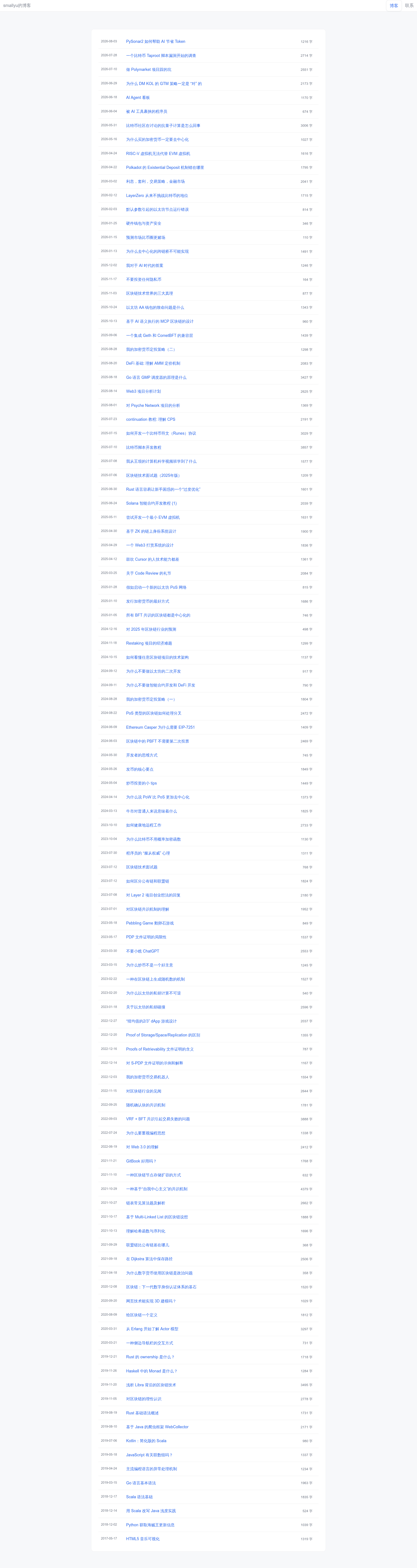
hexo-theme-yinwang is a Hexo blog theme that recreates the pre-October 2025 visual style of Wang Yin's personal website (yinwang.org), giving Hexo users a minimal, text-focused theme with multilingual, tag-cloud, category, about, and GitHub Issues–based micro-blog pages.
What is hexo-theme-yinwang?
hexo-theme-yinwang is a theme for the Hexo static site generator, designed by the developer smallyunet and distributed on GitHub. It takes a standard Hexo blog project with posts written in Markdown and outputs a static website whose design mirrors Wang Yin's personal site as it appeared before October 2025. The theme supports Chinese and English locales, a live demo is hosted at smallyunet.github.io/yinwang-blog, and a preconfigured template repository called hexo-theme-yinwang-demo provides a quick start with LaTeX rendering and the micro-blog page already set up.
Key Features
- Multilingual support — The theme reads the
languagefield in the blog's root_config.yml; set it toenfor English orzh-cnfor Chinese. - Responsive layout — The design adapts to desktop and mobile screen sizes, keeping the content-first aesthetic consistent across devices.
- Custom page types — Five front-matter types activate dedicated pages:
tags,categories,about,display, andmicro-blog; each requires a page created withhexo new page. - Micro-blog from GitHub Issues — The micro-blog page pulls posts from GitHub Issues using the configured GitHub owner, repository, and issue year/number pairs; run
hexo generateto refresh content automatically. - LaTeX math rendering — Install
hexo-filter-mathjaxto render inline formulas like$E = mc^2$and block formulas in posts, with MathJax options configurable in the blog config. - Word count and tags display — The
hexo-wordcount-syplugin powers per-post word counts, andshow_tagsadds tags at the end of each post. - Theme configuration options — The theme
_config.ymltoggles pagination, header/footer display, whether dates and word counts appear in lists, and footer links (e.g., ICP filing). - Google Analytics integration — An optional block in the theme config enables Google Analytics by setting
enable: trueand an ID likeG-XXXXXXXXXXX.
Who is it for?
- Hexo users who want a minimalist, content-focused blog — The theme strips away visual clutter so posts and math formulas take center stage.
- Fans of Wang Yin's website — Those who want the same clean typography and navigation structure can apply this theme rather than redesigning it.
- Technical bloggers writing about math or programming — With built-in LaTeX support and straightforward code, the theme suits notes, essays, and tutorials.
What can you do with hexo-theme-yinwang?
- Publish a micro-blog — Configure GitHub Issues as the content source and use the
micro-blogpage type to publish short posts directly from issue comments or descriptions. - Add LaTeX formulas to posts — Write inline
$...$or block$$...$$formulas and have them rendered by MathJax when the plugin is installed and enabled. - Set up navigation pages — Create tag, category, and about pages and link them via the theme's
menuconfiguration to give visitors clear paths through the blog.
How does hexo-theme-yinwang work?
Installation follows the standard Hexo theme workflow: clone the repository into themes/hexo-theme-yinwang inside your blog project, install the required plugins with npm install --save hexo-renderer-pug and npm install --save hexo-wordcount-sy, then set theme: hexo-theme-yinwang and disable the built-in highlight in the root _config.yml. After that, run hexo clean && hexo server to preview locally. For a faster start, clone the hexo-theme-yinwang-demo template, run npm install, and launch with hexo server; the demo already includes LaTeX, micro-blog, tag cloud, categories, about, and external link support.
Pricing
hexo-theme-yinwang is free and open source, released under the MIT License, so it can be used, modified, and redistributed without licensing fees.
FAQ
Does hexo-theme-yinwang require special plugins?
Yes, two plugins are required: hexo-renderer-pug to render the theme's templates and hexo-wordcount-sy to display word counts. For LaTeX rendering, you also need hexo-filter-mathjax.
How do I create a micro-blog page?
Run hexo new page micro-blog, then set type: micro-blog in the page's front matter. In the theme config, specify the GitHub owner, repo, and the year/issue pairs for the micro-blog content, then run hexo generate.
Is the theme available for languages other than Chinese?
Yes, the theme supports English and Chinese. Set the language field in the blog's root _config.yml to en for English or zh-cn for Chinese, and the interface strings switch accordingly.
Can I use this theme with an existing Hexo blog?
Yes. You only need to download the theme into the themes directory, install the two required npm packages, update the theme setting in your blog's _config.yml, and rebuild. Your existing posts in Markdown will be rendered in the new design.