Template details
Hola
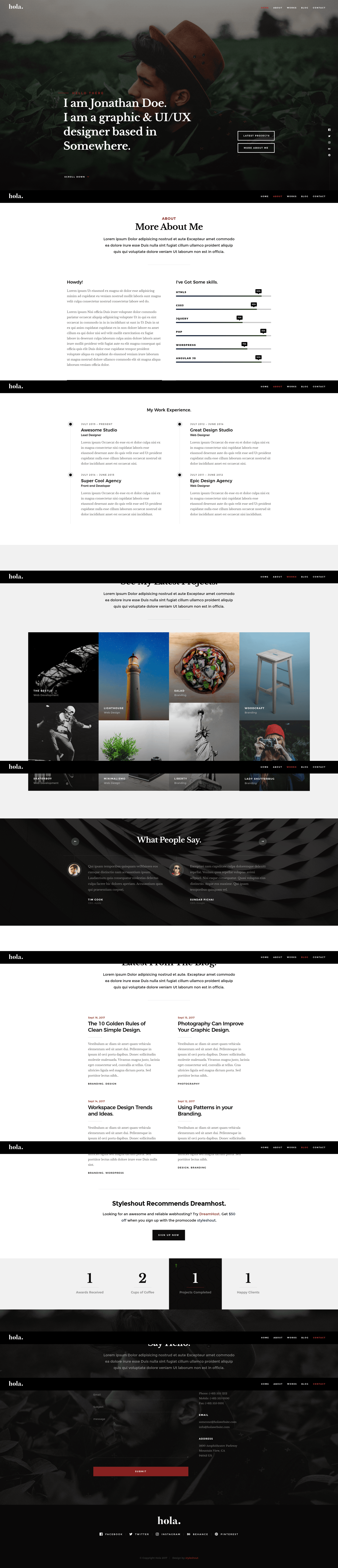
Free one-page HTML5 portfolio template with parallax hero, sticky nav, Photoswipe grid, skill bars, testimonials, and blog.
About this template
Hola is a free, one-page HTML5 portfolio website template from ThemeWagon, built on Bootstrap v4.0.0-alpha.5 and designed for creative professionals to present their resume, portfolio, and blog in a single-page layout.
What is Hola?
Hola is a static HTML/CSS/JavaScript template created by Styleshout and distributed by ThemeWagon. It takes your personal content and renders it as a responsive, retina-ready one-page site with sections for a hero header, skills, portfolio grid, testimonials, stats, and a single blog page. The download includes 4 HTML files, CSS files, JavaScript source files, font icons, and a collection of plugin libraries, and it runs in any modern browser without a build step.
Key Features
Hola ships with notable features across layout, animation, and content sections.
- Bootstrap v4.0.0-alpha.5 — The page is built on this early Bootstrap 4 alpha, which provides the responsive grid, utilities, and component styling.
- One-page layout with sticky navigation — An animated sticky top navigation bar with scroll spy tracks the current section as you scroll, and a back-to-top button appears for quick navigation.
- Parallax hero header — The animated hero section has a parallax background, a scroll-down button, and is preceded by an animated CSS3 preloader.
- Photoswipe portfolio grid — A portfolio grid with hover effects and modal view built on the Photoswipe library presents your project images in a lightbox.
- Skill bars and fun fact counter — Animated skill bars visually display proficiency levels, and a stats section with a fun fact counter animates numbers as you scroll.
- Testimonial carousel — A Slick Slider carousel rotates client or colleague testimonials.
- Blog section — A dedicated blog section is included, with one blog HTML file among the 4 page templates.
- Working contact form — A contact form with jQuery Validation Plugin provides client-side validation and is ready to connect to a backend.
- Google Fonts and icon set — Uses Libre Baskerville and Montserrat from Google Fonts plus the Iconic icon font for UI icons.
Who is it for?
Hola is intended for creative professionals who want a clean online resume and portfolio without building a site from scratch. Freelance designers and developers can display their best work in the Photoswipe grid and quantify skills with animated bars. Photographers get a retina-ready image grid that looks sharp on mobile and desktop. Job seekers and bloggers can use the built-in testimonial carousel, stats counter, and blog section to tell a complete professional story on one page.
What can you do with Hola?
Hola's feature set supports several concrete use cases.
- Freelance designers: Showcase project case studies in the portfolio grid and link each item to a live demo or external site.
- Developers: Use the animated skill bars and fun fact counter to summarize years of experience, number of projects, or technology proficiency.
- Photographers: Present a visual portfolio through the Photoswipe lightbox, optimized for retina displays on phones and tablets.
- Personal bloggers: Use the included blog HTML file to publish static posts alongside your resume, with navigation in the sticky header.
FAQ
The most common questions about Hola concern licensing, contents, and customization.
Is Hola free to use?
Yes, Hola is free to download from ThemeWagon. The license allows use in commercial projects, and the template is open source with lifetime free updates.
What is included in the download?
The package contains all demo images, 4 HTML files, CSS files, JavaScript source files, font icons, and the listed plugins and libraries, including Parallax.js, Imagesloaded, Waypoints, Slick Slider, and jQuery Validation Plugin.
What browsers and devices are supported?
Hola is compatible with Chrome, Edge, Firefox, Opera, Safari, and mobile devices. The template is responsive and retina-ready, so it scales to different screen sizes.
How do I customize Hola?
You edit the HTML, CSS, and JavaScript files directly — no build tool is required. The code is described as clean and well-organized, and Bootstrap classes make layout changes straightforward.
Does the contact form work out of the box?
The form includes jQuery validation, but ThemeWagon does not document a built-in backend, so you would need to connect the form to a form-handling service or server script to receive submissions.