Template details
HyperDrive
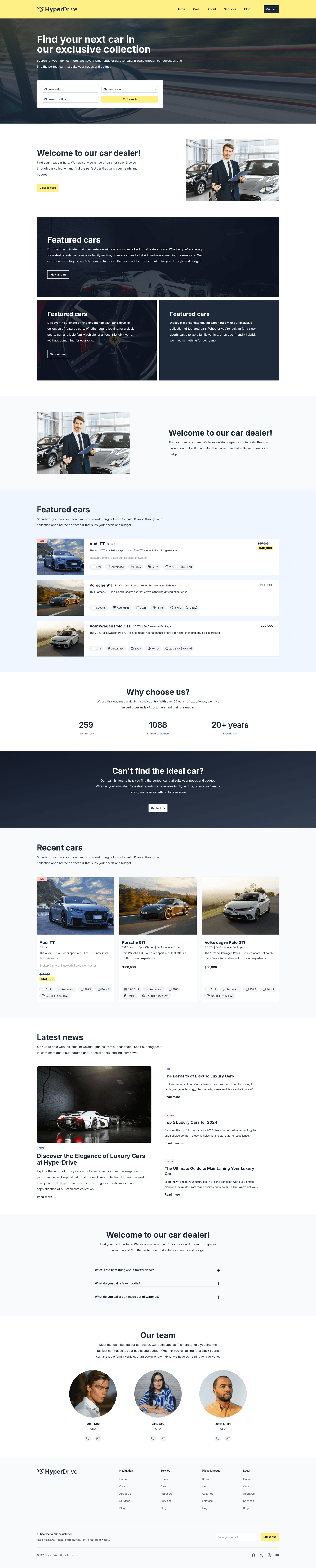
Free Astro + TailwindCSS theme for automotive dealership websites, with premade pages for cars, bikes, and boats.
About this template
HyperDrive is a free, open-source Astro starter theme for automotive dealership websites that bundles TailwindCSS, Embla Carousel, and seven premade pages.
What is HyperDrive?
HyperDrive is a free theme for the Astro framework, designed as a starting point for a car dealer website that can also sell bikes or boats. It takes your content as markdown/MDX files and produces a static website with fast load times. The theme is maintained by wpinfusion and available on GitHub at wpinfusion/astro-hyperdrive.
Key Features
HyperDrive's main advantages are its Astro-based architecture and ready-to-use dealership components.
- Built with Astro — The core framework is Astro, known for content-focused, fast static sites. After
npm run build, you get a production-ready static output. - TailwindCSS styling — Uses TailwindCSS for utility-first UI development, making customization straightforward for developers.
- Embla Carousel — Ships with Embla Carousel to create responsive sliders for featured cars or galleries.
- Seven premade pages — Includes Home, Cars, Blog, Contact, About Us, Services, and a 404 page, all ready to customize.
- Markdown/MDX content management — Add cars by creating
.mdxfiles in the/content/carsdirectory, each with a unique slug, title, price, description, and images, following theexample.mdxstructure. - Standard Astro project structure — Includes
src/components,src/layouts/Layout.astro,src/pages/index.astro,src/assets,src/styles, andpublic/favicon.svg. - Open source — The repository is publicly accessible, and support is available via the GitHub issue tracker or email at info@wpinfusion.com.
Who is it for?
HyperDrive is built for dealership owners and developers who need a clean, fast site for listing vehicles.
- Car dealerships — Launch a modern, responsive website to display inventory without building from scratch.
- Bike and boat dealers — Use the same theme to list non-car vehicles since the content model supports any product with price, description, and images.
- Web developers and agencies — Use HyperDrive as a client starter kit, then customize TailwindCSS classes and components to match a dealer's brand.
What can you do with HyperDrive?
HyperDrive supports three common dealership scenarios out of the box.
- Auto dealers: Publish vehicle listings by dropping markdown files into
/content/cars; each listing appears on the Cars page with its unique slug. - Marine dealerships: Showcase boats with image galleries powered by Embla Carousel and detailed markdown descriptions.
- Site owners: Run a blog alongside the dealership pages using the premade Blog page.
How does HyperDrive work?
After cloning the repository from GitHub, run npm install to install dependencies. Use npm run dev for local development, and npm run build to generate a production build. Content lives in markdown files, so adding a vehicle is a matter of creating a new .mdx file in /content/cars modeled on the included example.mdx.
Pricing
HyperDrive is free to download and use. You can clone the repository, install dependencies, and deploy your site without any license fee. Support is available through the GitHub repository and email.
FAQ
Is HyperDrive really free?
Yes, HyperDrive is a free, open-source theme. There is no cost to obtain or use the theme, and you can modify it for commercial dealership projects.
How do I add a car to HyperDrive?
Go to the /content/cars directory and create a markdown file with a .mdx extension. Each car needs a unique slug, title, price, description, and images. You can copy the structure from the provided example.mdx.
What technology does HyperDrive use?
HyperDrive is built with Astro as the main framework, TailwindCSS for styling, and Embla Carousel for sliders. It is a static site generator setup, so you run local commands with npm.
Does HyperDrive include a blog?
Yes, the theme includes a premade Blog page, so you can publish news or articles alongside your vehicle inventory.
Can I customize the design?
Yes, the theme uses TailwindCSS and a standard Astro layout structure (src/layouts/Layout.astro), which makes it straightforward to edit components and utility classes for a custom look.