Template details
Brilliant CV
A modern, modular Typst CV template with profile variants, Font Awesome icons, and multi-language support.
About this template
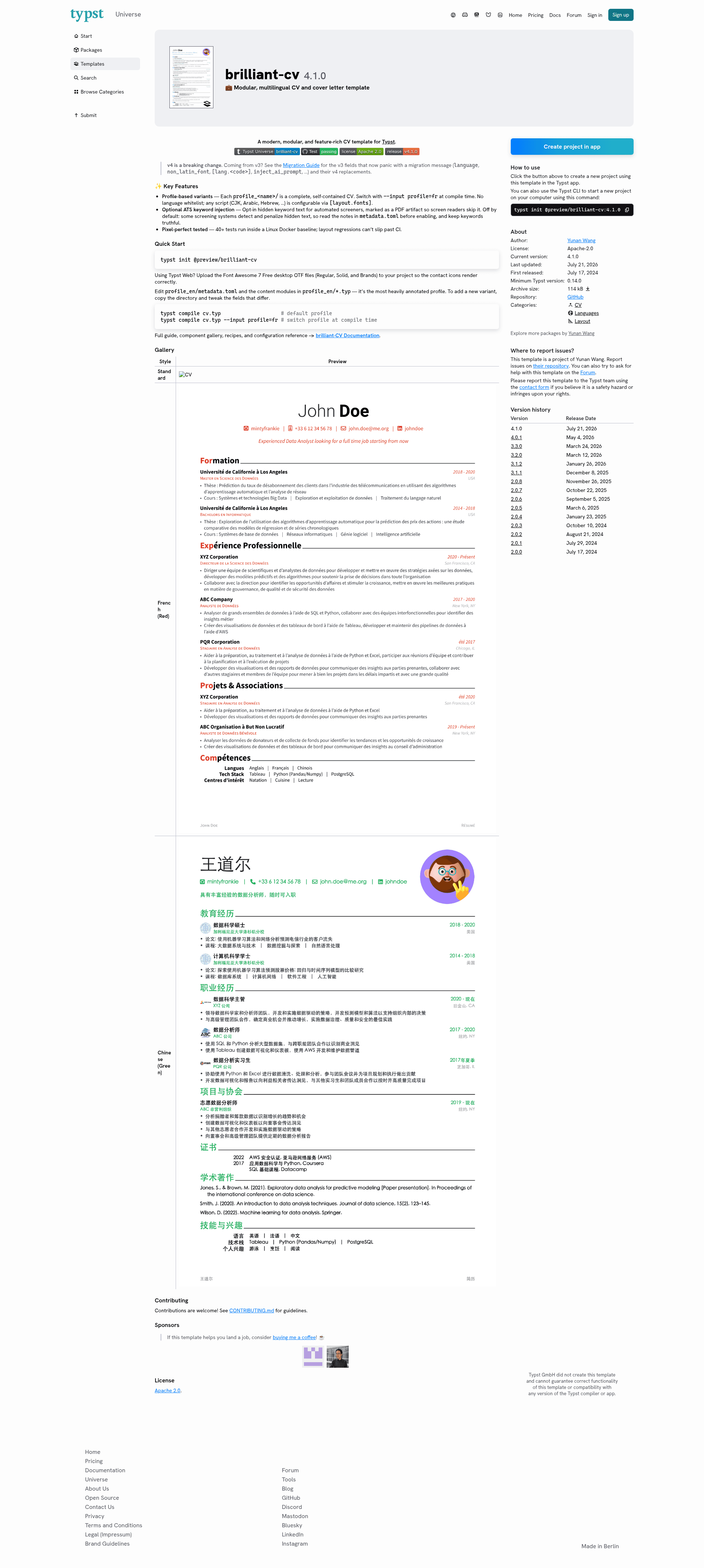
Brilliant CV is a modern, modular CV and resume template for the Typst typesetting system that compiles modular content blocks into tailored PDF variants for different jobs, audiences, or languages. Published on Typst Universe and maintained by yunanwg, it combines a clean, icon-enhanced layout with a matching cover letter so job applications look polished without hand-tuning the design.
What is Brilliant CV?
Brilliant CV is a Typst template that takes profile directories — each with a metadata.toml file and Typst content modules — as input and produces a formatted PDF resume plus a cover letter as output. Built for Typst, it runs both on the Typst Web app and the typst CLI. Version 4 introduced breaking changes; users coming from v3 should follow the migration guide for renamed fields like language, non_latin_font, and inject_ai_prompt.
Key Features
- Profile-based variants — Each
profile_<name>/folder is a self-contained variant selected at compile time with--input profile=<name>, letting you maintain one CV per job, audience, or language. - Modular content blocks — Build resumes from reusable experience, education, projects, publications, and skills sections, then combine the same blocks into long academic or one-page industry versions.
- Multi-script typography — Any script, including CJK, Arabic, and Hebrew, is supported through the
[layout.fonts]configuration. - Polished default styling — Font Awesome icons and a matching cover letter give a professional result without layout work.
- Optional ATS keyword layer — A hidden, opt-in (off by default) keyword layer can be embedded for automated resume screeners; the documentation advises keeping keywords truthful.
- CI-rendered previews — English, French, and Chinese previews are generated automatically from the live template, showing the same design across scripts.
- Open source license — Released under Apache 2.0, so you can reuse and modify it freely.
Who is it for?
Job seekers who want a professional, typographically clean resume without wrestling with layout. Academics can maintain a long publication-heavy CV and a one-page industry cut from the same building blocks. Multilingual applicants can keep separate profile variants per language, with the same design rendered in Latin, CJK, Arabic, or Hebrew scripts.
What can you do with Brilliant CV?
Brilliant CV lets you produce multiple resume variants from the same modular content, each tailored to a specific context.
- Job applicants: Compile a tailored PDF resume for each application by copying a profile directory and tweaking only the fields that differ.
- Academic researchers: Keep a detailed CV with publications alongside a condensed version for conference or industry submissions.
- Non-Latin-script users: Write your CV in Arabic, Hebrew, Chinese, or other scripts using font settings, while keeping the same layout.
- ATS-conscious candidates: Enable the optional keyword layer to help automated screeners parse your resume, while keeping the visible content unchanged.
How does Brilliant CV work?
Run typst init @preview/brilliant-cv to scaffold a project, then edit profile_en/metadata.toml and the content modules in profile_en/*.typ. Compile the default profile with typst compile cv.typ, or switch variants with typst compile cv.typ --input profile=fr. On Typst Web, upload the Font Awesome 7 Free desktop OTF files (Regular, Solid, and Brands) so the contact icons render correctly.
FAQ
Is Brilliant CV free?
Yes. Brilliant CV is released under the Apache 2.0 license, so it is free to use and modify, including for commercial purposes.
What is Typst?
Typst is a modern typesetting system that compiles plain-text markup to PDF. It has a web app and an open-source CLI, and hosts community templates on Typst Universe.
Can I create a CV in Arabic or Chinese with Brilliant CV?
Yes. The template decouples profiles from language, and any script works through the [layout.fonts] configuration. Previews for English, French, and Chinese are generated in CI, and the project also documents support for Arabic and Hebrew scripts.