Template details
Introduction
Minimalist, versatile Hugo theme for single-page or multi-section sites with multilingual support, projects, blog, and light/dark themes.
About this template
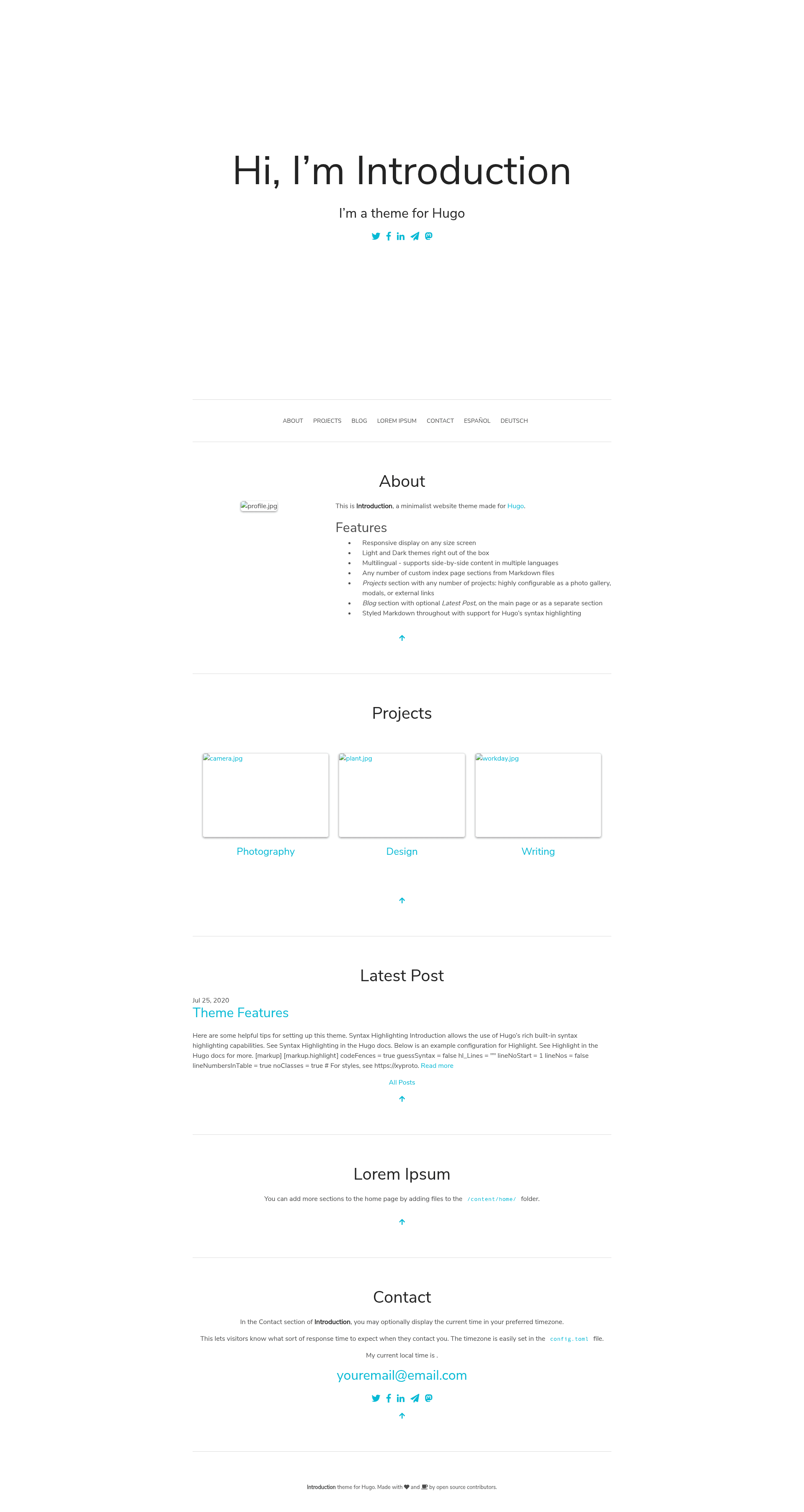
Introduction is a minimalist, versatile Hugo theme for building either a single-page site or a multi-section website, with built-in multilingual support, projects and blog sections, and automatic light and dark themes.
What is Introduction?
Introduction is an open-source theme for the Hugo static site generator, created by Victoria Drake and licensed under the Apache License 2.0. It takes markdown content from content/home, content/projects, and content/blog and renders a responsive site with smooth scrolling, a page-load fade-in effect, and an optional local-time display in the contact section. The theme requires the extended version of Hugo and uses Sass with Hugo Pipes and PostCSS for styling.
Key Features
- Multilingual — Supports many languages through translation files in the
i18nfolder; side-by-side content in different languages is supported, and new translations can be contributed. - Custom index page sections — Every markdown file in
content/homebecomes a section on the homepage, ordered by frontmatterweight, with an optional left-side image placed in the same folder. - Projects and blog sections — Projects support image galleries shown as a carousel, an optional
external_link, and aproject_timeframestring; blog posts appear in both the blog listing and a home page Blog section. - Smooth scrolling and fade-in — The CSS includes a fade-in effect on page load and smooth scrolling to anchor links out of the box.
- Straightforward configuration — Most settings live in
config.toml, with a fully configured example site underexampleSite/to copy from. - Styled Markdown and syntax highlighting — All markdown content, including post titles, is styled, and code blocks get syntax highlighting.
- Developer-friendly styling — Sass files are included and compile instantly via Hugo Pipes and PostCSS; changing Sass variables makes new color schemes easy.
- Optional analytics — Set
plausible = trueinconfig.tomlto use Plausible.io, or setgoogleAnalyticsto activate Hugo's internal template supporting both Universal Analytics and GA4 measurement IDs.
Who is it for?
- Personal site owners — Build a single-page portfolio with an introduction, projects, and contact section using only markdown files and a few config values.
- Bloggers — Publish posts under
content/blogand have them automatically appear in the blog listing and on the homepage. - Developers — Customize the theme by editing Sass variables, adding custom CSS or JavaScript via
customCSSandcustomJSinconfig.toml, or contributing translations and features.
Use cases
- Freelancers and creatives: Showcase a portfolio with project carousels and optional external links to live work.
- Multilingual content creators: Publish side-by-side translations and let visitors switch languages.
- Open-source maintainers: Use the example site as a starting point for a project landing page, and enable Plausible or Google Analytics from
config.tomlfor traffic insights.
How does it work?
Content is organized as markdown files in content/home, content/projects, and content/blog. Each file's frontmatter controls ordering through weight, images, and project metadata, and the theme renders the home page sections accordingly. The contact section is always the last home page section and can optionally show your current local time using vanilla JS variables.
FAQ
Does Introduction require the extended version of Hugo?
Yes, Introduction requires the extended version of Hugo because it uses Hugo Pipes and PostCSS to compile Sass. If you see a PostCSS error about the resource not being found, the README points to issue #210 for a workaround.
Is Introduction free to use?
Yes, Introduction is open source under the Apache License 2.0, so you can use, modify, and redistribute it freely as long as you preserve the license notice.
Can I add my own language translation?
Yes, create a .toml file in the i18n folder following the fields in existing translation files. Contributions for new languages are welcome through pull requests.
Does Introduction support Google Analytics and Disqus?
Yes, set googleAnalytics in config.toml to use Hugo's internal Google Analytics template, supporting both UA and GA4 measurement IDs. Set disqusshortname to activate Hugo's internal Disqus comments template.
Can I customize the look without editing Sass?
Yes, you can add custom CSS files by placing them under assets/ and listing them in the customCSS setting in config.toml. Similarly, custom JavaScript can be added via the customJS list.