Template details
j471n.in
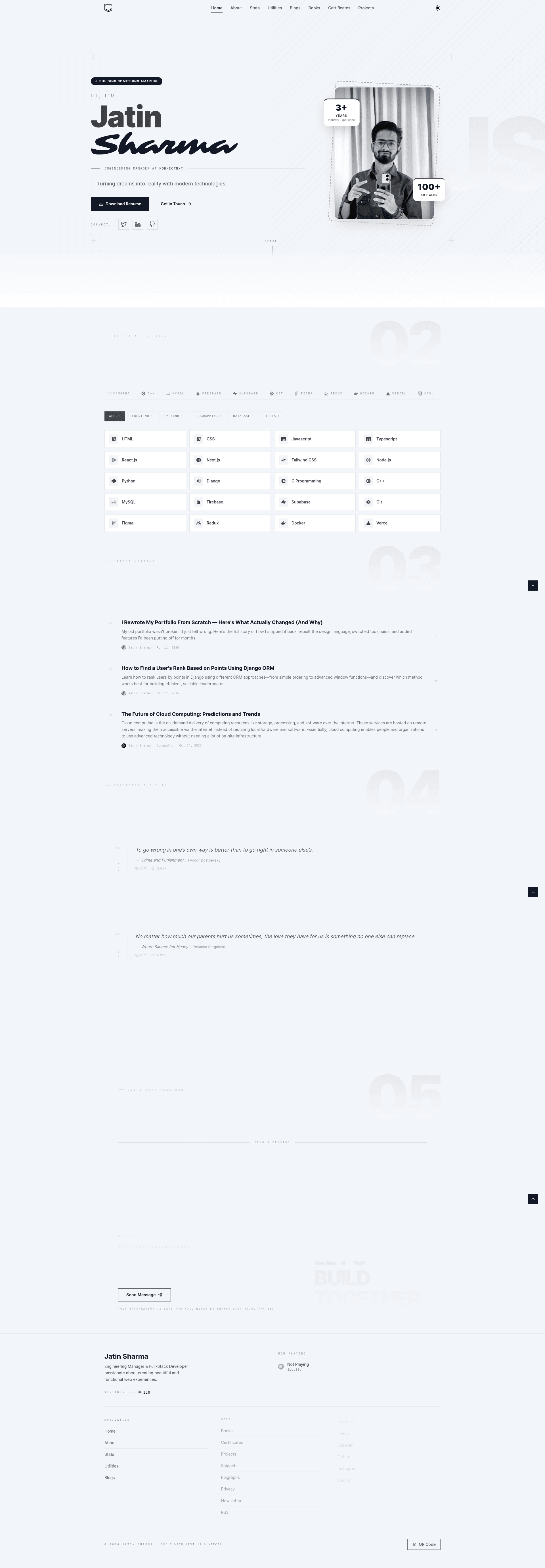
This is my portfolio built with Next.js, Tailwind CSS, Sanity, Spotify API, Dev.to API, MDX, Google Analytics and Vercel.
About this template
j471n.in is a developer portfolio and blog template built with Next.js, Tailwind CSS, MDX, and Supabase, built by the GitHub account j471n to showcase projects, certificates, movies, and live social stats in one place.
What is j471n.in?
j471n.in is a personal portfolio website and open-source template that takes content from Supabase, MDX blog posts, and several external APIs (Spotify, Dev.to, GitHub, TMDB) and renders it as a Next.js site styled with Tailwind CSS. It runs on Vercel and is maintained in the j471n/j471n.in GitHub repository. The site's data layer includes a Supabase database with tables for certificates, movies, projects, views, and user_data, each with a documented schema. The template also includes a blog powered by MDX and an ISR-based revalidation flow that listens to Supabase webhooks to refresh pages.
Key Features
- Next.js + MDX blog — Write posts as MDX files and render them in the Next.js framework; the README links to an in-depth guide on how the portfolio was built.
- Supabase as the content database — Store projects, certificates, movies, and blog-related data in Supabase tables with documented schemas; the project includes SQL table definitions for
certificates,movies,projects,views, anduser_data. - Spotify API integration — Pull and display your current or recently played Spotify data using
SPOTIFY_CLIENT_ID,SPOTIFY_CLIENT_SECRET, andSPOTIFY_REFRESH_TOKENenvironment variables. - Dev.to API integration — Fetch blog statistics from the Dev.to API using a
NEXT_PUBLIC_BLOGS_APItoken and show them on the site. - Google Analytics and Data API — Track visitors with Google Analytics and use the Google Analytics Data API to display how many users visited in the last 7 days via
GA_PROPERTY_ID,GA_CLIENT_EMAIL, andGA_PRIVATE_KEY. - Email.js contact form and newsletter validation — Enables a working contact form with Email.js and validates newsletter signups through the RapidAPI "E-mail Check Invalid or Disposable Domain" endpoint, whose free tier allows 1,000 requests per month.
- TMDB and GitHub integrations — TMDB automatically updates movie and TV show ratings, while the GitHub API fetches your profile details using a personal access token.
- Supabase webhook revalidation —
pages/api/revalidate.tsuses aREVALIDATE_SECRETand a configurable revalidate URL to refresh project and certificate pages when Supabase table events occur.
Who is it for?
j471n.in is aimed at developers who want a personal portfolio that combines a project showcase with a blog and live data from third-party services. It is best suited for developers comfortable with the Next.js ecosystem and willing to configure the many environment variables required for each integration. Specific roles: frontend developers looking for a Next.js + Tailwind portfolio starter; bloggers who write in MDX and want to display Dev.to stats; job-seeking developers who want to highlight projects, certificates, and social profiles with live Spotify/GitHub data.
What can you do with j471n.in?
- Developers — Showcase your projects and certificates by adding rows to the Supabase
projectsandcertificatestables; the home page displays pinned items. - Bloggers — Publish MDX blog posts and connect your Dev.to API token to pull in stats and articles.
- Movie and TV enthusiasts — Maintain a watched list with ratings via the
moviestable or automate it with TMDB credentials. - Personal brand builders — Display live Spotify playing history, GitHub profile data, and 7-day visitor analytics powered by Google Analytics Data API.
How does j471n.in work?
Clone the repository, install dependencies with yarn or npm install, and start the dev server with yarn dev or npm run dev. You must rename .env.example to .env.local and populate every service key; missing values will cause errors, per the README warning. For production, deploy to Vercel and configure Supabase webhooks so that table changes trigger the revalidation API to rebuild pages.
Pros and cons
- Pros — The template bundles a blog, project showcase, certificate list, movie tracker, and live stats from Spotify, GitHub, Dev.to, Google Analytics, and TMDB in a single Next.js project, and the README includes a complete Supabase schema and step-by-step environment setup.
- Cons — Setting up the portfolio requires configuring more than ten environment variables across multiple third-party dashboards, and the README explicitly warns that an incomplete
.env.localwill produce runtime errors.
FAQ
How do I run j471n.in locally?
Clone the repository from GitHub, install dependencies with yarn or npm install, rename .env.example to .env.local, fill in the required API keys, and then start the server with yarn dev or npm run dev. The site runs at localhost:3000.
Why does my Supabase query return an empty array?
The README explains that Supabase tables have no access by default, so you need to create policies. Go to the Supabase dashboard, select your project, click on Policies, and create a new policy that allows read access to your tables. After saving the policy, data queries will work.
Which environment variables are needed for the Spotify integration?
You need three values: SPOTIFY_CLIENT_ID, SPOTIFY_CLIENT_SECRET, and SPOTIFY_REFRESH_TOKEN. The README links to a blog post on j471n.in that explains how to obtain each one, and the same blog also covers other integrations.
Does the template come with a newsletter email validation?
Yes, it uses the RapidAPI endpoint "E-mail Check Invalid or Disposable Domain". You need an API key from RapidAPI; the free tier allows 1,000 requests per month.