Template details
jasonpyau.com
Fully customizable personal portfolio and blog website made with Spring Boot
About this template
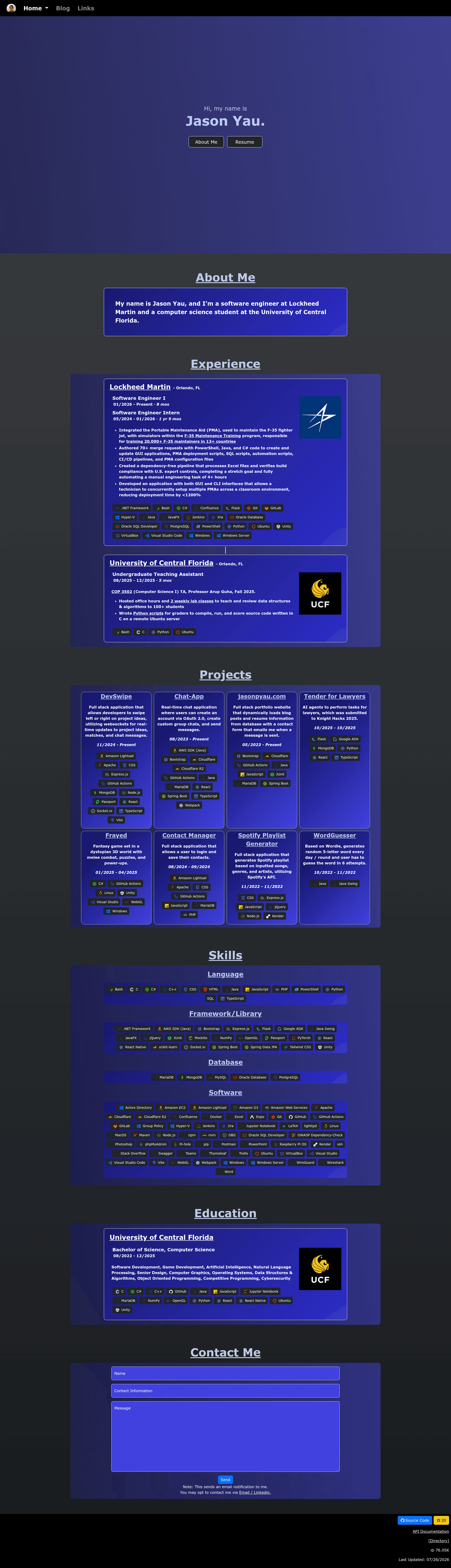
jasonpyau.com is a self-hosted personal portfolio and blog template built with Spring Boot (Java) that renders all content — blog posts, experiences, projects, and skills — from a MariaDB database, so you can update your site through an Admin Panel without editing any code.
What is jasonpyau.com?
jasonpyau.com is an open-source portfolio and blog website project created by Jason Pyau, using Java and Spring Boot for the backend and a separate Java Admin Panel for content management. The website dynamically loads blog posts, experiences, projects, and skills stored in a MariaDB database, and every component is customizable through the Admin Panel. It is designed to be self-hosted; the author runs it on a Raspberry Pi with Cloudflare protection and GitHub Actions to synchronize the main branch and server.
Key Features
- Database-driven content — Blog posts, experiences, projects, and skills are stored in MariaDB and displayed on the site without any code changes.
- Admin Panel — A separate Java application (located in
./admin) lets you modify all website content and settings; it is configured viaAdminPanel.propertiesand runs alongside the Spring Boot backend. - Spring Boot backend — The
./backenddirectory uses the Maven Wrapper (mvnw) to run both the frontend and backend with a singlespring-boot:runcommand; requires Java JDK 17 or later. - Email notifications — The Contact Me form sends email alerts through a Gmail account using an app password, configured via environment variables in
secrets.properties. - Self-hosting setup — The project runs on a Raspberry Pi in the author's deployment, using Cloudflare for protection and GitHub Actions to keep the server in sync with the main branch.
- API documentation — SwaggerHub hosts the API documentation at
https://app.swaggerhub.com/apis-docs/jasonpyau-com/jasonpyau.com/1.0.0.
Who is it for?
- Java developers — Those comfortable with Spring Boot and Maven can deploy and extend a database-driven portfolio without frontend build tooling.
- Self-hosters — People who want full control of their portfolio and blog can run it on a Raspberry Pi or any Ubuntu server with MariaDB.
- Job seekers and freelancers — Anyone who needs a professional portfolio with a blog, projects, and experience sections, and wants to update content without coding.
- Content owners — Users who prefer editing content through an admin interface rather than editing HTML or Markdown files directly.
What can you do with jasonpyau.com?
- Showcase your work — Maintain a personal portfolio with projects, skills, and experience entries that are editable via the Admin Panel.
- Publish blog posts — Write and manage blog posts stored in MariaDB, with the site automatically reflecting changes.
- Handle contact submissions — Configure the Contact Me section to send email notifications to your inbox using Gmail's app password.
- Self-host your resume site — Use it as a living resume that can be quickly updated without redeploying code.
How does jasonpyau.com work?
- Install Java JDK 17 or later and create a MariaDB database.
- Fill in
secrets.propertieswith your database credentials, Spring profile, email sender/receiver, and admin password; fill inAdminPanel.propertieswith the server URL and same admin password. - Run the Spring Boot backend with
sudo bash ./mvnw spring-boot:runfrom the./backenddirectory. - Compile and run the Admin Panel with
sudo bash ./runAdmin.shfrom the./admindirectory. - Access your site and log into the Admin Panel (using the admin password) to customize content.
Pricing
The project is publicly available on GitHub and is free to use; no paid tiers or licenses are mentioned in the README.
FAQ
Is jasonpyau.com free?
Yes, the source code is publicly hosted on GitHub under the jasonpyau/jasonpyau.com repository and can be used at no cost. The README lists no commercial licensing or payment requirements.
What do I need to run jasonpyau.com?
You need a server with Java JDK 17 or later, MariaDB installed with a database created, and optionally a Gmail account with an app password for contact form notifications. Both secrets.properties and AdminPanel.properties must be configured with your environment values.
Can I update content without modifying code?
Yes, all site content is stored in the MariaDB database. The Admin Panel provides an interface to change blog posts, experiences, projects, and skills, and the website reflects those changes immediately without any code edits.
Does jasonpyau.com have an admin panel?
Yes, there is a separate Java Admin Panel in the ./admin directory. It is compiled and run independently from the backend, and it uses the same admin password to let you manage the website's content and settings.