Template details
Phantom
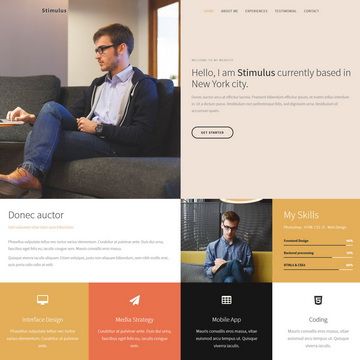
Phantom is an exciting professional Bootstrap resume template. It’s exclusively crafted to convince employers in an impressive way.
About this template
Phantom is a free, open-source Bootstrap resume and portfolio template by Themefisher, built to present professional experience, education, skills, and work samples to employers. It is a multi-page static HTML template distributed on GitHub under the MIT license, and it ships with a Gulp-based development workflow for easy customization and production builds.
What is Phantom?
Phantom is a professional resume and portfolio template built with Bootstrap v3.3 by Themefisher, designed to convince employers with a structured presentation of your credentials. It takes standard resume content — education, work experience, skills, services, and project portfolios — and renders it as a multi-page static website with eight ready-made pages: Home, Welcome, About, Services, Resume, Works, Testimonials, and Contact. The template runs on any static web host without a backend, and the code is released under the MIT license, meaning you can freely use, modify, and redistribute it.
Key Features
- Eight ready-made pages — Home, Welcome, About, Services, Resume, Works, Testimonials, and Contact cover the full arc of a job-seeking personal site, so you don't need to build any page from scratch.
- Bootstrap 3.3 foundation — The responsive grid, UI components, and utility classes come from Bootstrap v3.3, and you can edit the HTML and CSS files directly in the
themefolder. - jQuery-powered interactions — Includes jQuery plus Isotope for filterable works grids, Slick for image sliders, Nicescroll for custom scrollbars, and Animate CSS for entrance animations.
- Google Fonts integration — Typography is loaded from Google Fonts, letting you change the font family by editing the template's font links without altering CSS files.
- Gulp development workflow — With Node.js and Gulp installed,
npm run devstarts a local server with live reload, andnpm run buildgenerates a production-readythemefolder. - Free MIT code license — The template's code is free to download, adapt, and ship; only the demo images are excluded because they carry their own licenses.
- Live preview and documentation — A working demo is available at demo.themefisher.com/phantom, and detailed setup and customization docs live at docs.themefisher.com/phantom.
Who is it for?
Phantom is aimed at individuals who need a credible online presence for their career. Early-career professionals can use it to showcase their education, work history, and skills in a way that stands out to recruiters. Freelancers and independent contractors can present their services and past projects through the Services and Works pages to win new clients. Designers and developers who want a customizable static site will appreciate the Gulp-based tooling, which lets them edit source files and produce a minified production build without a backend.
What can you do with Phantom?
- Job seekers: Build a multi-page resume site with a dedicated Resume page, an About page, and Testimonials to back up your claims, and share the link with potential employers.
- Freelancers: Create a portfolio hub with a Services page listing your offerings and a Works page that uses Isotope to let visitors filter projects by category.
- Students: Put together a personal homepage with a Welcome page and Contact page to present your academic background and make it easy for recruiters to reach you.
How does Phantom work?
Download the template from the GitHub repository and unzip it; the theme folder contains the HTML and CSS files you can edit immediately. For advanced customization, install Node.js and the Gulp CLI globally, open the project in an IDE, run npm install to pull dependencies, then npm run dev to launch a local server that live-reloads on save. Once you finish editing, run npm run build to compile a production theme folder ready for any static hosting.
Pricing
Phantom is free to download under the MIT license, with no paid tier for the template itself. Themefisher does offer paid technical support and integration help via email, which is separate from the open-source code.
FAQ
Is Phantom free to use?
Yes, the Phantom template code is released under the MIT license, so you can download, modify, and use it for personal or commercial projects without paying any license fee. The demo images are not included in the free license and must be replaced with your own or properly licensed assets.
What do I need to run Phantom locally?
You need Node.js installed and the Gulp CLI installed globally via npm install --global gulp-cli. After that, open the project in an IDE like VS Code, run npm install once, and then use npm run dev to start a local development server with live reload.
Can I use the demo images in my project?
No. The images shown in the demo are included only for demonstration purposes and have their own licenses, so you are not allowed to redistribute or use them in your own site. You should replace them with your own photos or images you have permission to use.
How do I create a production build?
After making your customization changes, run npm run build in the project terminal. This command produces a theme folder containing all your modifications, and you can upload that folder to any static web host to deploy your site.