Template details
VueJS Portfolio Template
💼 Portfolio template using VueJs framework, CosmicJS API and Bootstrap
About this template
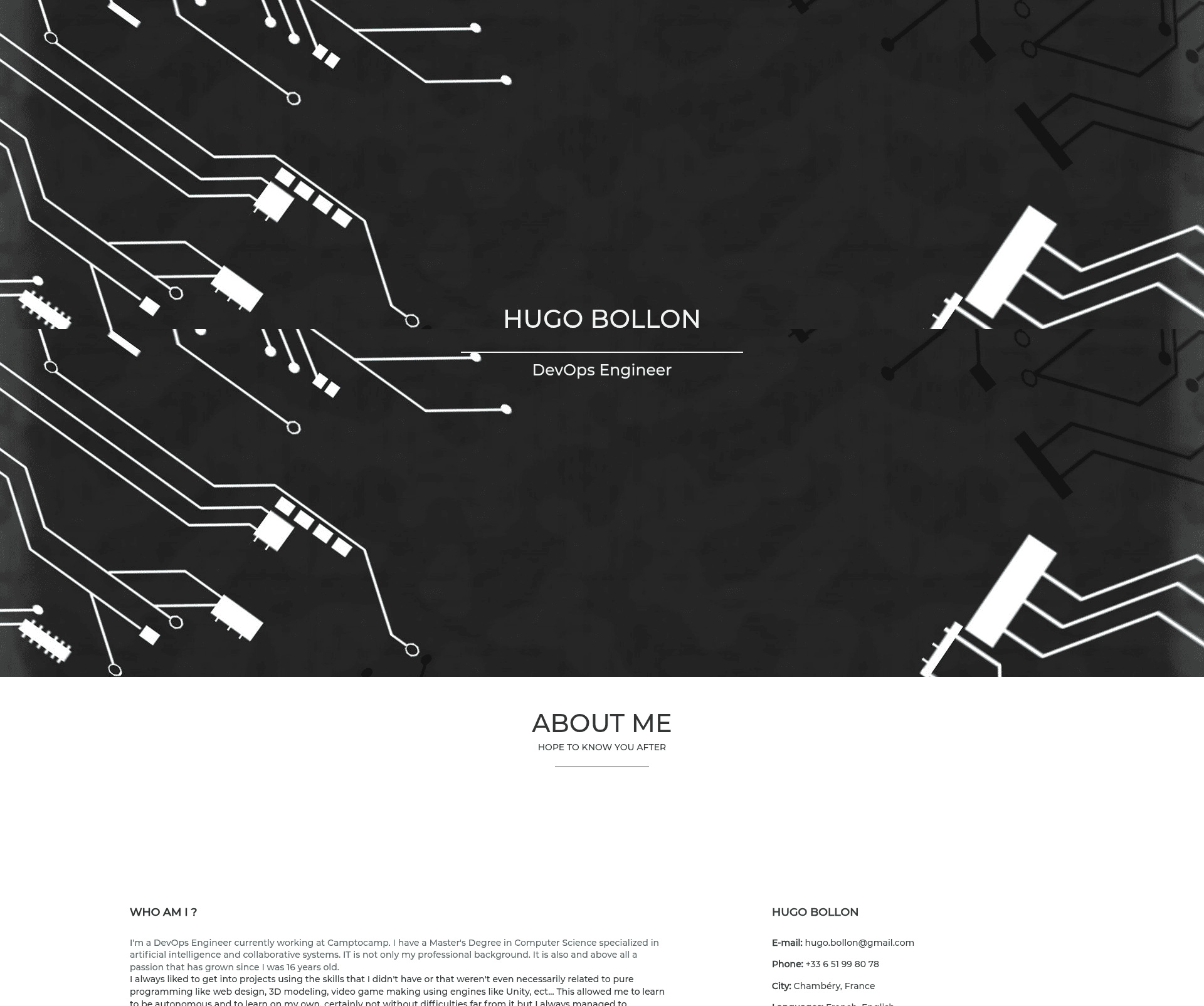
Portfolio VueJS is a one-page portfolio template built with Vue.js, Bootstrap 4.5, and SCSS that renders a professional portfolio site with content managed through the CosmicJS headless CMS.
What is VueJS Portfolio Template?
VueJS Portfolio Template is a free, open-source starter for a single-page personal portfolio. It takes content from a CosmicJS bucket — such as bio, projects, and links — and renders a responsive, animated page with a material design aesthetic. The template is built with Vue CLI, so it supports hot-reload development, production builds, and linting out of the box. It was created by Hugo Bollon and is available on GitHub under an MIT license, with a live demo at hugobollon.me.
Key Features
- One-page layout — A single-page design that keeps a visitor's scroll focused on showcasing your work, with animated layout sections.
- Vue.js framework — Built with Vue.js and Vue CLI, giving you component-based structure and standard npm scripts (
npm run serve,npm run build,npm run lint). - CosmicJS API content management — Add your CosmicJS credentials (token, bucket slug, read key) to a
.envfile; an import JSON atdata/portfolio-vuejs_import.jsonlets you seed the required object types quickly. - Bootstrap 4.5 and SCSS — Styling is done with Bootstrap 4.5 and SCSS, so you can customize variables and theme the design without writing plain CSS.
- Responsive design — The layout adapts to phone, tablet, and desktop viewports.
- Material design — The visual style follows Google's material design principles for components and animations.
- MIT license — The project is free to use, modify, and redistribute, including for commercial projects.
Who is it for?
The template is for developers and designers who want a minimal yet styled portfolio without building a site from scratch. Developers who know Vue.js (or want to learn it) can use this as a base project to customize and extend. People who need to update portfolio content frequently will benefit from CosmicJS, because editing data happens in the CMS interface rather than in code. Freelancers can also use it to get a live portfolio online quickly, as shown in the demo.
What can you do with VueJS Portfolio Template?
- Personal portfolios: Add your professional background, featured projects, and social links in CosmicJS, rebuild, and publish the site.
- Learning Vue CLI: Follow the setup steps to practice a real Vue CLI workflow including dev server, production build, and linting.
- Custom theme experiments: Because styling is SCSS with Bootstrap 4.5, you can override variables and create a different color scheme or layout with minimal effort.
- CMS integration practice: The template demonstrates how to connect a Vue.js frontend to a headless CMS using API credentials.
How does VueJS Portfolio Template work?
After cloning the repository, you run npm install to install dependencies. You then create a CosmicJS account and a new bucket, and update the .env file with your token, bucket slug, and read key. To pre-populate the bucket, import data/portfolio-vuejs_import.json from the import/export settings in your CosmicJS bucket, and then edit content through the CosmicJS interface. Finally, use npm run serve to develop locally or npm run build to compile a minified production build.
FAQ
Does this template require a CosmicJS account?
Yes. The portfolio content is fetched from the CosmicJS API, so you must create a CosmicJS bucket and provide your credentials in the .env file before customizing.
Is VueJS Portfolio Template free to use?
Yes, the project is released under the MIT license, so you can freely use, modify, and distribute it. The live demo is also publicly accessible.
How do I update my portfolio content?
All content changes are made in CosmicJS. Once your credentials are set up and the import JSON is loaded, you can edit existing entries or add new ones in the CosmicJS dashboard, then rebuild the site.
What is the output of the build command?
The npm run build command compiles and minifies the Vue.js application into production-ready static files that you can deploy to any static web host.