Template details
Jekyll Book Framework
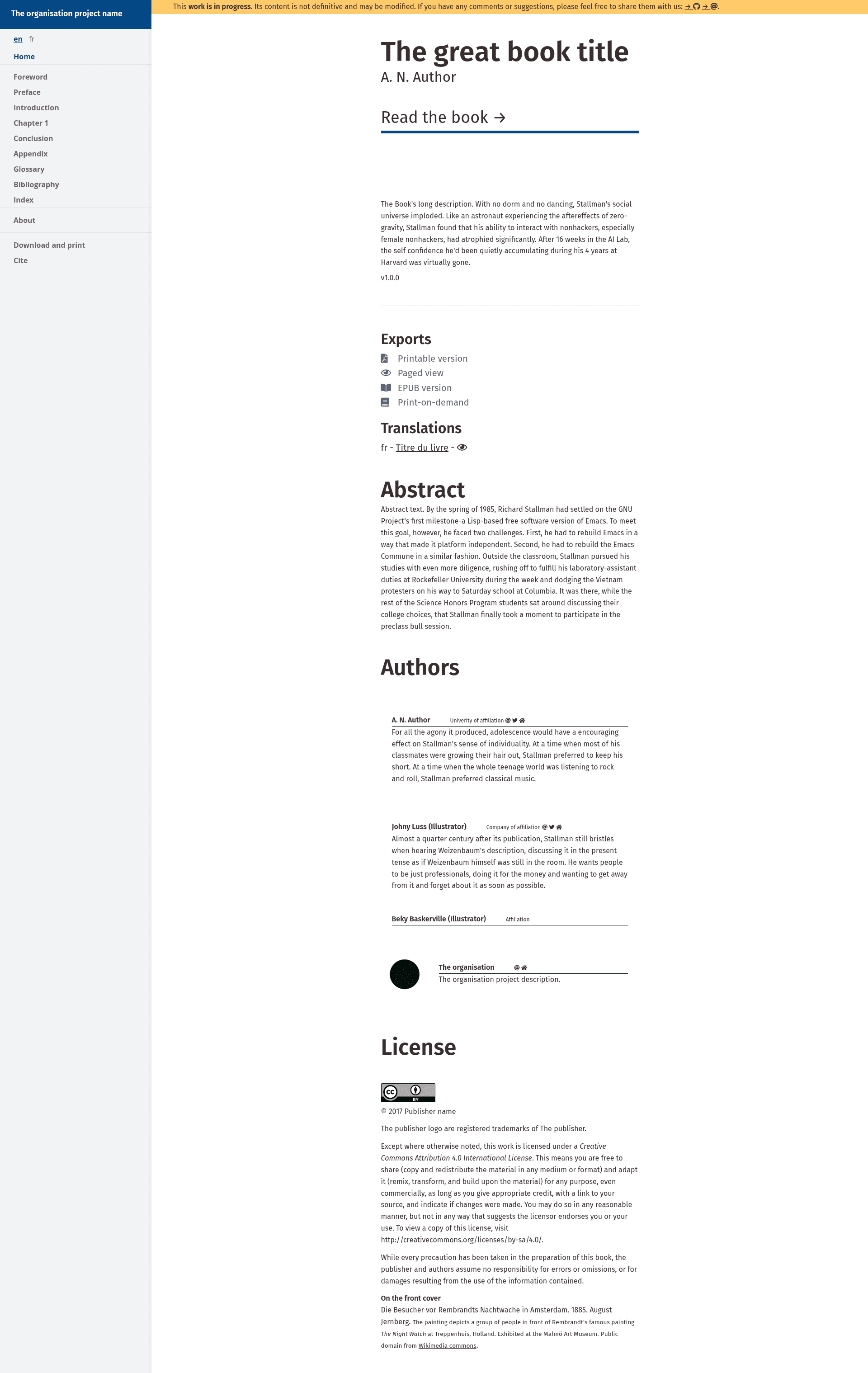
A Jekyll framework for publishing book in multiple format (HTML, PDF, epub)
About this template
Jekyll Book Framework is an open-source Jekyll template for writing and publishing books in multiple formats, turning Markdown manuscripts into a static HTML site with auto-generated PDF output.
What is Jekyll Book Framework?
It is a static site generator framework built on Jekyll (Ruby) and paged.js that accepts Markdown files as the source of a book and produces HTML and PDF editions. The project was created by Michael Ravedoni and is inspired by Antoine Fauchié's modular publishing system used for his thesis. It is distributed under the MIT License and can be deployed to Netlify, GitHub Pages, or any static web server via RSync/FTP.
Key Features
- Markdown writing — Write book content in Markdown format, with files organized under
book/text; a separatebook/frdirectory supports translations. - PDF auto generation — Uses paged.js to automatically paginate and generate a PDF during the Jekyll build.
- Jekyll static site generation — Leverages the Ruby-based Jekyll static site generator with a clean default interface for local preview at
http://localhost:4000. - Bibliography support — Includes the jekyll-scholar plugin and a
_bibliographydirectory for BibTex (.bib) reference management. - Flexible content structure — Separate directories for
materials(drafts and media),images, andoutput(generated formats), plus standard Jekyll folders like_layouts,_sass, and_includes. - Multiple deployment options — Pre-configured support for Netlify via
netlify.toml, GitHub Pages viabin/github-deploy.sh, and RSync/FTP via npm scripts. - Customizable styling — Edit stylesheet variables in
book/stylesand SCSS files in_sassto change the book's design. - Development workflow — Install dependencies with
bundle installandnpm run install, then usenpm run devfor local development andnpm run buildfor production builds.
Who is it for?
- Academic authors — Write a thesis or scholarly book with Markdown and generate a formatted PDF, similar to the thesis that inspired the framework.
- Independent publishers — Produce HTML and PDF editions from a single source without using commercial layout software.
- Technical writers — Maintain documentation or manuals in version-controlled Git with built-in bibliography handling and multi-format export.
- Developers — Customize the Jekyll theme, add plugins, or extend the deployment scripts to fit specific publishing pipelines.
What can you do with Jekyll Book Framework?
- Publish a book online — Create a static website of your book that can be hosted on GitHub Pages or Netlify with automatic rebuilds on push.
- Generate a print-ready PDF — The paged.js integration produces a paginated PDF without manual layout work.
- Manage translations — Use the
book/frdirectory structure to maintain a French translation alongside the original content. - Track changes with Git — Use the recommended commit conventions (
admin,style,edit,fix,org,gen,test) to organize contributions and revisions.
How does Jekyll Book Framework work?
Start by cloning or downloading the repository, then rename the folder to your book's name. Edit the metadata in _data/meta.yml, place your Markdown chapters in book/text, and adjust styles in book/styles. After installing Jekyll and npm dependencies, run npm run dev to preview locally or npm run build to generate the production site in _site. Deployment is handled through Netlify's automated builds, the github-deploy.sh script, or RSync commands.
FAQ
Does Jekyll Book Framework require Jekyll and Ruby?
Yes, the local build requires Jekyll and Ruby to be installed, along with npm for the provided scripts. You can install them with gem install jekyll bundler and by running bundle install in the project folder.
What file formats can it output?
The current version outputs a static HTML website and generates a PDF automatically with paged.js. Epub, mobi, and standalone Markdown export are on the roadmap but not yet implemented.
Can I use Jekyll Book Framework for free?
The framework is open source under the MIT License, so you can use it freely for personal and commercial projects.
How do I deploy my book to the web?
You can deploy to Netlify (with automatic builds from GitHub), GitHub Pages by running npm run deploy-github, or to any static host via RSync/FTP using the provided npm scripts.
Alternatives
- electric-book — A Jekyll-based book toolkit by Electric Book Works, listed as an inspiration for this project.
- Quire — A multi-format publishing framework from Getty Publications, also cited as an inspiration.