Template details
Material Bootstrap Wizard
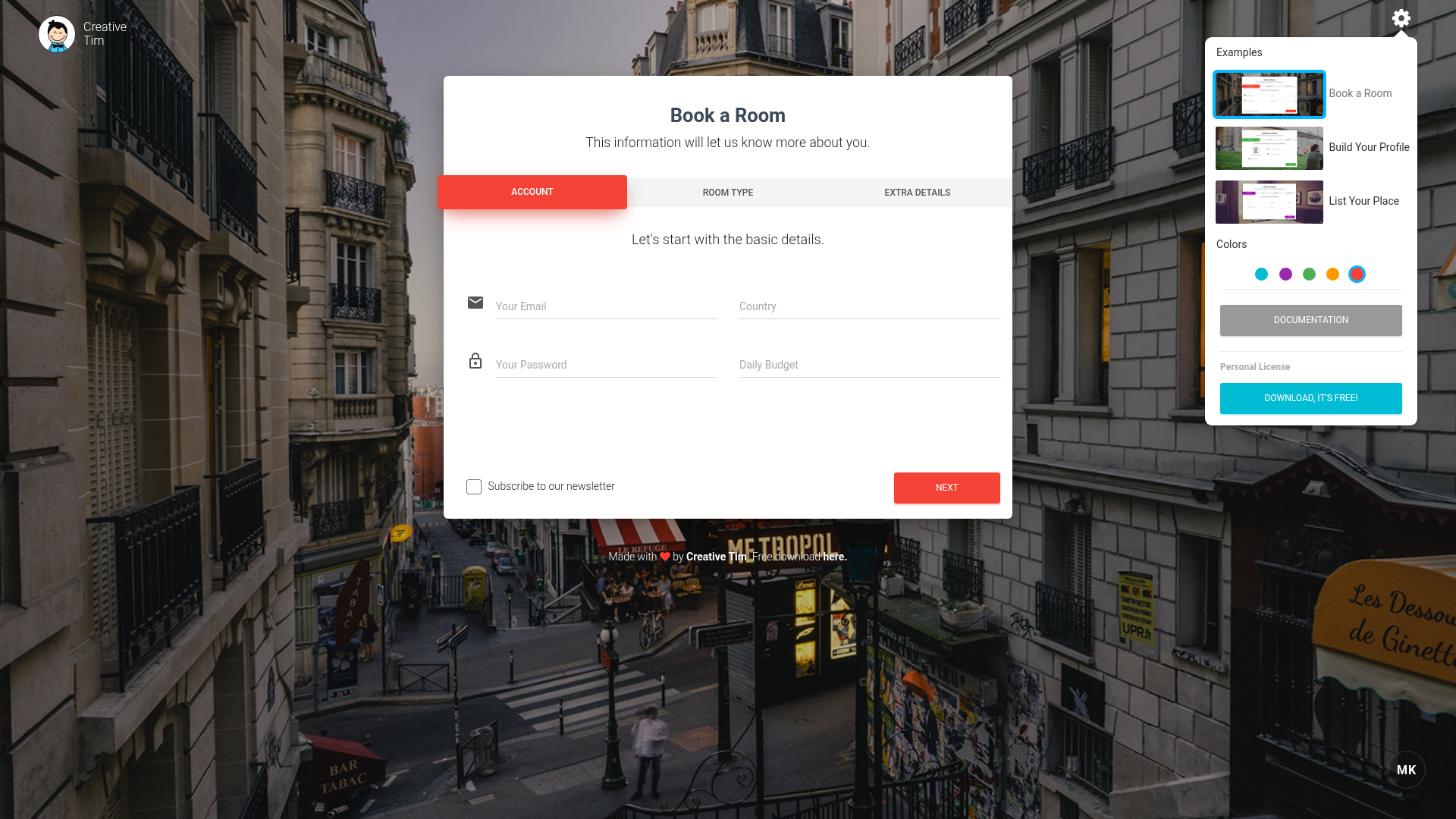
A responsive multi-step form wizard built on Bootstrap with Material Design styling, including three example flows and five color options.
About this template
Material Bootstrap Wizard is a free, responsive multi-step form wizard for Bootstrap that breaks long forms into step-by-step chunks, inspired by Google's Material Design and published by Creative Tim.
What is Material Bootstrap Wizard?
Material Bootstrap Wizard is a JavaScript plugin and UI template that converts long forms into a step-by-step wizard interface, so users see one section at a time instead of an endless page. It takes HTML form fields as input and outputs a multi-step flow with progress indication, validation, and five color schemes. The wizard runs on Bootstrap with jQuery and includes the jQuery Validation plugin for form checking. The design elements come from Creative Tim's Material Kit, and the underlying wizard plugin was originally created by Vadim Vincent Gabriel.
Key Features
- Three ready-made examples — the download includes wizard-book-room.html, wizard-build-profile.html, and wizard-list-place.html, each demonstrating a different use case for hotel booking, profile signup, and listing a property.
- Five color options — the wizard ships with five color schemes that you can switch between for the buttons, progress bar, and accents.
- Responsive layout — the wizard is fully responsive, so steps and form fields reflow on mobile, tablet, and desktop widths.
- Step-by-step validation — built-in integration with jQuery Validate runs checks on each step before the user can continue (validation on the next-step check was added in version 1.0.1).
- Sass source files — the styles are provided in SCSS (assets/sass/material-bootstrap-wizard.scss and a partials folder) as well as compiled CSS, so you can customize variables and rebuild.
- Lightweight asset set — the package contains bootstrap.min.css, material-bootstrap-wizard.css, jquery.min.js, bootstrap.min.js, jquery.bootstrap.js, and jquery.validate.min.js.
- MIT licensed — since version 1.0.2 (March 2017), the project is released under the MIT license, allowing free commercial and personal use.
Who is Material Bootstrap Wizard for?
- Web developers — anyone building Bootstrap-based sites who needs to break a long registration, checkout, or profile form into manageable steps without writing the wizard logic from scratch.
- UI designers — designers who want a Material Design–styled form component that they can restyle with the included SCSS variables.
- Product teams — teams running A/B tests on form completion can use the wizard's step indicator and validation to reduce drop-off on long forms.
What can you do with Material Bootstrap Wizard?
- Hotel booking flow: the book-room example collects dates, room type, and guest details across steps, showing how a reservation form can be split.
- User registration flow: the build-profile example walks through account setup information in stages, with validation at each step.
- Host listing flow: the list-place example lets property owners enter location, amenities, and photos in a guided sequence.
How does Material Bootstrap Wizard work?
The wizard works by dividing your form fields into separate steps and showing one step at a time. Users click or navigate to the next step only after the current step passes validation, and a progress bar at the top shows how many steps remain. Navigation is handled by jQuery, and you can use the plugin's documented API to customize behavior.
Pricing
Material Bootstrap Wizard is free. You can download the source from GitHub or from Creative Tim's product page, and it is licensed under MIT.
FAQ
Is Material Bootstrap Wizard free?
Yes, the wizard is free to download and use. It was switched to an MIT license in version 1.0.2, so you can use it in commercial projects without paying a license fee.
What files are included in the download?
The download contains an assets folder with CSS, JS, Sass, and image files, plus a documentation folder and three example HTML files: wizard-book-room.html, wizard-build-profile.html, and wizard-list-place.html. The JavaScript includes jQuery, Bootstrap, the validation plugin, and the wizard plugin itself.
Does Material Bootstrap Wizard work with any Bootstrap version?
The package includes its own bootstrap.min.css and bootstrap.min.js, so it works out of the box with the bundled version. If you want to use it with a different Bootstrap release, you will need to check compatibility yourself; the README does not specify a version number.
What examples come with the wizard?
Three examples are included: booking a hotel room, building a user profile, and listing a place. Each demonstrates a realistic multi-step form layout you can reuse or adapt.