Template details
Jekyll-Markdown
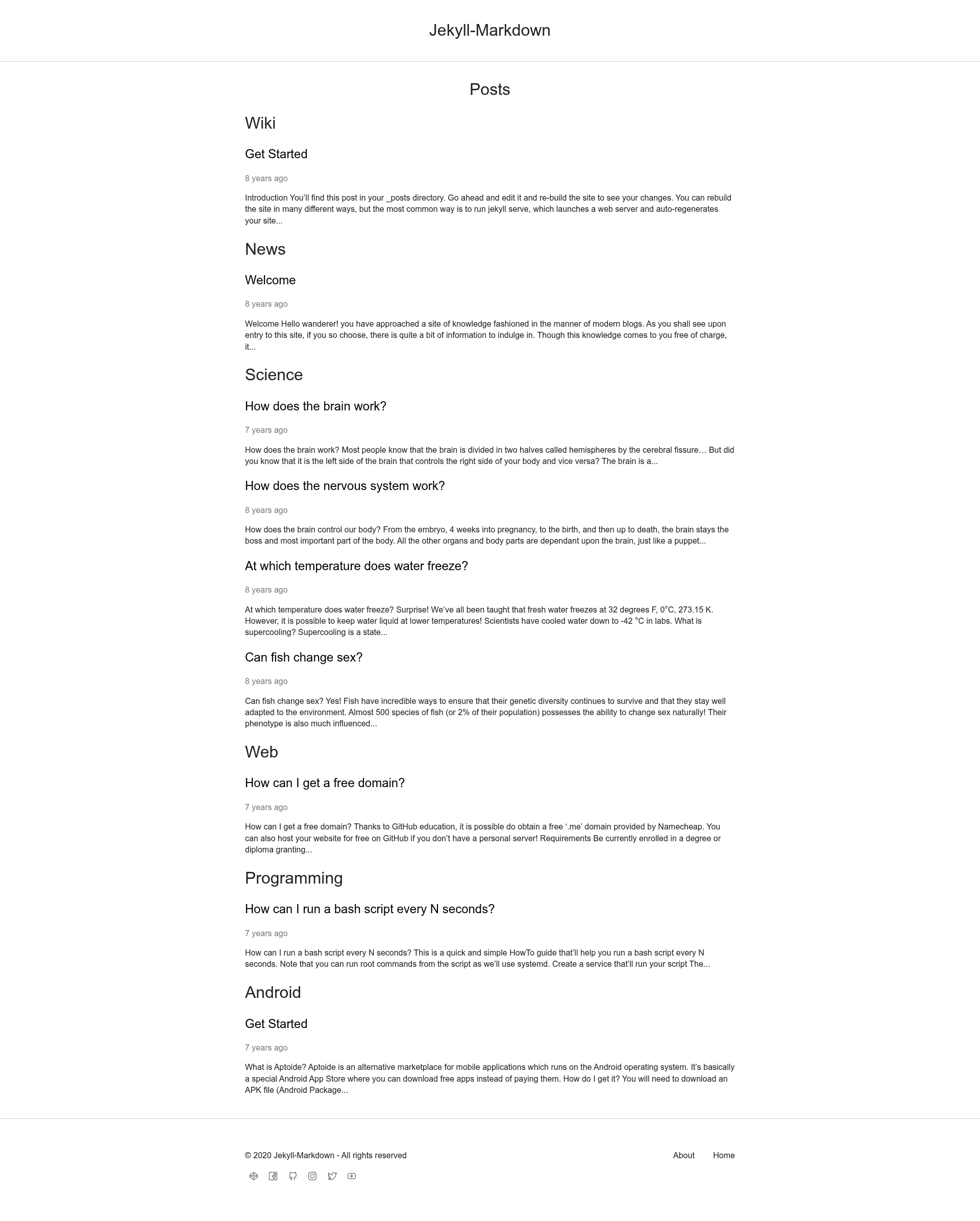
A pure black and white responsive markdown blog generator with categories, code highlighting and LaTeX formulas.
About this template
Jekyll-Markdown is an open-source, pure black-and-white responsive blog template for Jekyll that generates a blog from Markdown posts, with category sorting, code highlighting, and LaTeX formula support.
What is Jekyll-Markdown?
Jekyll-Markdown is a minimal blog generator built on the Jekyll static site generator by Luka Lafaye de Micheaux, released under the MIT License. It takes Markdown files placed in a _posts folder and outputs a static blog with no database or server-side rendering. The template is written with Markdown as its lightweight markup language and uses Jekyll's built-in tooling, so the only runtime requirement is a Jekyll installation on the machine that builds the site.
Key Features
- Pure black and white design — a monochrome theme with no color accents, built around typography and whitespace.
- Responsive layout — the blog adapts to desktop, tablet, and mobile screen widths without a separate mobile theme.
- Category sorting — posts can be organized into categories and sorted accordingly, as stated in the project's feature list.
- Code highlighting — code blocks written in Markdown posts are syntax-highlighted in the rendered blog.
- LaTeX formula support — mathematical formulas written in LaTeX render correctly inside post content, covering technical and academic writing.
- Jekyll static site generator — the build relies on Jekyll, which outputs plain HTML, CSS, and JavaScript files deployable to any static host.
- Markdown content workflow — every post is a Markdown file in the
_postsfolder, following Jekyll's standard filename conventions. - Single-file configuration — site-wide settings such as title and metadata are edited in one
_config.ymlfile.
Who is it for?
Developers and technical writers who already author in Markdown use Jekyll-Markdown to publish a clean blog without a CMS or database. Students and researchers use it to write posts containing LaTeX formulas that render in the browser. Minimalist bloggers who want a text-focused, black-and-white reading experience use it as a low-friction publishing setup they can run locally with jekyll s.
What can you do with Jekyll-Markdown?
- Developer bloggers: publish syntax-highlighted code tutorials as Markdown posts and deploy the generated static HTML to any hosting service.
- Academics and researchers: write math-heavy posts with LaTeX formulas that render correctly for lecture notes or research logs.
- Personal site owners: run the included local server to preview the entire blog at localhost:4000 before publishing.
How does Jekyll-Markdown work?
After installing Jekyll, move into the Jekyll-Markdown directory and run jekyll s to start a local web server at localhost:4000. Configure the website in _config.yml, then add posts to the _posts folder following the included help post as a content example.
Pricing
Jekyll-Markdown is free and open source under the MIT License, so it can be used, modified, and redistributed without a paid license.
Alternatives
- Chirpy, a Jekyll blog theme with built-in search and a PWA mode
- Minimal Mistakes, a larger Jekyll theme by Michael Rose
FAQ
Is Jekyll-Markdown free?
Yes. The project is released under the MIT License, which permits free use, modification, and redistribution, including for commercial projects.
How do I run Jekyll-Markdown locally?
Install Jekyll from the official installation guide, move into the Jekyll-Markdown directory, and run jekyll s. The blog is then available at localhost:4000 in your web browser.
Does Jekyll-Markdown support LaTeX formulas?
Yes. LaTeX formulas written inside Markdown posts are rendered as part of the generated blog, which makes the template suitable for mathematics, science, and engineering content.
How do I add a new post?
Create a Markdown file in the _posts folder using Jekyll's date-prefixed filename convention, and model the front matter and content on the help post included in the repository.
Can I deploy Jekyll-Markdown to GitHub Pages?
Jekyll is a static site generator, and GitHub Pages supports Jekyll natively, so you can host the generated blog there by pushing the repository to a GitHub Pages-enabled branch.