Template details
Jekyll Update Pages Action
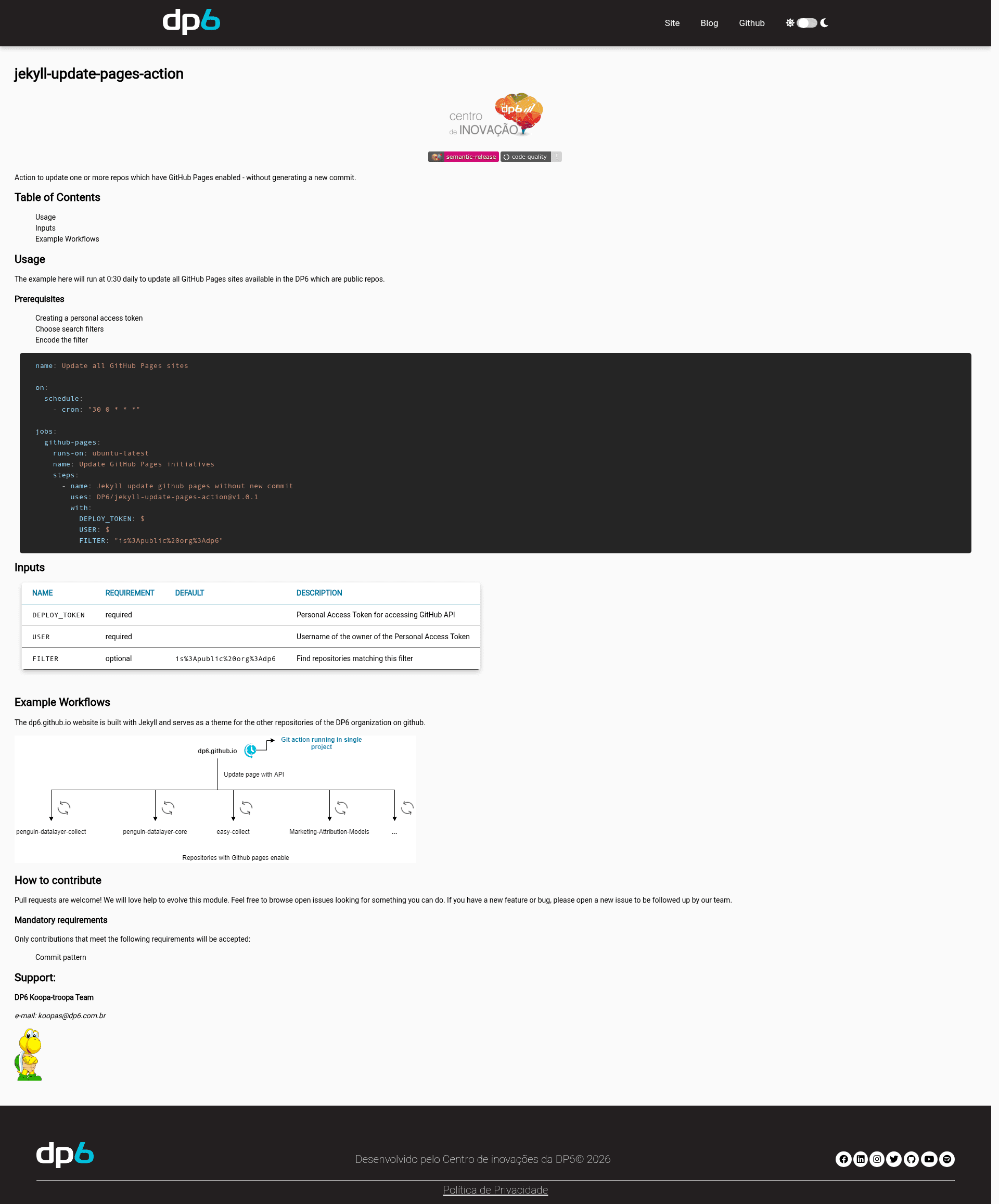
GitHub Action to update multiple GitHub Pages sites without generating a new commit.
About this template
Jekyll Update Pages Action is a GitHub Action that updates one or more GitHub Pages-enabled repositories without generating a new commit, using a GitHub search filter to locate repos and a personal access token for API access. Built and maintained by the DP6 team (the "Koopa-troopa Team"), this action is designed for organizations that run multiple Jekyll-based Pages sites and want to trigger rebuilds in bulk from a single scheduled workflow.
It takes three inputs: a required DEPLOY_TOKEN (personal access token), a required USER (the username of that token's owner), and an optional FILTER (URL-encoded GitHub repository search query, defaulting to is%3Apublic%20org%3Adp6). The action runs on ubuntu-latest and is invoked as a workflow step with uses: DP6/jekyll-update-pages-action@v1.0.1. Its output is a set of updated Pages sites that have been rebuilt without a new commit in each repo.
What is Jekyll Update Pages Action?
Jekyll Update Pages Action is a GitHub Action that updates multiple GitHub Pages repositories in a single automated run without creating new commits. It takes a personal access token, a username, and a repository search filter as inputs, and it outputs updated Pages sites by triggering rebuilds through the GitHub API. It runs on GitHub's ubuntu-latest runner and is published by the DP6 organization.
Key Features
- Bulk repository updates — Finds all repositories matching a single URL-encoded GitHub search filter and updates every Pages site in one run.
- No new commit — Triggers a Pages rebuild without adding a commit, keeping repo histories clean when only templates, themes, or dependencies change.
- Scheduled automation — The provided example runs daily at 0:30 via a cron schedule, making unattended updates possible.
- GitHub API integration — Uses a personal access token to authenticate against the GitHub API; the
USERinput identifies the token owner. - Configurable search filter — The default filter targets public repos in the
dp6organization, but any valid GitHub repository search query can be used. - Simple YAML setup — A complete workflow example is shown in the README with just three
with:inputs.
Who is it for?
- Multi-repo organizations — Teams like DP6 that run many GitHub Pages sites and need to push updates to all of them without manual commits.
- Jekyll theme maintainers — Developers who update a shared Jekyll theme and want all downstream Pages sites to rebuild automatically.
- CI/CD engineers — Those who want to schedule Pages refreshes on a cron timer, for example to pick up new content from data files or external sources.
What can you do with it?
- Organization admins: Set a filter like
org:myorg is:publicand run the action on a schedule to keep every public Pages site in the org updated. - Theme authors: After releasing a new version of a Jekyll theme, run this action to redeploy all sites that reference that theme without touching each repo's commit history.
- Automation builders: Combine it with other workflow steps to update Pages sites when a dependency changes, such as a shared data repository or a gem update.
How does the action work?
First, create a personal access token with the necessary scopes and URL-encode your chosen repository search filter. Then add a workflow step referencing DP6/jekyll-update-pages-action@v1.0.1, passing the token, the username, and the filter. The action uses the GitHub Search API to list matching repositories and triggers a Pages update for each, without creating commits.
Pros and cons
- Pros: Updates many repos at once; avoids commit noise; runs on a schedule with no manual intervention.
- Cons: Requires a personal access token stored as a secret; the default filter is specific to DP6's organization, so other users must override it.