Template details
Landing Pad
Free open-source Astro template for a link-in-bio landing page with Keystatic CMS integration.
About this template
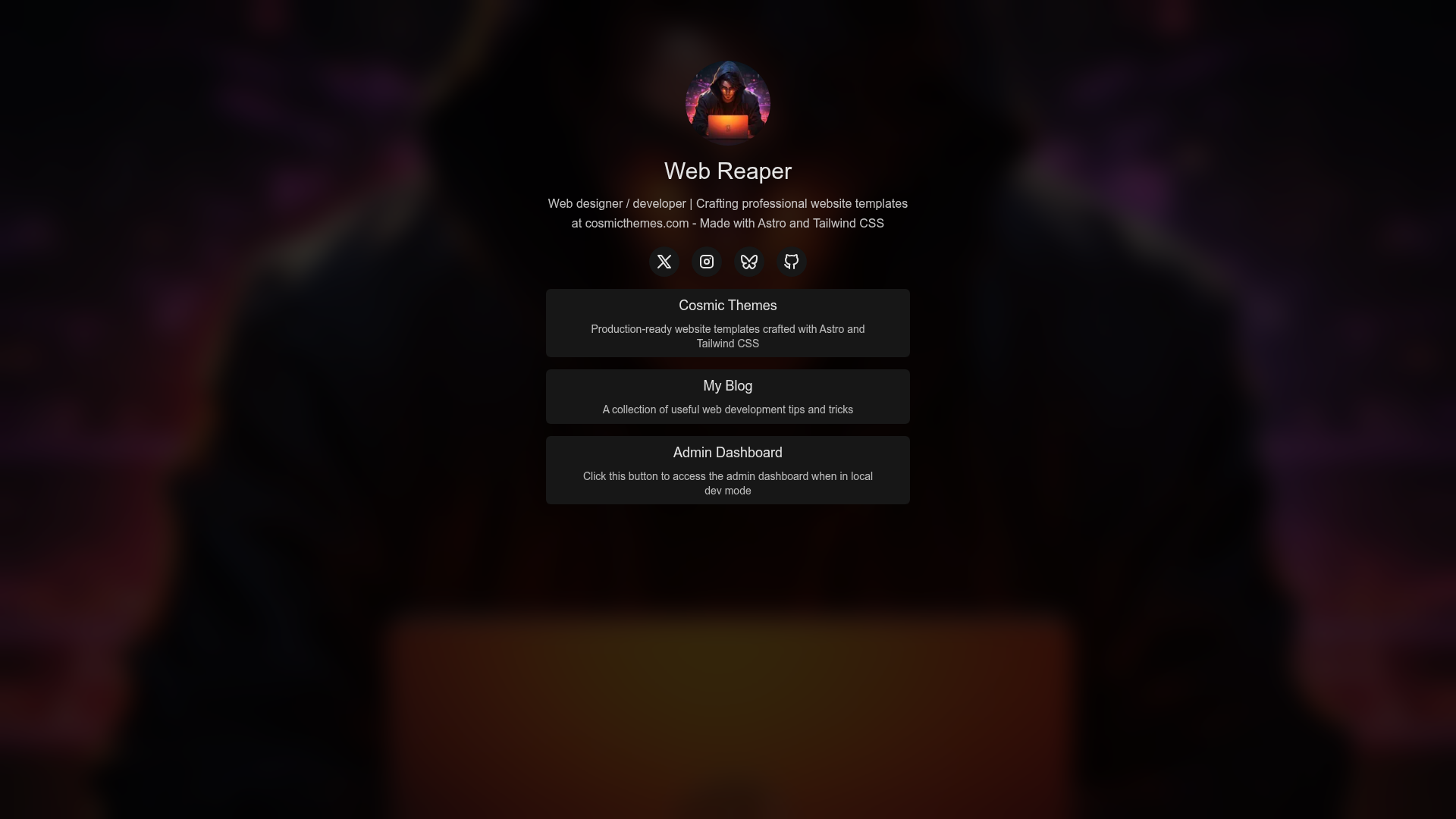
Landing Pad is a free, open-source Astro template by Cosmic Themes that creates a single-page link-in-bio site to organize links to your projects, social profiles, and other online presences.
What is Landing Pad?
Landing Pad is a production-ready landing page theme inspired by Linktree, built with Astro and styled with Tailwind CSS v4. It takes your content — written either as markdown files in src/data/ or entered through the optional Keystatic CMS — and builds a static site that lists your links and socials in one place. The theme is created and maintained by Cosmic Themes, and the live demo is available at landingpad.cosmicthemes.com. It ships with built-in image optimization via astro:assets, plus pre-configured Prettier and ESLint for code formatting and linting.
Key Features
- Link-in-bio landing page — A single-page template designed to present a collection of links, inspired by Linktree, that compiles to a fully static site on build.
- Keystatic CMS integration — Optional content management: edit links and text at the
/adminroute (e.g.,localhost:4321/admin) or directly in markdown files undersrc/data/. - Tailwind CSS v4 styling — All styles are built with Tailwind CSS v4, with color and design tokens adjustable in
tailwind.config.cjs. - Astro image optimization — Uses
astro:assetsfor automatic image optimization without extra configuration. - Pre-configured tooling — Prettier and ESLint are set up out of the box for consistent formatting and code quality.
- Open source license — Released under the GPL-3.0 license; purchasers of the All Access plan get a no-attribution license.
Who is it for?
Landing Pad suits developers and creators who want a fast, minimal link-sharing page without building from scratch. Bloggers and YouTubers can replace a paid Linktree subscription with a self-hosted page they control. Indie hackers and open-source maintainers can point the page at their GitHub repos, project demos, and social channels. Anyone comfortable with the command line can get it running in minutes using the quickstart steps.
What can you do with Landing Pad?
- Creators and influencers: Publish a single link hub for Instagram, TikTok, or YouTube bios that routes followers to your store, newsletter, and videos.
- Open-source maintainers: Showcase all your repositories and documentation links from one custom domain.
- Developers: Use the template as a starting point for a personal landing page, then extend it with Astro components in
src/components/. - Small businesses: Keep a clean page of contact links, booking pages, and product links for a temporary hover or print marketing campaign.
How does Landing Pad work?
Set-up follows a standard Astro workflow. Fork the repository and clone it locally, run npm install and npm run dev to start the dev server at localhost:4321, then edit content through the Keystatic admin UI at localhost:4321/admin or by editing the markdown files in src/data/. When you are done, update the site URL in astro.config.mjs and /public/robots.txt, and deploy the generated static files to Netlify, Vercel, Cloudflare, or any other static host.
Pricing
Landing Pad is free and open source under the GPL-3.0 license. Cosmic Themes also offers an All Access purchase that grants a no-attribution license, so you do not have to credit the theme on your site.
FAQ
Is Landing Pad free?
Yes, Landing Pad is free and open source under the GPL-3.0 license. A separate paid All Access option from Cosmic Themes provides a no-attribution license, letting you use the theme without visible credit.
How do I edit the links shown on my Landing Pad page?
You can edit content in two ways: use the Keystatic CMS interface at localhost:4321/admin while the dev server is running, or edit the markdown files stored in src/data/. The CMS button is also visible on the demo site's admin dashboard.
What tech stack does Landing Pad use?
Landing Pad is built on Astro and styled with Tailwind CSS v4. It integrates Keystatic CMS for content editing, uses astro:assets for image optimization, and comes with Prettier and ESLint pre-configured. The theme also supports deployment to any static hosting provider.
Can I deploy Landing Pad to Netlify or Vercel?
Yes, the theme produces a static site that can be deployed to Netlify, Vercel, Cloudflare, or any other static hosting provider. The Cosmic Themes deployment guide covers the specifics. The project uses a standard npm run build command to generate the dist/ folder for deployment.