Template details
Liveblocks AI Spreadsheet
A collaborative AI spreadsheet powered by Liveblocks.
About this template
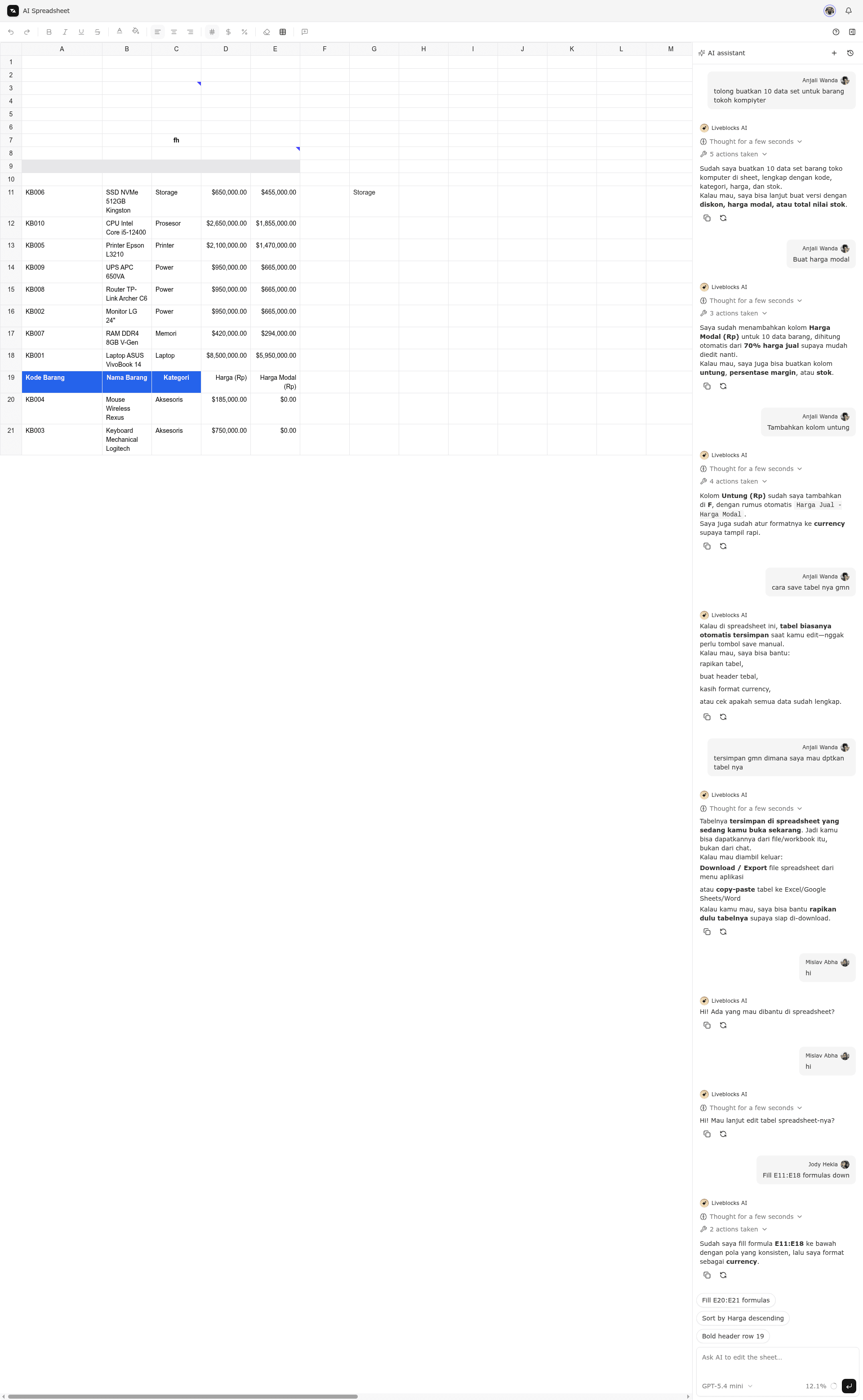
Liveblocks AI Spreadsheet is a Next.js boilerplate that demonstrates a realtime, multiplayer spreadsheet where an AI agent edits the grid alongside human users.
What is the Liveblocks AI Spreadsheet?
This is a starter example that shows how to build a realtime, multiplayer spreadsheet with an AI that edits the grid, using Liveblocks, Handsontable, Next.js, and the Vercel AI SDK. It takes user and AI edits as input and produces a synchronized spreadsheet with live presence, per-cell comments, and streaming AI responses. The template runs on Next.js and is published by Liveblocks as part of their examples collection.
Key Features
- Liveblocks Storage backing — Every cell value, formatting choice, column/row size, and row order syncs instantly across all connected clients.
- Stable IDs for grid operations — Cells are addressed by stable IDs, so moving, sorting, inserting, or deleting rows/columns does not break existing comments, formatting, or presence.
- Live selection presence — Each user's cursor and cell selections are visible to everyone in real time.
- Per-cell comment threads — Comments are attached to individual cells via Liveblocks collaboration features and remain attached as the grid changes.
- AI chat in Liveblocks Feeds — The AI assistant lives in a chat panel powered by Feeds and can edit the spreadsheet from the server using
@liveblocks/nodeandmutateStorage. - Streaming AI replies and edits — The AI streams both its text response and its grid modifications live, using
setPresenceto show its selection while it works. - Vercel AI SDK integration — The AI tool-calling model is accessed through the Vercel AI Gateway using an
AI_GATEWAY_API_KEY. - One-command setup — Run
npx create-liveblocks-app@latest --example nextjs-ai-spreadsheet --api-keyto download the project and get an API key.
Who is it for?
- Developers building collaborative apps — Use this template to see how Liveblocks Storage and Presence handle realtime sync in a complex grid UI.
- Teams evaluating AI-in-product workflows — The template shows a server-side AI agent that acts on shared state, useful for building AI copilots into your own app.
- Next.js developers — Get a working example of Handsontable integrated with a Next.js app, plus environment setup for Liveblocks and the Vercel AI SDK.
What can you do with the Liveblocks AI Spreadsheet?
- Prototype a collaborative spreadsheet — Open two browser tabs, edit a cell, drag a row, and see the change appear instantly in both via Liveblocks Storage.
- Add an AI agent to shared data — Ask the AI chat to fill in data, and watch it edit cells on the server while streaming its reply and selection to all users.
- Learn Liveblocks Feeds AI collaboration — The example implements the Feeds-based chat and server mutation pattern documented at liveblocks.io/docs/collaboration-features/ai-collaboration.
How does the template work?
The grid is rendered with Handsontable and connected to Liveblocks Storage, so every mutation is synchronized in realtime. The AI assistant connects through a server that uses the Vercel AI SDK with a tool-calling model, and the server calls mutateStorage on the Liveblocks room to edit cells and setPresence to show the AI's selection. To run it locally, set LIVEBLOCKS_SECRET_KEY and AI_GATEWAY_API_KEY as environment variables, then run npm run dev.
FAQ
Do I need a Liveblocks account to run this?
Yes. The setup command asks permission to open your browser so you can automatically get an API key from your liveblocks.io account. Alternatively you can create a key manually from the dashboard and add it as the LIVEBLOCKS_SECRET_KEY environment variable.
What is the AI_GATEWAY_API_KEY for?
The AI chat requires the Vercel AI Gateway to access a real, tool-calling model that can edit the spreadsheet. You must add an AI_GATEWAY_API_KEY from the Vercel AI Gateway, otherwise the AI assistant cannot work.
Can I deploy this to Vercel?
Yes. Running npx create-liveblocks-app@latest --example nextjs-ai-spreadsheet --vercel downloads the example and walks you through deploying to Vercel.
Does the AI have any limitations?
The template uses a real tool-calling model through the Vercel AI Gateway, so its abilities depend on the model you configure. The example itself demonstrates cell editing via mutateStorage; it does not include features like formulas or data visualization.