Template details
LiveTerm
Build terminal styled websites in minutes!
About this template
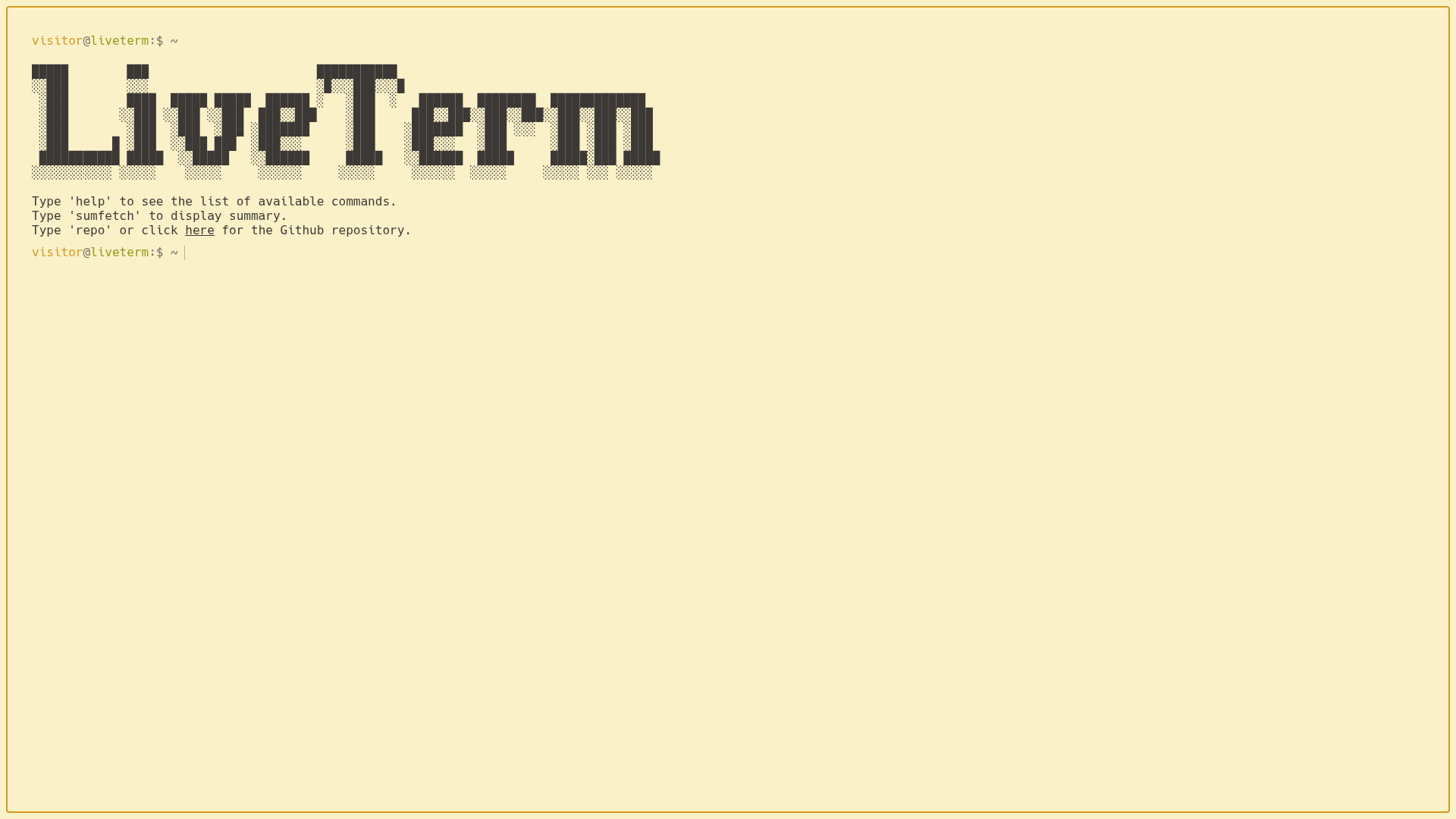
LiveTerm is an open-source, terminal-styled website template built on Next.js and TypeScript that renders a fully interactive command-line interface website from a single config.json file. You can ship a working personal site in minutes by editing one configuration file, with no need to touch JSX. LiveTerm runs on the Next.js framework, is installable via a one-line shell script or git clone, and deploys to Vercel with zero extra configuration.
What is LiveTerm?
LiveTerm is a highly customizable, minimal terminal-styled website template powered by Next.js. It takes one configuration file — config.json — as input and produces an interactive terminal-like website where visitors type commands like about, social, and banner to view your information. The template is authored by Cveinnt and is based on M4TT72's Terminal project. LiveTerm is open-source and available on GitHub.
Key Features
- Single-file configuration — 90% of customization happens in
config.json: set your name, ASCII art, email, GitHub and LinkedIn handles, resume URL, hostname, and color scheme. - Pre-configured themes —
themes.jsonships several color themes derived from the vscode-base16-term palette, which you can swap intoconfig.jsonfor light or dark mode. - Terminal commands — Visitors interact with your site using commands such as
about,banner, and link commands, giving a playful developer-oriented browsing experience. - One-line installer — Run
sh -c "$(curl -fsSL https://raw.github.com/Cveinnt/LiveTerm/main/install/install.sh)"to install LiveTerm in the current directory. - Docker support — A
docker-compose.ymlis included so you can run the site in a container withdocker-compose up -d. - Built for Vercel deployment — The template is structured as a standard Next.js app, so it can be connected to a GitHub repository and auto-deployed on Vercel.
Who should use LiveTerm?
Developers and technical creatives who want a non-traditional personal website. Developers use it to show their bio, GitHub, LinkedIn, and resume in a terminal interface. Job seekers can spin up a distinctive portfolio site in under five minutes without writing custom React components. Tinkerers can repurpose it as a browser startpage, project page, or even a web music player interface.
What can you do with LiveTerm?
- Personal website: Display your name, ASCII banner, GitHub/LinkedIn links, resume, and contact email in an interactive terminal.
- Browser startpage: Replace your default new-tab page with a LiveTerm instance showing quick links and system info.
- Project page: Promote an open-source project with a terminal-styled landing page hosted on Vercel.
- Creative experiments: Use the template as a shell for any command-driven mini-site, such as a music player or a product teaser.
How does LiveTerm work?
Install it with the one-line curl script or git clone https://github.com/Cveinnt/LiveTerm.git, then run yarn install && yarn dev. Open the local dev server and edit config.json; saving the file reflects changes in real time. When you're ready, push the repository to GitHub and connect it to Vercel for automatic deployment.
FAQ
Is LiveTerm free to use?
LiveTerm is an open-source GitHub repository, so you can freely clone, modify, and deploy your own instance. The project's source code is public, and it does not gate features behind a paid tier.
Does LiveTerm require the yarn package manager?
Yes — LiveTerm expects yarn for installing dependencies and running the dev server. You can install yarn from the official docs, then run yarn install && yarn dev in the project directory.
Can I deploy LiveTerm to Vercel?
Yes, the template is built on Next.js, so Vercel is the recommended host. You can connect your GitHub repository to Vercel and it will auto-deploy on every push, or use the vercel CLI to deploy manually.
What can I customize without touching code?
Most customization happens in config.json, where you change the title, name, ASCII art, social links, email, resume path, prompt hostname/username, and color scheme. Themes in themes.json can be copied in without writing CSS.
Does LiveTerm offer Docker support?
Yes, the repository includes a Dockerfile and docker-compose.yml. After customizing config.json, run docker-compose up -d to start the container in the background.