Template details
Atidraw
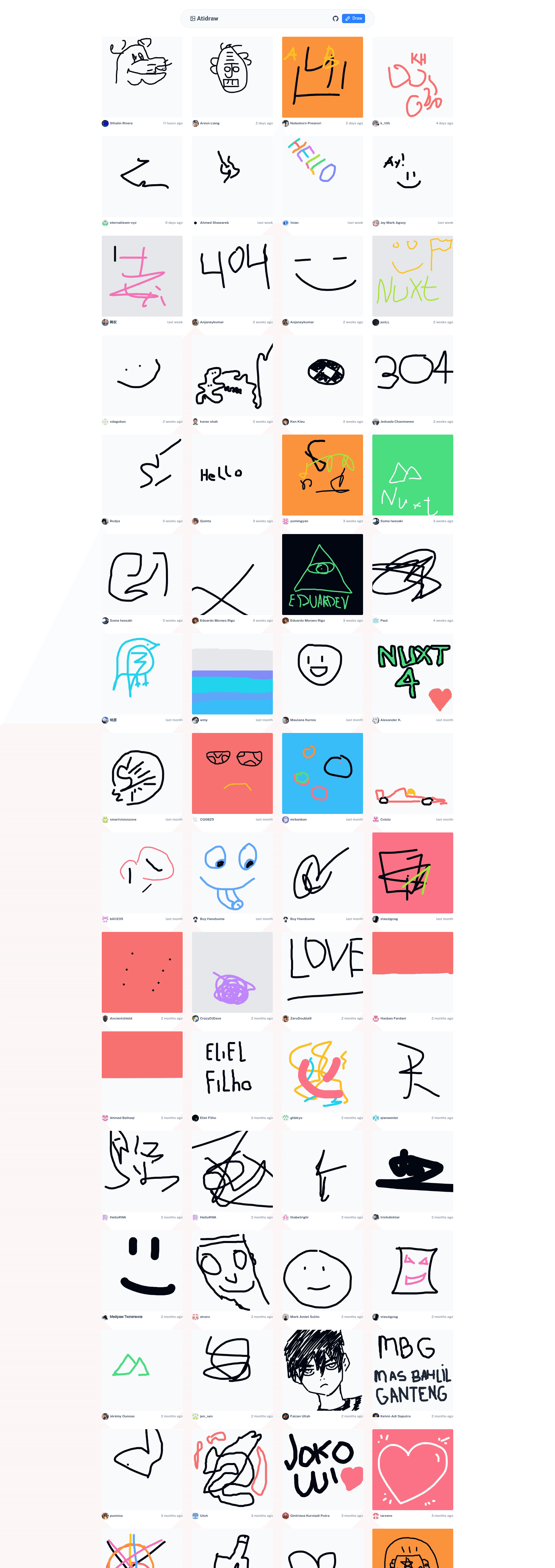
Web application that lets you create, enhance, and share your drawings with the world.
About this template
Atidraw is an open-source (MIT) Nuxt web application that lets you draw something and see what AI draws from it.
What is Atidraw?
Atidraw is an open-source Nuxt application that provides a drawing canvas and AI-powered image generation. Users sketch an image, and the app sends it to Google Nanobanana through Vercel AI Gateway to generate an AI version. It runs with server-side rendering, authentication, and global storage, and is built on Nuxt, Nuxt UI, and NuxtHub.
Key Features
- Drawing Canvas — The canvas uses the
signature_padlibrary for a responsive drawing experience. - AI-Powered Enhancements — The app automatically generates alt text for accessibility and SEO, and creates a new image from your drawing using Google Nanobanana via the AI SDK.
- Global Storage — Drawings are stored on the filesystem locally during development and on Vercel Blob or Cloudflare R2 in production.
- Flexible Authentication — Users can sign in with Google, GitHub, or remain anonymous with local-only storage.
- Server-Side Rendering — The application runs with server-side rendering (SSR) for performance and SEO.
- Tech Stack — Built on Nuxt, styled with Nuxt UI and TailwindCSS, with authentication via Nuxt Auth Utils and blob storage via NuxtHub Blob.
Who is it for?
- Developers — Use Atidraw as a reference implementation for building AI image-generation apps with Nuxt, authentication, and cloud storage.
- Hobbyists — Anyone who wants a simple web app to sketch and see AI interpretations of their drawings.
- Educators — A concrete example to teach how Vercel AI Gateway and the AI SDK integrate with a Nuxt frontend.
What can you do with Atidraw?
- Create AI art from sketches: Draw anything on the canvas, and Atidraw generates an AI-enhanced version using Google Nanobanana.
- Share your drawings: The app includes global storage so you can store and share your creations with the world.
- Learn AI integration: Developers can study the code to see how to wire up the AI SDK, Vercel AI Gateway, NuxtHub Blob, and authentication in a single Nuxt project.
How does Atidraw work?
- Install dependencies with pnpm.
- Copy the environment variables from
.env.exampleto.env. - Create a Vercel AI Gateway API key and add it to your environment.
- Run
pnpm devand visithttp://localhost:3000to start drawing.
FAQ
Is Atidraw free?
Yes, Atidraw is open source under the MIT license. However, it requires a Vercel AI Gateway API key to generate AI images, which may incur usage costs depending on your Vercel plan.
What technologies does Atidraw use?
Atidraw is built with Nuxt, Nuxt UI (TailwindCSS), Nuxt Auth Utils, NuxtHub Blob, and the AI SDK. The drawing canvas uses the signature_pad library.
Can I sign in without Google or GitHub credentials?
Yes, if you do not set the Google and GitHub credentials in your environment, anonymous sign-in is enabled, and users can draw with a local-only identity.
Where are drawings stored?
During development, drawings are stored on the local filesystem. In production, they are stored on Vercel Blob or Cloudflare R2 through NuxtHub Blob.
How do I run Atidraw locally?
Clone the repo, run pnpm install, copy .env.example to .env, add your Vercel AI Gateway API key, then run pnpm dev. Open http://localhost:3000 to start drawing.